package en.codegym.task.jdk13.task04.task0429;
import java.io.BufferedReader;
import java.io.InputStreamReader;
/*
Positive and negative numbers
*/
public class Solution {
public static void main(String[] args) throws Exception {
BufferedReader reader = new BufferedReader(new InputStreamReader(System.in));
int number1 = Integer.parseInt(reader.readLine());
int number2 = Integer.parseInt(reader.readLine());
int number3 = Integer.parseInt(reader.readLine());
int counter = 0;
if (number1 <= -1) {counter ++;}
if (number2 <= -1) {counter ++;}
if (number3 <= -1) {counter ++;}
{System.out.println("Number of negative numbers:" + " " + counter);}
if (number1 >= 1) {counter ++;}
if (number2 >= 1) {counter ++;}
if (number3 >= 1) {counter ++;}
{System.out.println("Number of positive numbers:" + " " + counter);}
}
}
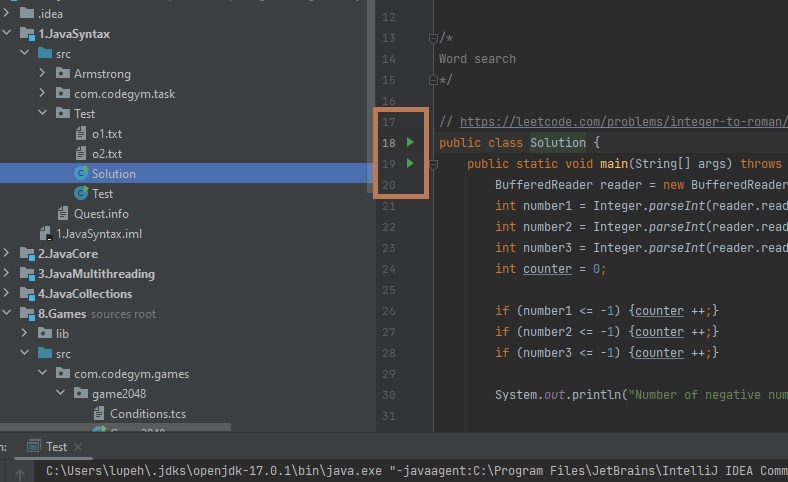 This will run the current code. IntelliJ is set up to create and build HUGE programs with multiple different entry points. Codegym tasks are one HUGE program where each individual task is an entry point. Because of the intelliJ way intelliJ is designed, when you click the run button at the top of the page it will run the code that it is set to run, which may not be the code you are looking at on your screen. By hitting the green arrow to the left of the main() method you want to run it will run that specific code every time.