Hey fellow coders! Remember that moment when you first opened IntelliJ IDEA and thought, "How did I ever live without this?" Well, get ready to experience that feeling all over again. IntelliJ IDEA 2025.2 isn't just another update. It's like your favorite IDE suddenly gained superpowers.

I'm serious. Throughout IntelliJ IDEA's history, we've seen many cool updates, but what JetBrains did in version 2025.2.1 is pure magic. Trust me — we're about to break down everything from the Junie AI agent to Java 25 LTS support, and I'll show you why each new feature isn't just a "fancy gimmick" but real help in your daily development.
1. Junie AI: The Robot That Turns Programmers Into Superheroes
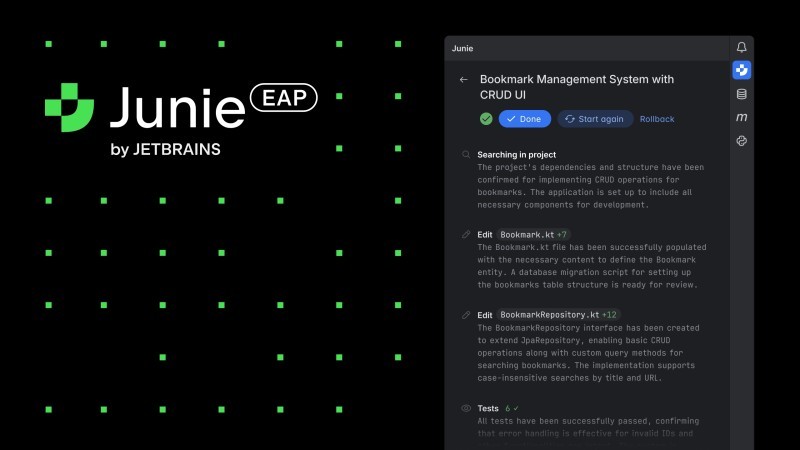
Forget all the fears about "AI will replace all programmers" — that's complete nonsense! What's actually happening is much more exciting: AI is transforming regular programmers into superhumans. And the Junie AI agent in IntelliJ IDEA 2025.2 is vivid proof of that.
Imagine this situation: you're solving a problem, and instead of googling "ArrayList Java example" for the 47th time, you simply explain to Junie in plain English what you want to do. And it doesn't just write code — it also explains why it's done that way, refactors your workarounds, and even creates tests. Magic!
The coolest part — most AI features became free! JetBrains clearly understood: AI should be like air — available to everyone, not just those lucky few who can afford a premium subscription. Unlimited code completion, local models, and basic AI Assistant capabilities now cost nothing.
Honestly, when I first launched Junie and watched it fix my bugs... Man, I felt a bit ashamed. This robot fixed in a couple of seconds what I'd been wracking my brain over for half an hour. At first I thought: "That's it, career over, I'll be replaced by a machine!" But then it hit me — this is freaking awesome!
I used to spend half the day on all sorts of nonsense: forgot a dot, didn't close a bracket, didn't add an import. Now I can focus on interesting stuff — designing architecture, solving real business problems, creating. Basically, I transformed from a code monkey into an engineer. AI took over the routine, leaving us the most interesting part!
2. Java 25 LTS: Ready for the Future Today

Friends, I have great news for you: Java 25 LTS officially launched in September 2025, and IntelliJ IDEA 2025.2 fully supports it! This isn't just "we added syntax highlighting" — the IDE truly understands all the new language capabilities and is ready to use them to the max.

What's new in Java 25? Here are the most interesting features:
Compact Source Files — now you can write small programs without all that ceremony with classes. Remember those times when printing "Hello World" required half a page of code? Java finally realized that not all programs need to look like enterprise monsters. Students, rejoice — your first programs will be much more concise!
Instance Main Methods — forget about public static void main. Seriously, forget it forever. Now you can write regular methods, and they can be the entry point to your program. This feature saves beginners so many nerves that Oracle should have added it back in Java 1.2.
Flexible Constructor Bodies — finally you can validate data BEFORE calling the superclass constructor. I remember how many workarounds we invented to get around this limitation. Now you can just do what's logical, not what the compiler allows.
But the most interesting thing for those studying multithreading — Scoped Values as a modern replacement for ThreadLocal in the Virtual Threads era. IntelliJ IDEA not only supports the new syntax but also offers automatic migration from old ThreadLocal. And yes, folks — the future of programming has arrived right now!
3. Remote Development Became As Fast As Local
This was the main problem: working with code on a remote server always meant sacrificing speed. In IntelliJ IDEA 2025.2, this problem is solved radically.
The editor now works with native responsiveness, Search Everywhere and Find in Files execute instantly, and the debugger has been completely redesigned. 1.5x faster connections through Toolbox App makes switching between projects almost instantaneous. It's like upgrading from a bicycle to a Ferrari — the difference is noticeable!
For students learning to program on their laptops at home, this might seem unimportant. "Why do I need remote development if everything's local?" But trust me — when you get a job and face development on servers in Kubernetes, remember my words. And you'll thank JetBrains for solving this problem in advance.
We're living in the golden age of programming! Imagine a developer from 2015 who could only dream of such performance. And now we complain if the IDE hangs for half a second when searching for a file. We're spoiled!
4. Spring Development: Now You Can See the "Internals"
If you've already reached studying Spring on CodeGym (and it will definitely happen!), you're in for a pleasant surprise. The Spring Debugger Plugin — is a revolution in understanding Spring applications.
Imagine: you set a breakpoint in your Spring Controller, and the IDE automatically shows a live map of the Spring Context. Which beans are loaded, where configuration values come from, the state of transactions and database connections — everything at your fingertips. Beautiful!
It's like an X-ray for Spring applications. We used to guess at tea leaves: "Why isn't my @Autowired working?", and now we see the entire dependency injection process in real time. No magic — just pure engineering that can be understood and controlled.
Speaking of magic — remember when Spring seemed like a black box? "It works, but I don't know how" was our mantra. Now with such a debugger we can finally figure out what's happening under the hood of this beautiful framework!
5. Virtual Threads: Debugging Multithreading Became Simple
JDK 21 brought us Virtual Threads — an amazing technology, but debugging millions of lightweight threads was pure hell. Imagine trying to find one specific needle in a haystack of a million needles. Pretty much the feeling before version 2025.2.
Now the Thread Dump Viewer automatically groups threads with identical stacks, shows lock objects, and supports the new JSON format. When you have 100,000 Virtual Threads running, the IDE doesn't show a chaotic list (which used to make developers cry) — it groups them by execution patterns and lets you analyze bottlenecks at a glance.
For those just starting to study multithreading — don't be scared of these numbers! First master classic Thread and Runnable, and you'll move to Virtual Threads when you're ready to conquer enterprise.
6. Performance: Maven 4 and Kotlin K2
Maven 4 received full support even before the official release. The IDE properly inherits environment variables, supports Maven Daemon for faster builds, and works with the new syntax. In short, everything as we love it — works faster, fewer failures.
Kotlin K2 Mode became the default standard. Even if you're only studying Java now (which is right!), remember — Kotlin is your bright future. And when you get to it, code analysis performance will be cosmic. Seriously, the Kotlin developers finally solved the problems that sometimes made the IDE slow on large projects.
7. Practical Tips for Daily Work
Want to squeeze the maximum out of IntelliJ IDEA? Here are a few tricks I use every day:
Search Everywhere (double Shift) — your main navigation tool. Use prefixes: /plugins for plugin management, /appearance for UI settings. It's faster than digging through menus.
Multiple selection (Alt+J) for simultaneously editing multiple code fragments. Select a variable with an unfortunate name (we've all been through temp, data, obj), press Alt+J several times to select all occurrences, and rename them synchronously. Feel like a refactoring god!
Live Templates use without hesitation: sout for System.out.println (yes, we still sometimes debug with prints, no shame), psvm for the main method. But most importantly — create your own templates for frequently used constructs. It's like hotkeys, only cooler.
8. CodeGym and IntelliJ IDEA: Convenient Integration
Speaking of IntelliJ IDEA — we at CodeGym have a special plugin for this IDE. No switching between browser and program! Got a task, wrote a solution in a professional development environment, sent it for review — all in one place.
The plugin integrates with our platform — wrote code, pressed a button, got results with detailed error explanations. Simple and convenient.
You can download it right from the IDE: File → Settings → Plugins, find "CodeGym" and install. Everything will be configured automatically — as it should be in 2025!
9. Comparison with Competitors: Why IntelliJ Leads
Let's be honest: VS Code can flirt with Java, but IntelliJ marries it and lives happily. 84% of Java developers use IntelliJ IDEA versus 31% VS Code. The numbers don't lie — when it comes to serious Java development, the choice is obvious.
GitHub Copilot is good (no argument), but the Junie AI agent with full understanding of your project context — that's a completely different league. Eclipse is losing ground faster than Java applets' popularity (dropped from 39% to 28% in a year), and NetBeans... well, NetBeans remains NetBeans.
The cost of €16.90/month for Ultimate for a student might seem like half a day's courier salary. But think about ROI: when you become a junior and earn your first €2000-3000 per month, those 17 euros will pay for themselves in time saved in the first working week. And maybe on the first day, when you won't spend half an hour looking for why auto-import doesn't work.
10. What Awaits IntelliJ IDEA in the Future
IntelliJ IDEA 2025.3 EAP is already open with plans for unified distribution (finally they'll combine Community and Ultimate into one installer — no more struggling to choose when downloading!), a new Islands Theme, and full Spring Boot 4 support.

Kubernetes integration will get new YAML actions (who said YAML isn't a programming language? We all know it's true!), and Kotlin Notebook will become a stable feature. JetBrains shows they're not resting on their laurels.
Soon we'll have even more AI integrations, even more automation of routine tasks, even more opportunities for creativity. Programming isn't getting harder, it's getting more interesting!
Conclusion: The Era of Super-Programmers Has Already Begun!
IntelliJ IDEA 2025.2 isn't just an IDE, it's a portal to the future of programming, where AI and humans work as a perfect team. The Junie AI agent, revolutionary Spring Debugger, parity between remote and local development, full support for the already released Java 25 LTS — every feature is aimed at making you the best version of yourself as a programmer.
Forget all fears about "AI will replace programmers" — that's nonsense! Actually, we're living in the most exciting time in the history of programming. AI took over the boring work (hello, syntax errors!), and left us the most interesting part: creativity, architecture, solving business problems.
For beginners, this is the best starting point for learning Java. Instead of struggling with small things, you can immediately focus on understanding logic and algorithms. For experienced developers — it's a tool that turns complex tasks into fascinating puzzles, and impossible projects into reality.
If you're learning Java — congratulations, you've caught the wave! Learn in the same development environment used by 84% of professional Java developers. And with convenient plugins, the process becomes even smoother.
Research shows: programmers with AI assistants work 55% more productively, feel happier, and get more enjoyment from their work. This isn't replacement — it's an upgrade!
In a world where development speed determines competitive advantages, IntelliJ IDEA 2025.2 provides exactly those superpowers that turn regular programmers into code superheroes. And the best part — most of them are now available for free.
Programming is interesting. And with the right tools — it's also incredibly powerful. Welcome to the future, where every programmer can be Superman!
GO TO FULL VERSION