My friend Andrew asked me back in 2019: "Wait, C# — is it like C, but more advanced?" I laughed. Nope, I said, completely different thing.
Now Andrew works for an international company, making games with Unity. Earns $85,000 a year. And he started from absolute zero. Just found a solid course for beginners, started learning C#, and didn't quit.

Want to understand what this language is all about? Is it worth learning in 2026? How much can you actually earn? I'll tell you everything. Honestly, no marketing BS.
What is C# and why does it have such a weird name?
C# is a programming language from Microsoft. First introduced to the world in 2000. Pronounced "see-sharp".
Now here's the interesting part. Know why it's called that?
The Musical Story
In music, the sharp sign # means raising a note by a semitone. Like, you play "C", then "C-sharp" — it'll sound a bit higher. Cooler. Microsoft was basically saying: "Look, our language is C, but a semitone higher. It's gonna be better."
But there's another meaning. Look at the hash symbol #. You can imagine it as four plus signs arranged in a square: ++++. Remember C++? That had two pluses. This one has four! Microsoft's marketing team definitely had some fun.
The truth is, C# isn't a continuation of C or C++. It's a completely new language, built from scratch. Sure, it has similar syntax. But that's like saying a car and a bicycle are the same thing because they both have wheels.
A bit of history (short, I promise)

In the late 90s, Java was at peak popularity. Sun Microsystems (Java's owners) and Microsoft couldn't come to an agreement. Microsoft wanted to do their own thing with Java, Sun said no.
So Microsoft thought: "Why do we need permission? Let's make our own language. With blackjack and... well, our own."
The team was led by Anders Hejlsberg — a legend in the programming world. This guy had previously created Turbo Pascal and Delphi. So he had serious experience in language creation.
In 2000, they introduced C# along with the .NET platform to the world. And you know what? People loved it.
What is .NET and why does it matter?
Okay, here's an important thing to understand. C# and .NET are like fish and water. Can you eat fish without water? Yes. But it won't swim.
.NET is a platform. What does that mean?
Look. You built a house, right? There are bricks — that's your C# code. But bricks alone aren't enough. You need a foundation, a roof, plumbing, electricity. All of that is .NET. The infrastructure that makes everything work.
.NET includes:
- Runtime environment (CLR) — the thing that runs your code
- Compilers — translate your code into machine language
- Huge library of ready-made solutions — no need to reinvent the wheel
- Development tools — everything you need for comfortable work
The coolest part? .NET works everywhere. Windows, Linux, macOS, mobile platforms. Write code once — it works everywhere.
Important: to run a C# program, you need .NET. But to work with .NET, you don't have to write in C#. You can use F#, Visual Basic, and other languages. But 90% of developers choose C#.
Where is C# used in 2026?
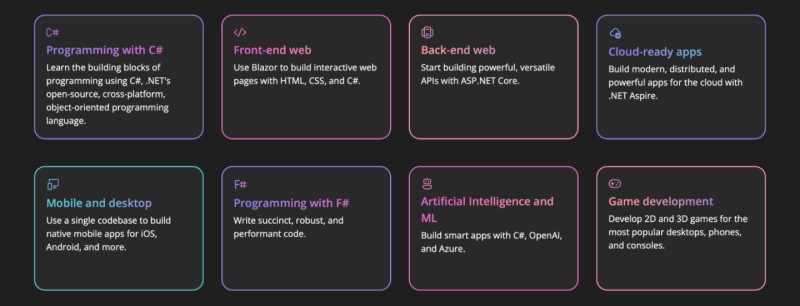
I'll give you a list. Hold on tight.
1. Games (and this is a massive market)
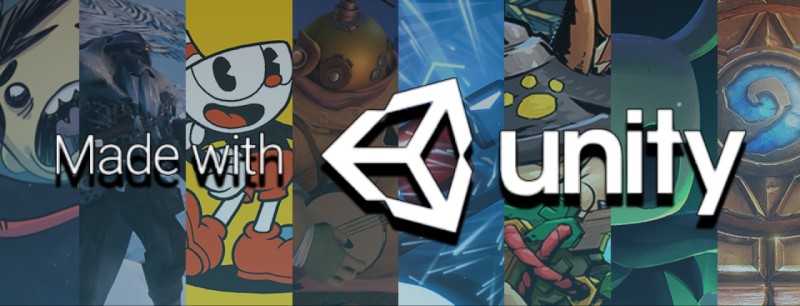
Unity is a whole separate story. Know how many mobile games are made with Unity? More than half! Pokemon Go, Hollow Knight, Cuphead, Hearthstone — all Unity + C#.
Want to make games? C# is your ticket into this industry. Not just a ticket — a VIP pass.
2. Web Development
ASP.NET Core is a powerful framework for web applications. Stack Overflow runs on it. Lots of corporate systems too.
The new thing in 2025-2026 is Blazor. It's a technology that lets you write web applications entirely in C#, even the frontend. Imagine that? No JavaScript. Just C#. Blazor's popularity growth in the past year — 10x!
3. Desktop Applications
Windows applications? Obviously. But not only! With .NET MAUI (Multi-platform App UI), you can write applications for Windows, macOS, iOS, Android. One codebase — all platforms.
4. Enterprise Development
Banks love C#. Insurance companies too. Large corporations are crazy about it. Why? Well, it's reliable. Secure. Scales without problems. Plus if something goes wrong — Microsoft is always available.

Enterprise salaries are astronomical. But more on that later.
5. Cloud Services
Microsoft Azure — remember it, right? One of the three biggest cloud platforms. AWS, Google Cloud, and Azure. So, C# for Azure is like a native language. Everything's built for it.
6. Machine Learning
Yep, ML.NET exists. You can do neural networks and machine learning in C#. Not as popular as Python, but for integrating ML into .NET applications — it's perfect.
7. Mobile Applications
Xamarin (now .NET MAUI) lets you write apps for iOS and Android. One codebase — both platforms. Time savings — massive.
Honest talk about salaries

Okay, here's what you came for. Numbers. What they actually pay.
Fresh data — end of 2025, early 2026. Everything converted to dollars for convenience.
Eastern Europe. I'm taking Poland, Czech Republic, Romania, the Baltics.
If you're a junior — first couple years of work — you'll get around $25-40K per year. Not astronomical, but enough to live on. And it's already better than most other professions.
Middle developer (2-5 years experience) — now it gets interesting. $45-70K annually. You can rent an apartment, buy a car, go on vacation.
Seniors (5+ years) earn from $70K to $110K. That's serious money for the region.
Western Europe. Germany, UK, Netherlands, Sweden.
Junior starts at $45K to $65K. That's more than a middle in Eastern Europe!
Middle gets $70-95K per year.
Senior — hold on — $95K to $140K. You can buy a house.
The States. This is astronomical.
Juniors start at $65-90K. Just starting! Even higher in San Francisco and New York.
Middles earn $95-130K.
Seniors — $130-180K and up. I've met people making $250K, but those are absolute top tier.
China. Beijing, Shanghai, Shenzhen.
Junior — $20-35K per year.
Middle — $40-70K.
Senior — $70-120K.
Numbers are before taxes. Taxes vary by country. But even with taxes — impressive, right?
Compare with doctors or teachers. They earn two-three times less. And that's a fact.
Job market: numbers and facts
According to the TIOBE Index (November 2024), C# ranks 5th globally among all programming languages. Growth in the past year — +2.67%.
There are lots of vacancies. Tons of them.
- In Europe, there are over 45,000 open positions for C# developers
- In the US — over 65,000
- Worldwide — over 150,000
Demand is stable. Not explosive like Python once was, but very steady. C# isn't a trendy language. It's reliable. Like a Toyota Camry: not the flashiest, but it'll run for 500,000 kilometers.
C# vs Java vs Python: honest comparison
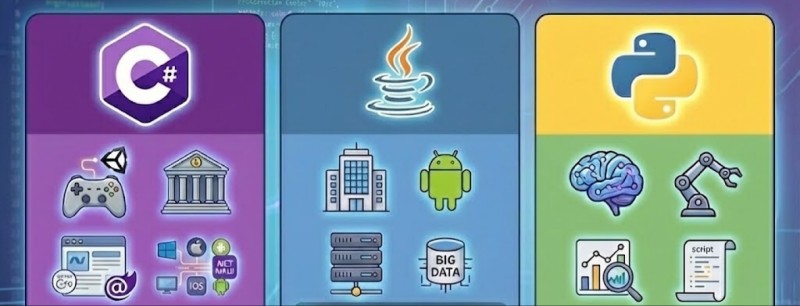
Let's be fair here. Each language has its niche.
C# vs Java
This is an eternal debate, like "iPhone vs Android".
What's better in C#:
- More modern syntax (async/await, LINQ, pattern matching)
- Unity for games — better than Java
- Tight integration with Windows and Microsoft stack
- .NET Core — faster than many Java frameworks
What's better in Java:
- More job openings (but not by much)
- Android development (though Kotlin has overtaken)
- Huge legacy codebase — there'll always be work
- More Open Source projects
Conclusion: if you want to make games or work in the Windows ecosystem — C#. If you want enterprise work with huge legacy systems — Java. Better yet, know both.
C# vs Python
This is like comparing a Swiss Army knife and a chainsaw. Different tools.
What's better in C#:
- Performance (10-50x faster than Python)
- Static typing (fewer bugs in production)
- Better for large systems and enterprise
- Unity for games
What's better in Python:
- Easier for beginners
- Data Science and Machine Learning
- Massive number of libraries
- Quick start
Conclusion: if you want Data Science — Python. If you want games, web, or enterprise — C#.
Comparison table: C# vs other languages
| Parameter | C# | Java | Python |
| Execution speed | Very fast | Fast | Slow |
| Learning difficulty | Medium | Medium | Easy |
| Job openings | Many | Very many | Many |
| Junior salary | $25-65K | $25-60K | $20-55K |
| Senior salary | $70-180K | $70-170K | $65-160K |
| Games | Unity (top) | LibGDX (weak) | Pygame (weak) |
| Web development | ASP.NET (excellent) | Spring (excellent) | Django (good) |
| Data Science | ML.NET (medium) | Weak | Top choice |
| Enterprise | Top choice | Top choice | Growing |
| Mobile apps | .NET MAUI (good) | Android (top) | Kivy (weak) |
Pros and cons of C#
Let's be honest. Perfect languages don't exist. C# has its strengths and weaknesses.
Pros of C#:
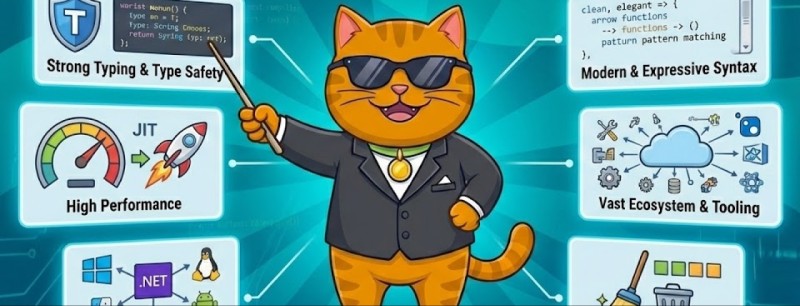
- High performance. C# programs run fast. Close to C++, but easier to develop.
- Modern syntax. Async/await, LINQ, pattern matching — all this makes code clean and readable.
- Unity. If you want to make games — C# is practically a monopoly in Unity. And Unity is half the gaming market.
- Salaries. C# developers get good money. Especially in enterprise and game development.
- Excellent IDE. Visual Studio and JetBrains Rider are among the best development tools in the world.
- Cross-platform. .NET Core works on Windows, Linux, macOS. Write once — works everywhere.
- Microsoft ecosystem. Azure, Office 365, Windows — integration is perfect. If you work with Microsoft products, C# is the best choice.
- Stability. Microsoft invests billions in development. C# won't disappear tomorrow.
- Strong typing. The compiler catches errors before running. Fewer bugs in production.
- Huge library. NuGet has thousands of ready-made packages. No need to reinvent the wheel.
Cons of C#:
- Microsoft dependency. Yes, .NET is cross-platform. But Microsoft still controls development. Some people don't like that.
- Fewer vacancies than Java. Not critical, but it's a fact. Java is slightly more popular.
- Not for Data Science. Python is king in ML and data analysis. C# lags behind here.
- Not for mobile development. Yes, there's .NET MAUI. But Swift for iOS and Kotlin for Android are still more popular.
- More complex than Python. For a beginner, C# might seem harder. Though it pays off later.
- Visual Studio is heavy. Installation takes time and disk space. Though there's lightweight VS Code.
- Fewer Open Source projects. Than Java or Python. Though the situation is improving.
Bottom line: pros outweigh cons if you're going into games, web, or enterprise. For other niches — depends on the situation.
What do you need to know to work as a C# developer?
Okay, let's say you've decided: "Yes, I want to learn C#!" Great. What specifically do you need to master?
Basic level (Junior):
- C# syntax. Variables, loops, conditions, functions. The very basics.
- OOP (object-oriented programming). Classes, objects, inheritance, polymorphism, encapsulation. You can't go anywhere without this.
- Collections. List, Dictionary, Array, HashSet. Working with data.
- LINQ. Language Integrated Query — powerful tool for working with collections.
- Exception handling. Try-catch-finally. How to properly catch errors.
- Databases. SQL, working with Entity Framework or ADO.NET.
- Git. Version control system. Mandatory.
- Visual Studio. Or JetBrains Rider. Need to work in a professional IDE.
Middle level (Middle):
- ASP.NET Core. Web development. MVC, Web API.
- Asynchronous programming. Async/await. Very important for performance.
- Unit tests. xUnit, NUnit. Code testing.
- Dependency Injection. Design pattern.
- REST API. Creating and consuming APIs.
- Docker. Application containerization.
- Design patterns. Singleton, Factory, Repository, and others.
- SignalR. For real-time communication.
Advanced level (Senior):
- Microservices architecture. Designing large systems.
- Azure. Microsoft cloud technologies.
- Kubernetes. Container orchestration.
- Message Brokers. RabbitMQ, Kafka.
- NoSQL databases. MongoDB, Redis.
- GraphQL. Alternative to REST API.
- Security. OAuth, JWT, protection against attacks.
- Performance optimization. Profiling and code optimization.
Sounds like a lot? Yes. But you learn this gradually. In 6-12 months you can master the basic level. In 2-3 years reach Middle. In 5 years — Senior.
How to learn C# in 2026: step-by-step plan
Listen, I've seen thousands of people who started learning programming. Some quit after a week. Others made it to employment. What's the difference?
The approach.
Here's a plan that works. Tested by real people who are now working developers.
Step 1: Define your goal
Why do you need C#? Seriously, think about it.
- Want to make games? Then focus on Unity.
- Want high corporate salary? Then web and enterprise.
- Want freelance? Then web development.
Your goal determines what to learn. Don't try to master everything at once. Choose one direction.
Step 2: Choose your learning method
There are several options:
Self-study (books, YouTube, Microsoft documentation).
Pros: free. Cons: no structure, easy to get stuck, no feedback.
Works if you have iron discipline. Honestly — most people quit.
Online platforms with interactive practice — this is the most effective.
University programs — if you want a degree (though in IT it's not really necessary).
Bootcamp courses — intensive programs for several months.
Which path to choose for learning C#? Depends on you. Some people love digging through documentation themselves. Others need structure and task verification. Both approaches work.
But remember the main thing: practice matters more than theory. Ten times more.
Step 3: Practice, practice, practice
Reading about code and writing code are different things. Like reading about swimming and actually swimming.
Where to practice:
- LeetCode (algorithms)
- HackerRank (challenges)
- Codewars (challenges)
But the best thing is structured courses with instant verification. When you solve a problem and the system immediately says: "Correct" or "Here's your mistake".
CodeGym made an excellent C# course: 68 levels, 400+ practical tasks. You learn right in a professional IDE (JetBrains Rider), there's a plugin that checks your solutions instantly. AI validator gives advice on your code. Gamification — you level up your character, earn achievements. Plus basic topics and first tasks are available for free — you can start right now with no investment.
The idea is simple: you don't just read theory, you write code immediately. Lots of code. And get feedback instantly.
Step 4: Build pet projects
After basic knowledge, start making your own projects:
For beginners:
- Console calculator
- To-Do application
- Currency converter
- Simple text game
For intermediate:
- Web application (ASP.NET Core)
- Simple 2D game (Unity)
- Mobile app (.NET MAUI)
- REST API for some service
Important: put everything on GitHub. Employers look at your code.
Step 5: Prepare for interviews
Last 2-3 months of learning:
- Solve algorithmic problems (LeetCode)
- Read about design patterns
- Prepare answers to popular questions
- Do mock interviews (practice interviews)
Frequently asked questions (FAQ)
Q: How long do I need to study C# to find my first job?
A: Realistically, 6-12 months of intensive learning. But it depends on how many hours per day you're willing to invest. 2-3 hours every day — and in 10 months you're on the market.
Q: Do I need to know English?
A: Basic technical English is mandatory. All documentation, 90% of jobs, Stack Overflow — everything's in English. But you don't have to speak perfectly. Reading and understanding technical documentation is enough.
Q: Can I learn C# for free?
A: Yes! Microsoft provides free documentation and tutorials. Visual Studio Community is free. YouTube is full of training videos. But here's the most interesting part — on CodeGym, basic course topics and initial tasks are available for free. This is top-tier for starting: you can try the platform, solve first tasks, understand if it's for you or not. If you like it — continue further. Free C# learning requires more self-discipline, but it's quite doable. If you need full structure with all tasks checked — consider paid courses after you complete the free part.
Q: Where to start learning C# programming?
A: Start by installing Visual Studio Community (free). Then go through syntax basics: variables, loops, conditions, functions. Then study OOP (object-oriented programming) — it's the foundation of C#. Solve practical problems in parallel. Don't get stuck in theory for more than a week — move to practice as quickly as possible.
Q: Which C# courses are best for beginners?
A: The best C# courses are those with lots of practice. Look for courses where you write code, not just watch videos. Good options for learning C#: CodeGym (interactive practice), Pluralsight (videos + tasks), Udemy (check ratings). The main thing is to have instant code verification and feedback.
Q: C# or Python for a beginner?
A: If you want quick results and Data Science — Python. If you want higher salaries, games, enterprise — C#. Both are excellent choices.

Q: Can I work remotely with C#?
A: Yes! Many companies hire remote. Especially after the pandemic. You can live anywhere and work for an American or European company.
Q: Do I need a programmer's degree?
A: No. In IT they look at your skills, not paper certificates. Portfolio on GitHub + ability to solve problems = you're hired.
Q: Is it worth learning C# in 2026?
A: Yes. C# has been stable in the top 5 languages for 20+ years. Microsoft actively develops the platform. Demand is high, salaries are good. It's a reliable choice.
Q: Is it hard to learn C# after Java?
A: Very easy! The languages are 80% similar. Syntax is very close. You'll get comfortable in a couple of weeks.
Q: Can you make mobile apps with C#?
A: Yes, with .NET MAUI (formerly Xamarin). You write one code — works on iOS and Android. Not as popular as Swift/Kotlin, but quite viable.
Q: Which specialization to stick with: web, games, or desktop?
A: Depends on what interests you. Games — if you love gamedev (Unity). Web — if you want stability and lots of vacancies. Desktop — if you want to work in enterprise. All three directions pay well.
Q: Do I need to know math for C# programming?
A: Basic — yes (algebra, logic). Advanced math — only if you're going into ML, graphics, or algorithms. For web development or business applications, advanced math isn't needed.
Q: Is C# dying?
A: No. In the past 5 years, C# has only grown. Unity, Blazor, .NET MAUI — these are all new opportunities. Microsoft invests billions in development. C# will live for a very long time.
The future of C#: what's next?
Microsoft is actively developing the ecosystem. Here's what's interesting:
1. .NET 9 (released November 2024)
Even more performance. Improvements in Blazor. New language features.
2. AI integration
Microsoft is investing in AI. Expect more libraries for ML and Azure AI integration.
3. Cloud development
Azure is growing. C# is native to Azure. Big prospects there.
4. Cross-platform
.NET MAUI is developing. Soon making mobile apps in C# will be even easier.
5. WebAssembly and Blazor
This is the future of web development. C# could replace JavaScript on the frontend. Sounds fantastic, but it's reality.
Conclusion: start today
I didn't write this article just so you'd read and forget.
I want you to make a decision.
Programming isn't rocket science. It's a skill you can learn. Yes, it takes time. Yes, it'll be tough. But it's worth it.
Think about your life a year from now.
Option 1: You stayed in the same place. Same job, same money, same problems.
Option 2: You're a Junior C# developer. Salary 2-3 times higher. Working remotely. Growth prospects — huge.
What separates these two options?
A decision. One single decision today: "I'll start learning."
Marcus from Warsaw started from scratch at 25. Now he's 28 and earning $95,000. He's not a genius. He just started.
Sarah quit accounting at 32. Think she wasn't scared? She was. But she started.
Alex lives in a small town. Works for an American company. Salary $70,000. He started simply because he was tired of being broke.
Why shouldn't that someone be you?
Start today. Not in a week. Not in a month. Today.
Download Visual Studio. Write your first "Hello, World!" program. Make a commit in Git. Begin your journey.
In a year you'll thank yourself for starting. And if you don't start — you'll regret not doing it now.
The choice is yours.
But remember: time will pass anyway. The only question is, where will you be in a year? In the same spot, or on your way to a new career?
Good luck. You've got this.
Thousands of people before you made it. And you can too.
P.S. If you want a structured approach to learning C# with instant task verification and an IDE plugin — try the course on CodeGym. 68 levels, 400+ tasks, everything hands-on. Basic topics and first tasks are free — you can start right now. Many started exactly this way and reached Senior positions.
GO TO FULL VERSION