There's a request you keep repeating: look at the changes, check these files, format it like this, and stay out of there. Every time you explain the same procedure from scratch, and every time a little differently.
The result drifts along with the wording. Today it came out great; tomorrow you forget half the conditions, and the agent faithfully does exactly what it heard.
The fix here isn't a better memory on the agent's side; it's a folder with instructions. A skill is a procedure written down once, which Claude Code can pick up on its own or on your command. Let's look at where that folder lives, how to be sure the skill actually landed, and what to check before the first run.
What a skill is
Before we pull apart files and fields, let's get a feel for it.
Picture a carpenter. He wrote down his usual order of work once and prepared his notes, his templates and a program for the machine. Now all it takes is a short instruction: "clear everything away, sharpen the bit, next is the cat chair - run the CNC template". Hit start and off it goes.
A written-down procedure holds the whole job together:
- Tidies up by your rules. Clears the bench, lays out the tools - the same way every time, exactly as you're used to.
- Stays inside the written boundaries. The saw is still spinning - hands off. It does the safe part of the job right away, no extra questions.
- Looks things up when it needs to. Time to sharpen the bit - it opens the sharpening rule. It doesn't keep that in its head in advance; it pulls it out on the spot.
- Keeps templates for different jobs. Moved from tables to chairs - it takes the ready-made setup plan.
- Runs the complicated part with one command. The program for the repeated cuts is already sitting there. All you say is "find the Cat Chair template and send it to the CNC" - the machine keeps the clearances and the order of operations.
A skill is built the same way. It isn't one more tool in the agent's hands; it's a packaged procedure. The main instruction holds the order and the boundaries, reference files give the details on the spot, templates keep the blanks ready, and scripts run the repeatable mechanics. Describe it once, and after that you just call it.
The skill format itself isolates nothing. The instruction can limit the work to styling, but there's no technical wall between CSS and logic. A good skill states its area of work explicitly; after a run you look at the changed files and check how the page behaves. "Works" and "looks right" are different layers, and the guarantee comes from checking, not from the format.
Where a skill lives
No cloud magic here. A skill is a folder on disk, inside your own project:
.claude/skills/web-design/SKILL.mdThe path reads segment by segment: the service folder .claude, inside it skills, inside that the skill's own folder (you pick the name), and in there the file SKILL.md. A plain text file, opens in anything.
For a skill in a project or in your home folder, the directory name becomes the name of the slash command, unless the file itself sets a different name (more on that below). So pick it with an eye on how it will read in the chat.
Now a correction to the picture most people carry in their heads: a skill isn't one file; it's a folder. Anything at all can sit next to SKILL.md.
.claude/
└── skills/
    └── web-design/
        ├── SKILL.md      # the main file: description and instructions
        ├── palettes.md   # a reference, the agent opens it if it needs to
        └── scripts/
            └── check.py  # a script that can be run
When it picks a skill on its own, the agent has the name and the short description on hand, not the whole body. SKILL.md loads when the skill starts, and the reference files next to it load only when needed. That's why a long reference doesn't fill up the context in advance.
For ordinary local work, three sources of skills matter:
| Where it sits | Path | Who gets it |
|---|---|---|
| in the project | .claude/skills/folder-name/ | everyone who works on this project |
| in your home folder | ~/.claude/skills/folder-name/ | you, in all of your projects |
| from a plugin | arrives together with the plugin | wherever that plugin is enabled |
The ~ sign stands for the user's home folder. In commands you leave it as it is; if you're opening the folder by hand, go to your own home directory.
The difference between the first two places is simple, and it's worth sorting out right away.
Put the folder in a project and the skill works only in that project. Open the one next door and it isn't there.
A skill in your home folder is available in every project. Handy for a shared procedure, but it can also fire somewhere you weren't expecting it. General things go home, project things stay in the project.
If Claude Code runs under a separate training profile ~/.claude-codegym/, your personal skills live in its skills/ folder. The project path .claude/skills/ doesn't change with the profile.
The description decides when a skill fires
A typical story: the folder is in place, the file is there, and the agent behaves exactly as before. Nothing is broken - it just never connected this skill with the task.
Look at what the agent has on hand at the moment of choosing. It hasn't read the body of the skill yet: only the list of names and descriptions is loaded. So the decision comes from the description, and from nothing else.
Let's put together a minimal project skill end to end. Its name is web-design - that's what the folder is called, and the command /web-design comes from there too. We don't write the name inside the file here; the folder has already set it:
.claude/skills/web-design/SKILL.mdAnd here's what goes inside, nothing more is needed:
---
description: Cleans up a web interface - modern CSS, smooth transitions,
  a consistent palette. Use when someone asks to make it look good or stylish.
---

# Web design

Use soft shadows, smooth transitions and deliberate typography.
Keep the palette consistent, put animations on hover and on elements appearing.
At the top, between the triple dashes, sits the metadata block; below it, plain instruction text. No field is required, but a description is worth writing every time: without one the agent guesses what the skill is for from the first paragraph of the body, and that's a lottery.
A good description answers two questions: what the skill does and when to reach for it. And in the words you actually use when you write requests.
# stays silent: no telling when to apply it
description: Helps with styling

# fires: says both what it does and when
description: Cleans up an interface - CSS, typography, palette.
  Use when someone asks to make it look good, stylish, or to fix the layout.
The description is what decides when a skill comes up on its own. But that isn't the only way in: a skill has a name, and you can call it by that name yourself. Type /web-design and the description has nothing to do with it; the agent reads the file and carries it out.
Ready-made skills often carry a name field. For skills in a project or a home folder it sets the command that the / menu shows: a deploy-staging folder with name: deploy is called as /deploy. The directory name keeps working too. In a plugin, name can set the last part of the command, the part after the plugin name.
Two ways to start it, then. Everything that comes after them is the same.
The left branch is the automatic one: the request matched the description, and the agent picked up the skill. The right one is manual: you typed /web-design, and the skill ran no matter what the description says.
Skills land in the same / menu as the built-in commands. The file .claude/commands/deploy.md and the skill .claude/skills/deploy/SKILL.md both create the same command, /deploy; if both are there, the skill wins.
Install it and check
The folder is in place. How do you tell that the agent saw it, and not just that a file is sitting on disk?
/skillsThe command opens the list of skills and shows where each of them came from. Type a couple of letters and the list filters down. If your folder name is in the list with the state on, Claude Code sees the skill and allows it to run.
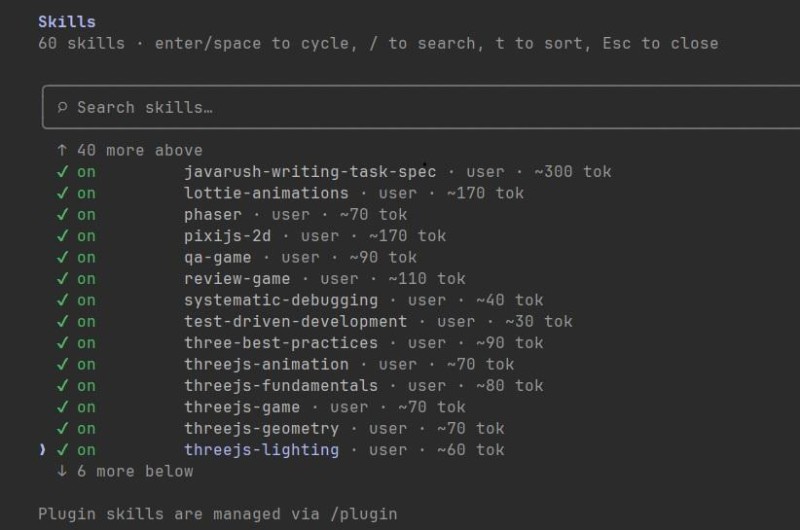
Usually Claude Code picks up a new or changed SKILL.md on the fly. If the name isn't in the list, work through this in order:
| What to do | When it helps |
|---|---|
| check the file name | the skill folder has to hold a file called SKILL.md, not readme.md and not instructions.md |
| check the path | a project skill lives in .claude/skills/, a personal one in the skills/ folder of the active profile |
/reload-skills | the files are in place, but the automatic refresh didn't happen. The command forces a rescan of the folders |
| restart the session | the top-level skills folder didn't exist at all when you started Claude Code |
The skill is in the list, but it never comes up by itself? Reloading has nothing to do with it. Check the description and the field disable-model-invocation: true - that one allows manual invocation only. Reword the request, or call the skill by name. If the manual call works, the installation is fine.
What to check before you trust it
Time to dial the enthusiasm down a notch. A skill isn't a color theme or a wallpaper you can put up and take down again. It's a set of instructions your agent will carry out in your project.
What you read isn't just the main file; it's the whole folder. Start with four things:
- the description - does it match what you want from the skill, and does it fire too broadly;
- the body and the links inside it - what the skill tells the agent to do and which neighboring files it asks to open;
- the
scripts/folder, if there's one - what commands run there, which files and network addresses they touch; - the
allowed-toolsfield - which tools the skill approves in advance, with no separate permission prompt.
---
name: pre-commit-style
description: Brings the project to a common style before a commit
allowed-tools: Read, Write, Edit, Glob
---
Here allowed-tools isn't a plan of work, and it doesn't limit the agent's full set of capabilities either. The field only pre-approves the listed tools for the turn in which the skill is called. The names decode easily:
Read- read files;Write- create new files and overwrite existing ones whole;Edit- make changes inside an existing file;Glob- find files by pattern, that is, walk the project and see what's in there at all.
The first and the last only look. Write and Edit can change files: if the instruction leads to that, there may be no separate permission prompt on that turn. But having the permission doesn't mean the agent is bound to use it. The project's permission rules still apply.
The field isn't evil in itself: it clears away the extra confirmations exactly where you want them gone. But the set was picked by whoever wrote the skill, so it's worth a look before the first run.
Clone a project and its .claude/skills/ folder arrives along with the code. A skill from there can come up on its own on a description match and get the pre-approved tools from allowed-tools. Before the first run of Claude Code in an unfamiliar project, open that folder, read the instructions and look through the scripts.
And one last thing, less frightening but far more common. A skill steers the agent; it doesn't guarantee the result. After a run, look at the changed files and check what came out: a styling skill can make the page prettier, but nobody is confirming that the button still works.
Where to get ready-made ones
You don't have to write a SKILL.md from scratch just to try one. Most ready-made skills come from open repositories, or arrive together with plugins.
The shortest route is to ask the agent to find a suitable one, but not to install it blindly. The wording can go like this:
Find a skill for styling interfaces. Show me the source, the SKILL.md and the
scripts, explain which files and tools it uses. Until I confirm this,
do not install anything.
Once you've looked at the source and the contents, ask for the folder to go into the project's .claude/skills/ and check the result with /skills.
If you'd rather search yourself, the query Claude skills marketplace does the job. A catalog helps you find options, but it isn't a safety badge: you still read the contents before installing.
SKILL.md follows the open Agent Skills standard, so the basic structure carries over between different agents. But Claude Code adds fields and invocation options of its own. If you move a skill into another tool, check which of its capabilities are really supported there.
You can build your own skill with the agent
The moment to start your own skill is easy to spot without any theory: you're explaining the same procedure for the third time. Not the task, the order of steps - look at this, check that, format it like so, stay out of there. If it repeats, it's ripe.
And here's the good news. You don't have to write SKILL.md from a blank page. The agent can put together a draft; all you do is explain what the procedure is and what you want from it. It looks like an ordinary conversation:
Make a skill for preparing a commit. It should look at what changed,
check that no stray files got into the commit, and write the message
from our template. I will run it by hand, when I feel like it.
If the requirements are not enough, ask questions first.
Notice that you named no fields at all and never went near how the file is built. The requirements are stated in plain words; turning them into fields is the agent's job.
If there isn't enough to go on, the agent will ask. Without that request it may just start making assumptions, which is why the line is already in the example. When the draft comes back, check the files, find the skill through /skills and do a trial run.

If the procedure can be walked through by hand, do it with the agent before packing it up. One commit taken step by step shows where you had to correct it and what your explanation was missing. A skill built from a live run beats one built from memory.
When SKILL.md grows too big
Your first skill almost always comes out as a single file, and that's fine. It gets cramped later: the procedure picks up details, a mapping table moves in, then a list of rules, then three long examples, and one day you open a file four screens tall.
Piling it all into one place is a bad idea, and the reason came up above: the body loads whole the moment the skill goes to work. Four screens of reference material ride along even on the run where one line out of them was all you needed.
So the details move out into files next door, and SKILL.md keeps a pointer: in such and such a case, open such and such a file. You've already seen the folder with palettes.md and scripts/, and here's how it looks from the inside:
## References

- Palettes and color combinations - in [palettes.md](palettes.md)
- Ready-made markup examples - in [examples.md](examples.md)
- To check contrast: run scripts/check.py
A reference is something the agent opens when it needs to. A script can be run without pulling its whole source into the conversation, so the size of the file costs almost no context. But someone else's script still gets read before the first run: it's executable code, and its output goes into the agent's work.
It helps to organize the files by purpose:
SKILL.md- the procedure itself: what to do, in what order, what not to do. Before the call the agent sees its description, and loads the body when it starts;- references - tables, rules, long examples, everything that isn't needed on every run;
scripts/- the things that are easier to run than to describe in words. In someone else's skill these files get read before the run;- templates - files the skill takes as a starting point and adapts to the task.
Which gives you a flip-side conclusion, this time about other people's skills. A short SKILL.md doesn't mean "a simple skill". Have a look at what's in the folder next to it.
How this changes the way you work
Pulling it together into a few lines:
- a repeated request turns into a folder. Describe the order of work once, and after that it plays back the same way, in any session and on any day;
- your own skill doesn't have to start from a blank page. You explain the procedure in words, ask for the gaps to be filled in, and check the draft that comes back;
- on an automatic start the skill is picked by its
description, on a manual one by the name with a slash. If it stays silent, first find out whether it's visible in the list and whether the automatic start is allowed; /skillsanswers the question "did it land at all". Half a minute of checking saves half an hour of guessing;- someone else's skill gets read before installing and before running, together with its linked files and scripts;
- a skill changes how the agent does the work, but it doesn't fence off the area of edits and it's no substitute for checking the result.
GO TO FULL VERSION