An hour into a task, and the agent suddenly offers an option you turned down half an hour ago. Or it recaps a file you've already fixed by hand. It looks like forgetfulness, but that's just how this works. The agent looks through a window of limited size, and what it sees there isn't the whole project, only whatever made it into that window.
Let's go through what fills the window, how to look at it with the /context command, and what to do when there's almost no free space left.
Context and its limit
Context is the information available to the model for its next step: your messages, the agent's answers, the code it has read, the output of commands, project instructions. The context window sets the limit on how much of that fits at once. It isn't free disk space, and it isn't your computer's RAM.
Which brings us to the distinction that causes most of the confusion. Three things that are easy to mistake for one another:
- files on disk - the contents of the project, which tools can read;
- the saved session history - a record of the conversation that sits on disk and can be reopened;
- the current context - what's available to the model right now.
These sets are related, but they aren't the same. A file can sit in a folder and never make it into the conversation. and the conversation may still hold a half-hour-old version of a file. So "but we discussed this" doesn't by itself mean the agent has up-to-date information in front of it.
- Project file
- Read by a tool
- Information for the answer
Between a file existing and the agent knowing about it, there's a reading step. Claude Code takes that step on its own: it searches the project, opens what it needs, moves on to related code. You don't have to list every path up front. But until that step happens, as far as the conversation is concerned the file isn't there.
All of this is measured in tokens - the pieces the model chops text into, your request and the code it reads alike. A token can be a whole word or just part of one, so counting tokens by counting words won't work.

What fills the window before your first question
The window is taken up before you've even typed a word. The /context command shows exactly what's taking up the space:
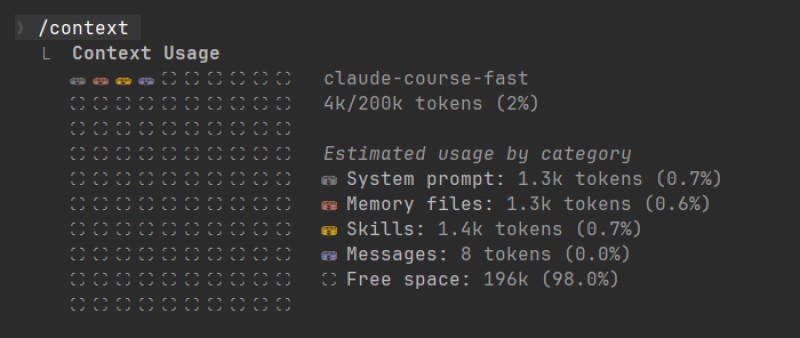
The session has only just opened, and 4k of 200k tokens are already taken - all of it overhead: System prompt is the agent's own instructions, Memory files are the CLAUDE.md and project rules it picked up, Skills is the list of skills available to it. The Messages line, the conversation itself, is still empty.
And here's what the picture looks like an hour into the work, with a couple of MCP servers connected on top:
/context

  System prompt     3.2k   ( 2%)   the agent's base instructions
  System tools     12.1k   ( 6%)   descriptions of the built-in tools
  MCP tools        21.4k   (11%)   connected external servers
  Memory files      1.8k   ( 1%)   CLAUDE.md, rules, auto memory
  Messages         45.2k   (22%)   your conversation, files, logs
  Free space      116.3k   (58%)
This is a sketch, not the output of any particular version: the set of lines and the on-screen layout depend on your version of Claude Code and on what's connected in the project, and the size of the window depends on the model. But the shape of it is always roughly the same, and there are a few practical things to take from it:
- the baseline overhead - the agent's instructions and the descriptions of its built-in tools - is always there, and you have no say in it;
- every connected MCP server adds at least a list of its tools to the window, even if you never use it once. Connecting one "just in case" means paying for it in every session;
- a
CLAUDE.mdthat has gotten out of hand is also paid for again on every launch. One more argument for keeping it short; - as the work goes on, essentially one line grows - messages. That's the one worth watching.
If Claude Code is at hand: run /context, ask it to read a couple of files, and run it again. The messages line will grow before your eyes, and you'll see what a single read costs you.
What piles up as you work
From there you fill the window yourself - and not only with words. Everything the agent reads and receives at your request lands in the context:
| Source | What exactly takes up space |
|---|---|
| The conversation | your messages, the agent's answers, including the options you rejected |
| Files that were read | the whole contents, or just the fragments needed |
| Tool results | the output of a command, the lines it found, observations from the browser |
| Skill and MCP material | the instructions of a skill that came into play, the description of a tool that was called |
The request and the context it brings back are two very different quantities. "Show the whole log" is four words, and the result runs to thousands of lines. That's exactly why a large output can hurt more than a long question (the space goes to the answer, not the question).
Hence the habit of handing over sources selectively. The @ sign before a path pulls a file into the conversation, and autocomplete kicks in as you type the path: Read @src/reward-flow.js and explain where the number of points is set. Mentioning a folder with @ shouldn't be read as loading the contents of all its files either: a reference to a folder gives you a list of files. Pick the source to match the question. This distinction between referencing a file and referencing a directory is exactly what the documentation on passing files describes.
One more small thing. If you then change ten to twenty by hand, the earlier answer won't update itself. Ask the agent to read the current contents before it draws a new conclusion. A reference to a file that was read once doesn't turn the old text in the conversation into a live copy of the file on disk.
When space runs out
The window doesn't stretch, but the session doesn't cut off mid-sentence either. As it fills up, Claude Code runs a compaction: it replaces the detailed history with a summary and frees up room. This happens automatically, and when exactly depends on the model and the settings.
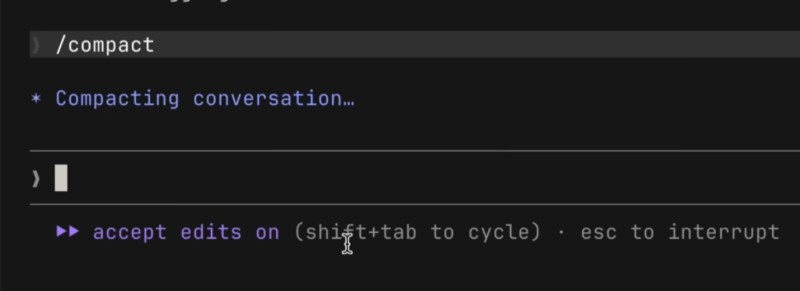
You can also start compaction yourself, with the /compact command. The point of doing it by hand is that you pick the moment - e.g. right before a big new chunk of work - and you can say what matters enough to keep:
/compact Keep the goal of the task and the boundaries of the edit,
the rejected option with a separate handler,
and the next step: check clearing the search field.
The main thing about compaction: what stays in the window is a summary, not the conversation. A detail that didn't make it into the summary has left the window, and arguing "you agreed to this twenty minutes ago" after a compaction gets you nowhere - it's easier to pull the fact you need out of the file again. Project instructions aren't lost along the way, though: the root CLAUDE.md is loaded again.
The second command, /clear, doesn't compact anything. It opens a new conversation: the old one stays saved and reachable through /resume, the project files don't change, and the project instructions load as usual. A clean start, nothing lost.
| Command | What it does | When to pick it |
|---|---|---|
/context | shows what's filling the window | it's not clear where the space went |
/compact | folds the history into a summary | same task, but a lot of history has piled up |
/clear | starts the conversation over | the task has changed |
The rule for choosing is simple. Same task - compact; different task - open a new conversation. There's no need to clear after every command: while you're working through one problem, its observations and clarifications are working for you. Before a new topic, though, it's worth writing down the conclusion you need in a couple of lines: "the reward is set in src/reward-config.js, it's awarded in src/reward-flow.js". That's a pointer to where you can come back, without rewriting the whole conversation.

How to spend the window more sparingly
You'll reach for those three commands far less often if the window doesn't fill up with junk from the start. A few habits do most of the work here:
- Ask specific questions. The agent answers a vague request by exploring: it reads files it doesn't need and works through options. A named file and a named expectation save both space and time.
- Don't dump everything at once. A question about a failing test needs the lines around the error, not the entire log.
- Keep project instructions short.
CLAUDE.mdloads in every session. Long reference material is better kept in separate files that get read when they're needed. - Turn off MCP servers you don't need. A server connected "just in case" takes up space on every launch, and the payback is zero.
- Hand big investigations to a subagent. It works in its own window and returns a summary, while the dozens of files it read stay with it.
What to keep in mind
Context is what you put on the table, not what "exists in the project". Three different things: a file on disk, an entry in the history, and the information in the current window. The confusion between them explains most of the strange answers you get.
From there it comes down to three actions: look at how full the window is with /context, hand over the source you need with @, and decide in time whether to compact the conversation or start a new one. Choose by the situation - a compaction won't replace reading the file you need, and a file you handed over won't check the agent's reasoning for you.
GO TO FULL VERSION