Picture a shopping list page: it opens, items get added, the buttons look fine. A finished screen still doesn't tell you that the code behind it was thought through. Developers make a separate pass over the code to catch missed bugs and talk decisions over. You can hand that job to an agent, and it does it well. You just have to explain the task.
1. How a team checks code
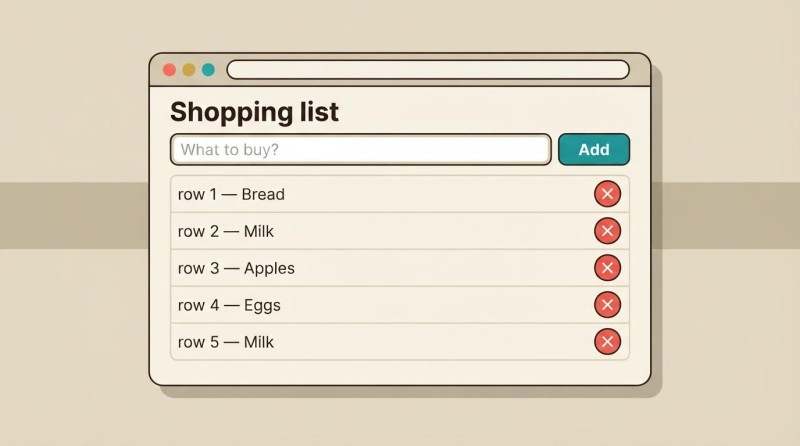
A developer on a small team picked up a task: build a shopping list where entries can be added and deleted one at a time. He wrote the code, tried adding bread and milk, then deleted the bread. It all worked. Before passing the work on, he read his own changes once more: dropped a leftover chunk, renamed something confusing. That's self-review.
Then he asked a colleague to look at the code. The colleague knows the programming language and reads how adding works, how the program picks the entry to delete, what happens to the rest of the list. A pass like that is called code review, and the person doing it is the reviewer.
The colleague spots something. The program picks the item to delete by its name. If the list ends up holding two "Milk" entries, tapping one of them can remove both. The author tested bread and milk, so he never hit that case.
The reviewer leaves a comment next to that piece of code: "Right now this deletes every item with that name. Do we allow duplicate entries? If we do, only the selected one should go". The author clarifies the requirement: duplicates are allowed, since someone could have added them for different people. After the discussion he changes the way an entry is picked. The colleague looks at the fix again and confirms the comment was addressed.
- The author writes the code and checks it
- The colleague reads the code and leaves comments
- Author and colleague discuss the comments
- The author makes the agreed edits
- The colleague checks the fixes
The diagram shows a review pass that turned up comments. The code goes from the author to the colleague, then comes back for fixes. If questions remain after the second look, the discussion and the edits repeat. Once nothing significant is left, the colleague approves the change.
That's the normal working cycle: wrote it, showed it, got a comment, talked it over, fixed it. Sometimes there are several comments, sometimes none at all. Or the author explains the decision and the colleague drops the question. A review doesn't require you to agree with every comment.
A pass like this also covers how readable the code is: whether the next developer will make sense of it, whether one rule has to be changed in several places. Along the way the colleague learns how the new part of the program works. Knowledge of the project spreads across people instead of sitting with the author alone.

Review is easy to mix up with testing (these two get confused constantly). When someone adds two items and taps the button, they're checking how the running program behaves. When they read the deletion code and work out which entries it will pick, that's a review. Nothing stops you from running the program during a review to check a hunch. The two approaches complement each other.
2. How to hand a review to an agent
Now picture the shopping list written by Claude Code from your description. You can explain what's supposed to happen on the page, but you can't read the logic behind it. The technical half of the review can go to an agent too: it reads the files and explains the findings in plain words.
The roles from the team story stay the same. There's the author of the code, and there's a reviewer with a task of their own. In Claude Code that reviewer can be a subagent, a helper the main agent hands a specific piece of work to. Here it reads the code and comes back with findings.
Asking the author to go over its own work again helps too. A separate reviewer adds a different angle, because its job is to judge the result. Give it the requirements so it knows which solutions are acceptable. Banning duplicate items, for instance, would technically make the deletion problem go away, but it would also change how the page is meant to behave.
The Claude Code guidance on review suggests a separate reviewer and explicit criteria. It also advises focusing on the findings that affect correctness and the requirements. Let's apply that to a small part of a project.
To set up a review you need to describe the behavior you want and decide which confirmed problems to fix. Reading the logic, tracking down the cause and working through the technical objections can all go to the agents.
The diagram has three roles: you set the requirements and choose the edits, the main agent organizes the work and fixes the code, and the reviewers study the code and the findings. The main agent passes them the material they need and brings the results back to you. If nothing gets confirmed, the fixing steps are skipped. Below we walk through that sequence in three requests.
What you end up with is a clear explanation of the problem, the result of the re-check and a report on the fix. And if a finding turns out to be wrong, that's a useful result too: you skipped an edit you didn't need.
If you want a permanent helper for passes like this, the article on creating and running a subagent comes in handy. Preparing a more detailed assignment for it is covered in the article on the brief and the output format.
Request 1. Review the code that was written
Start Claude Code in the project folder. Send the next three requests to the main session, because the main agent passes the work to the helpers itself. From here on we use the sample shopping list; for your own project, swap in your own description of the behavior.
Have a separate subagent review the shopping list code
in the current project. Check adding and deleting entries.
Requirements: duplicate names are allowed; only the selected
entry gets deleted; an empty item cannot be added.

Read the current code and the parts of the project it touches.
Look for bugs that break these requirements.
Do not change the code. Do not add new features.
For each finding, explain in plain words:
what can go wrong, which action triggers it, and why you think so.
Point to the place in the code so another agent can check it.
If you find no problems, say so. List what you checked
and what you could not determine. Save the report to REVIEW_REPORT.md.
I do not know the programming language: explain the outcome without making me read code.
The file REVIEW_REPORT.md will be an ordinary text report. We picked the name ourselves, and it's there so that the next request can point at the findings to re-check. The line "do not change the code" separates the review from the fixing; writing the report is still allowed.
A useful answer in our example might read like this: "If you add two items with the same name, deleting one removes both. The code picks entries by name, so it touches both matches". That's a made-up example of an answer, not the result of a check on your project.
The consequence is clear enough: a person loses an entry they meant to keep. The file name and the spot in the code are there for the next agent, so it can find the cause. You don't have to dig into that part yourself.
Start with one finished piece: deleting items, counting points or saving a note. A request like "check the whole project and improve everything" easily comes back as a long list of unrelated advice. Say what's supposed to work, and ask the agent to explain the consequences of whatever it finds. A report like that is easier to read. And much easier to act on.
3. How to re-check the findings
The reviewer agent gets things wrong too. Say it writes: "An empty item can be added to the list". Sounds convincing. But the check for empty input already exists in another part of the program, one the agent never read. The finding describes a problem that isn't there.
A confident but invented statement like that is usually called an AI hallucination. In a review it's especially awkward: the agent offers a fix, and you spend time changing code that already worked. So it pays to re-check both the code once it's written and the findings about it.
We've already taken the first step and had someone look at the author's work. Now we give another reviewer the report together with the current project. Its job is to find out whether each finding holds up. It's allowed to disagree with the first reviewer.
Request 2. Check the reviewer's report
Have another subagent re-check REVIEW_REPORT.md
against the current project code and the requirements from the previous request.
Pass those requirements to it explicitly.

For each finding, work out whether the described problem exists.
Check the related parts of the code: the handling may already be there.
Do not treat the first report as proof. If a conclusion needs
a run to confirm it, do that run with the tools you have.
Do not change the project code.

For each item say whether it is confirmed, refuted
or still undetermined. Give the evidence in plain language.
Keep what you concluded from reading the code separate from what the checks actually returned.
Do not present a check you did not run as done.
Save the result to REVIEW_CHECK.md and explain it to me briefly.
After that you have REVIEW_CHECK.md with the result of the re-check. In our sample case the second agent might confirm the duplicate-names problem and refute the one about empty input: "An empty string is rejected before the entry is added. The first reviewer missed that check".
That's already enough to pick the next move. The deletion problem is ready to be handed off for a fix. That finding is no reason to change anything about empty input. If the agent writes "still undetermined", ask it to explain what it was missing. Sometimes the question comes back to you: do two identical entries count as one item, or as two?
A second pass helps filter out invented findings, but it doesn't guarantee they're all gone. Two agents can repeat the same mistake. That's why the answer needs evidence: what exactly the reviewer found in the project, or what came out of the run. "I agree with the previous agent" on its own isn't enough.

4. The fix and the second review
Now choose what to fix. All you need for that is a sense of how the problem affects the way the page is meant to work. In our example having an extra item deleted clearly gets in the way, so we take that one. A suggestion to add sorting can wait. It has nothing to do with fixing deletion anyway.
Pass the agent the whole finding you picked, so it doesn't have to guess what you meant by "fix the first bug". Ask it to check the result again after the change. This is the team story continuing: the colleague looks at the corrected version.
Request 3. Fix it and check the result
Fix the confirmed problem from REVIEW_CHECK.md:
deleting one item wipes out every entry with the same name.
Only the selected entry should be deleted. Duplicate names are allowed.
Do not implement the other suggestions from the review right now.

After the fix, use the tools you have to check adding
and deleting items, including two with the same name.
Then have a separate subagent review the fixed code again:
whether the cause is gone and whether adding and deleting still work.
Pass it the original requirements and the description of the problem being fixed.

Explain to me in plain words what changed, which checks
were run and what the second review showed.
If something could not be checked, name it separately.
Do not widen the task with new improvements.
For your own project, replace the paragraph about shopping items with the confirmed finding from your report. The rest of the sequence can stay as it is: fix, check, a separate look at the result.
A good summary says something specific: "Each entry is now deleted on its own. A check with two identical names left the second entry in place. The second review didn't find the earlier cause of the bug". You can only write that after actually running those checks. If the agent only read the code, it has to say so.
You can also open the page and try the usual actions yourself. No knowledge of the language is needed for that. It's an extra check of the visible result; the technical review of the fix is still the agent's job. If the agent couldn't run the code properly, the report will state that limitation clearly instead of a promise that "everything definitely works".
You don't have to turn every pass into endless polishing. If the problem you picked is fixed, checked, and the second look turned up no related bugs, that task is done. And that's it. Anything new you want deserves a discussion of its own.
GO TO FULL VERSION