1. What a subagent is and what it is for
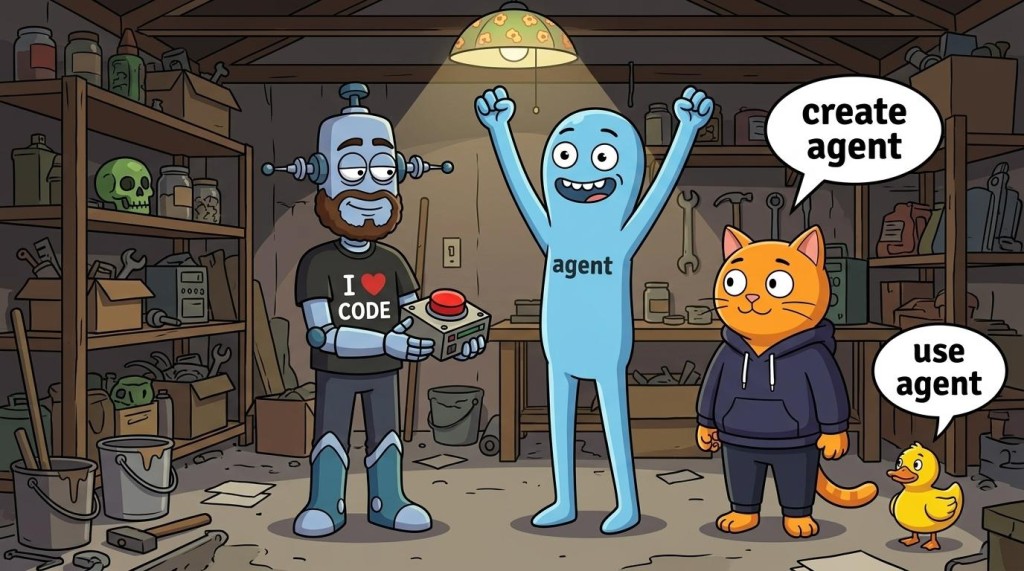
A subagent is a specialized helper that Claude Code hands a task to. It does the work in a context window of its own and returns a short summary to your session. The files it reads, the searches it runs and the tools it calls stay in its context.
Why bother? In the main session your messages, the files you've read and the output of commands all take up room in one window, and that window has a limit. As it fills up, Claude Code trims the history, and some of the detail can go missing. A subagent moves the intermediate work into a separate window and leaves only the result in the main conversation.
The simplest subagent
For a first run an ordinary message in Claude Code is enough: ask explicitly for a subagent and describe its task. You don't need to write a role file up front; a built-in helper will do for a job like this. For example:
Use a subagent to read the file index.html.
Have it build a short map of the file: the main sections
and what each of them does. Then have it write a brief summary
of the contents in 3-5 sentences.
Do not change the file. Return the subagent's answer to this session.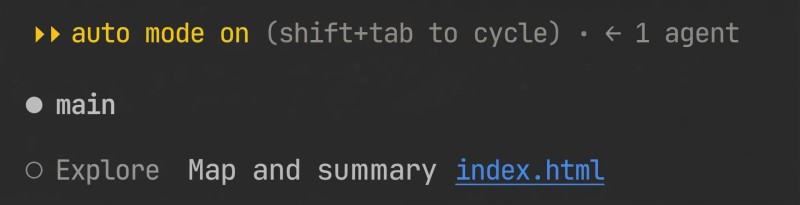
The main agent hands the task over and shows you the helper's answer in your conversation once it's done. If the run moves to the background, a bar with the subagent's name and the state of its work appears at the bottom, under the input field. Click it to open the subagent's session and see what it reads and does. While the work is going on, check that a separate subagent run actually started: a plain-text request steers Claude's choice, but on its own it doesn't guarantee the work gets delegated.
What a subagent gets
When you need to repeat the same job with a fixed set of rules, you can describe a role of your own in a file. A custom subagent like that starts out with two main things in hand:
- the role instruction from your configuration file - its specialization and the rules it follows;
- the task description, which the main agent writes from your request.
On top of that, Claude Code adds some shared background on its own: the project's CLAUDE.md files, a git status snapshot and details about the environment. Your conversation with the main agent isn't part of it.
One thing on the diagram matters most: the subagent does the job in its own window and returns a summary to the main conversation. The main agent never has to load all the intermediate reads and searches. The summary itself still takes up room in the main context, though.
This split has a downside. The summary doesn't show the whole path to the conclusion. It may not show you what data the helper was missing, or what it left unchecked. So the answer needs to carry its evidence and its limits, and its conclusions are worth verifying.
Why Claude does not remember everything
The context window is what the model has in front of it while it puts together the next answer: instructions, the part of the conversation it can still see, the code it has read, the output of commands. That's why the agent can build on a decision you made several messages back. The window has a limit; it doesn't keep the entire conversation in full detail forever.
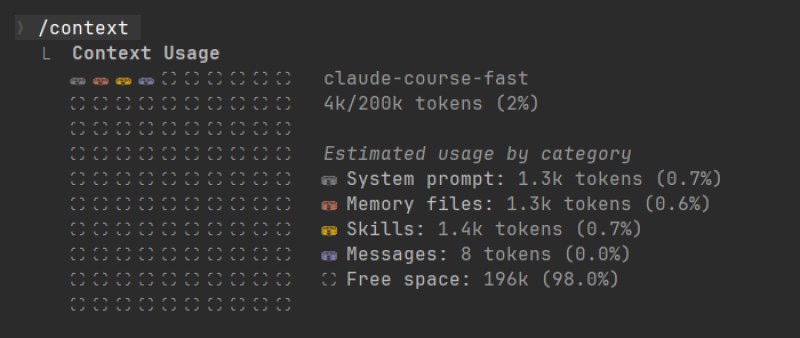
In the screenshot the /context command shows 4k/200k tokens (2%): about 4,000 tokens out of the 200,000 available are in use. A token is a small piece of text - a word, a part of a word or a punctuation mark. So 200,000 tokens isn't the same thing as 200,000 words. That's the window size of the session in the screenshot; on another model or another configuration it can differ.

Below it you can see where the room goes: System prompt is the system instructions, Memory files are the loaded memory and rules files, Skills is information about skills, Messages is the conversation itself. There's almost no conversation here yet, but part of the window has already gone to instructions. The line Free space: 196k (98.0%) shows how much room is left. Talking, reading files and running commands use it up.
The saved conversation and the current context window are two different things. The conversation can stay in the session history, but the model gets only a limited amount of it when it prepares an answer. As the window approaches its limit, Claude Code trims the history, replacing details with a short recap along the way. That isn't instant amnesia about the whole conversation: part of it survives in the summary. But a single condition, an explanation or an option you rejected at the very start may not make it in. After that the agent can no longer lean on that detail until you remind it, or until it reads the source again.
Files work much the same way. The fact that app.js sits in the project doesn't mean its contents made it into the window. The agent has to read it. The general instructions in CLAUDE.md can be loaded again, but they don't bring back every decision from the chat.
Say you agreed that items with the same name count as separate entries. If that condition lives only in an old part of the conversation, it can be out of reach after the history is trimmed. Before an important check it helps to state the condition again, or to ask the agent to read the document where it's written down.
Next we'll work through this with a custom reviewer that reads code: what it gets to see and how to create its role file. We're talking about a plain new run here; this example doesn't need ways to continue earlier work or to hand over a copy of the history.
2. What the reviewer knows about the project
A separate context doesn't mean the helper knows nothing. It has its starting instructions and access to the project. Here's where the custom reviewer from our example gets what it knows:
| Information | How it reaches the reviewer |
|---|---|
| Standing rules for the check | From the role file: what to do, which tools are available, what to return |
| The specific task | The main agent writes the assignment from your request |
| Project code and documents | The reviewer itself opens the available files it needs for the check |
| General project rules | The applicable CLAUDE.md files are loaded, if there are any |
CLAUDE.md is a file with general instructions for Claude Code: where the source code lives, say, and which conventions the project follows. No need to create one just for this check.
Your conversation history doesn't carry over automatically. If the main agent has already read app.js, what it read there won't show up in the reviewer's context by itself. The file hasn't gone anywhere, though: the helper can open it again.
Decisions made in the chat are the same story. Suppose you agreed that two identical names in the list have to stay separate items. That requirement matters when you're checking deletion. It reaches the reviewer if the main agent puts it into the assignment, or if the helper reads the document where it's written down.
Our reviewer has no tool for asking you a question directly. So when it runs short of data, it should write down what's missing and return the part of the result it does have. The main agent can then come back to you about the condition. Better to replace "the way we decided earlier" with the decision itself right from the start.
3. Creating the role file
We'll put the role in .claude/agents/reviewer.md inside the project. The user folder ~/.claude/agents/ can also hold roles that are available across different projects; the ~ sign stands for your home folder. For now the project version is enough.
You can have Claude Code create the file for you:
Create .claude/agents/reviewer.md for reviewing the page code
without changing it. Allow only Read, Grep, Glob.
The reviewer returns findings with evidence, the scope it covered
and its limits; finding nothing is an acceptable answer.
Show me the file you created.
What comes out should be an ordinary text file. Here's a ready-made version: compare the agent's answer against it, or just save this one yourself. If you already have a role under that name, look at what's inside it first, so you don't overwrite an instruction you need.
---
name: reviewer
description: Reviews the code of a finished page for behavior bugs and returns a report backed by evidence. Use when asked to review a page without fixing it.
tools: Read, Grep, Glob
---
Study the code of the given files against the stated requirements.
Do not change files. Do not promise to run the page: you only have reading and search.
For every finding state the place, the expected behavior, the evidence,
the conditions of the check and the impact. If you are short of data, say so.
List separately what you checked and what you did not.
If you found no problems against the stated criteria, say exactly that.
The block between the two --- lines is called frontmatter: settings at the top of a Markdown file. Here name sets the name of the role, description tells the main agent when to pick it, and tools lists the tools it can use. Below that come plain-language instructions.
The three tools in the example do exactly what reading code calls for: Read opens a file, Grep searches by contents, Glob finds files by name or path. So the reviewer will be able to find the delete function and read it, but it won't open the page in a browser and won't run a command in the terminal.
The line "do not change files" describes the assignment. The tools field limits how it can be carried out. Leave only the request in the text and skip the tool limit, and the helper may keep the ability to write. In the ready-made example both parts are in place already, so there's nothing to add later.
A role file looks a lot like a skill: settings plus the text of an instruction. Easy to mix up. But here we're setting up a separate run for a check. A skill usually adds a repeatable procedure to the current conversation, although skills can run in a separate context too. Choose by how the work should be done, not by how similar the two files look.
4. Check the role and call the reviewer
The file on disk is the first result. Now let's see whether the session picks it up. Open the file and look at the name reviewer, the description, the tools line and the text: is there a promise in there to open a browser or to fix the errors on the spot?
In the Claude Code input field type @ and pick reviewer with the agent label. You want the role itself, not the similar-looking entry with a file path. Picking from the list is how you explicitly say which helper should do the job.
If the role is missing, check the path first: the file has to sit in .claude/agents/ of the project you have open. Then check the frontmatter: both separator lines, the name and the description. You can also ask Claude Code to check the definition file itself.
Per the Claude Code documentation, changes in a folder that's already being watched get picked up within a few seconds. If the agents folder showed up for the first time after the session started, you need a restart. Close the current session, then in a normal terminal, from the same project folder, run:
claude --continueThat continues the last conversation in the current directory. Once it starts, check the @ list again. The launch command itself goes into the terminal after you exit, not inside a conversation that's already running.
For the first assignment we'll take a shopping list page: the markup in index.html, the logic in app.js, both files in the project root. In your own project swap in your paths and your expected behavior. Once you've picked the reviewer from the list, add this text after the mention:
Study index.html and app.js in the project root.
Check adding and deleting items: the counter has to match
the number of items left, and deleting one entry must not
delete another one with the same name.
Do not change the files. Return conclusions from the code and what to check in the browser.
That already carries everything a narrow check needs: where to look, what should happen and what result you want back. No need for a separate brief file. The main agent will phrase the task for the reviewer you chose. Picking it with @ decides who does the work; it doesn't mean your message is passed on word for word.
5. How the result comes back
After you send the request, check whether a reviewer run has started. In a normal interactive session work like this can go on in the background: you see it in the panel and can keep talking. The /tasks command lets you look at the tasks, recently finished ones included.
When the check is done, the main agent gets the result and passes it on to you. If the recap is too short, ask for more: "Show the reviewer's final report in full". That way you keep the exact wording of the finding and the limits of the check.
Here is roughly what a sample report about the counter looks like:
Checked adding and deleting in app.js.
In removeItem() the list is redrawn, but I found no call to
updateCounter() on that path. The counter is expected to show
the number of entries left.
Check in the browser: add one item, delete it,
compare the counter against an empty list.
Did not separately check deleting entries with the same name.
Did not run anything in the browser.
This is an example of the shape of an answer, not a promise that your page has exactly this bug. Our reviewer can only read code, so the last line describes its abilities honestly. A conclusion drawn from code can be sound without a run, but the evidence still needs checking: maybe another function on the same path updates the counter.
Open the place it points to, or repeat the described steps in the browser. If the problem holds up, you can hand the fix to the main agent. If it doesn't, tell the agent what you saw and ask it to re-check the conclusion. A neatly formatted report doesn't decide what you should change.
The answer "found no problems against the stated criteria" is fine too, as long as it's clear what was checked. But "could not find the file with the delete logic" means a partial result: the path has to be sorted out first. Padding a report with guesses to make it look substantial helps nobody.
By the way, the list can also hold the built-in roles Explore and Plan. They are available without creating role files of your own.
6. When delegating is worth it
After the first check goes well, it's tempting to spin up a separate helper for every action. But a new run has to buy you something: an independent look, or a piece of self-contained work whose step-by-step detail you don't need in the main conversation.

| Task | Where it's easier to do |
|---|---|
| Check a finished function against explicit criteria | A separate reviewer pays off even for a small file: the independent look is the point |
| Trace where a value comes from across many files | A subagent can come back with a short answer and the paths you need |
| Change the label on a button you already know | In the main conversation: a separate run adds next to nothing |
| Work the behavior out together with you, refining it at every step | The main conversation makes it easier to keep the shared context of the discussion |
Several dependent steps can add up to a single task for a subagent too. Find the handler, check where it's called, write up a conclusion - that's a perfectly sound, self-contained assignment. What you should avoid is handing every step to a different helper if that means explaining the previous step's result to each of them again.
You can give a subagent its own model through the model field. You don't need it yet: a clear role and a result you can verify come first. A separate run on its own means neither a stronger nor a weaker model.
A second role has to check something different
Suppose that besides the reviewer you want a playtester to check a user scenario. A copy of the old instruction under a new name will change almost nothing. Start by separating what the role works on from the result:
| Role | When to call it and what to pass | What you get back |
|---|---|---|
| reviewer | You need the delete code reviewed; pass the files and the requirements | A conclusion from the code with the place, the evidence and the limits |
| playtester | You need a user scenario assessed; pass the steps, the expectations and whatever observations you have | What happened at each step, where the result diverges from the expectation and what was left unchecked |
For example, the role could deal only with deleting one of two items that share a name: after the action one entry should be left and the counter should read 1. That's a measurable assignment. "Tell me whether the page is any good" leaves far too much room for advice about taste.
Now match the assignment against the tools. With only reading and search, as our reviewer has, the helper won't carry out any action in a browser. It can put together a test scenario, or go through the observations you wrote down. That's preparing or analyzing a check. Not a playtest it ran itself.
Prepare a test scenario for deleting one of two items
that share a name. For every step give the action
and the expected result. Do not change code, do not claim you ran it.
Once I give you my observations, compare expected against actual
and list what data is missing.
Running the check itself takes an available browser tool, plus a check that the run actually happened. The name playtester alone doesn't get you there. First decide how the check will run, then write into the role file when to call it and what result it can honestly return.
7. What this looks like in your session
You now have a role file the session can see, and a short check you can hand to it. That's enough to start with. There's no need to build up a dozen similar reviewers in advance.
From here on, fix the layer where the problem turned up. Left out an important condition - add it to the assignment. Got a conclusion you doubt - check the evidence. The reviewer keeps coming back with answers that are too general - sharpen the role instruction. The file stays in the project, and your next check already starts from those rules.
For jobs you repeat, a brief for the reviewer comes in handy. Once the answer is in, move on to checking the findings and choosing the fixes.
GO TO FULL VERSION