You're building a locale guide with Claude Code: you're adding search to the list and are about halfway through. Then it turns out the saved version of the page has the wrong caption under the heading. A two-minute fix, but you'd like to check it separately from the half-finished search, not tangled up with it.
Let's see how to give the second task its own working folder in the same repository, open a separate Claude Code session there, and save the result at the end without mixing anything up. A second folder doesn't speed anything up by itself. It's there for one reason only, really: so the two tasks don't get mixed together in one set of files.
When one working folder isn't enough
The practice project locale-guide is a browser page with a list of locales. Right now task A is underway in its folder: search, branch feature/search, one unfinished change:
git status --short
 M app.js
You don't want to lose this change, but it's too early to call it a finished result. And then task B shows up, completely unrelated to search: fix the caption in index.html in the version that's saved in main.
The first idea that comes to mind is to open a second terminal and start another claude in the same folder. You get two separate conversations, but they share the same files. If both agents start changing the same spots, the edits can get mixed up. In our simple example the caption and the search live in different files for now, but both sessions see the same unfinished project. And switching branches means dealing with the current changes first.
The way out is to give task B its own workspace. Git's answer to this is a worktree: a separate working folder for the same repository. Claude Code has the --worktree flag, which sets up such a folder and starts a session in it right away. We'll go through the mechanism first, then the flag.
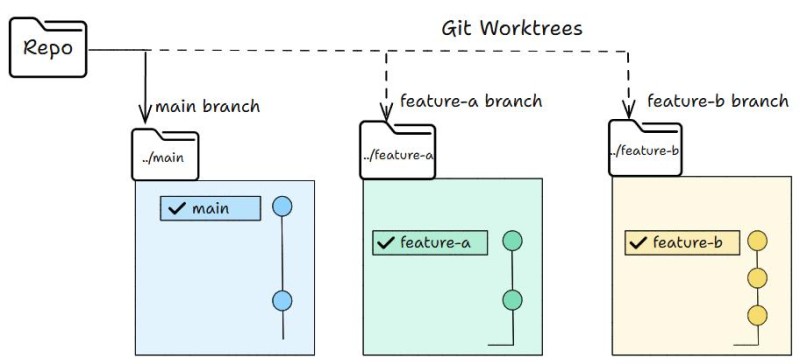
One caveat before we go on. You don't have to work this way on every task. If the tree is clean and the fix is short, a second folder just adds hassle. Alternating between tasks in one folder is perfectly fine too.
Branch, working folder, and session
Three things that are easy to mix up, mostly because you're dealing with all of them at once:
| What it is | What it holds | Where it lives |
|---|---|---|
| branch | a pointer to a commit and a line of history | in the repository, shared by all working folders |
| working folder (worktree) | the files you're working with right now, plus what's staged for the next commit | on disk, each folder has its own |
| session | the conversation with the agent and its context | in Claude Code |
That also answers the second-terminal question: a new session separates the conversation, not the files. To separate the files, you need a second working folder.

History and branches are shared, since both folders are tied to one repository. Git settings are shared by default too, although Git does support per-worktree settings. But each folder has its own working files and staged changes. The uncommitted search from the first folder won't show up in the second one on its own.
You usually can't check out the same branch in two folders at once. Git refuses and names the folder that already has it:
fatal: 'fix/label' is already used by worktree at '/projects/locale-guide-label'Pick the starting point
In our example the repository already exists, with at least one commit, a local main branch, and a feature/search branch. Both still point to the same commit, and the search exists only as an uncommitted change. Let's look at the starting state with three commands in the main folder:
git status --short        # what isn't saved right now
git branch --show-current # which branch the main folder is on
git log -1 --oneline main # the latest commit in main
M app.js
feature/search
d5ec405 add locale guide pageFor an independent caption fix we branch from main: task B needs the saved version of the page, not the current state of the search. Note that this is the local main on your machine. It doesn't have to match the branch of the same name on the remote, and the command doesn't fetch anything from the network.
If the second task needs the result of the first, start by deciding which saved commit it needs and create the folder from that. A plain git worktree add doesn't carry uncommitted changes over automatically. Copying files by hand, or extra tools that set up the environment, is a separate story.
Create the second working folder
From the locale-guide folder:
git worktree add -b fix/label ../locale-guide-label mainIt reads left to right: create a new branch fix/label, put the working folder next door at ../locale-guide-label, and use main as the starting point. The last argument makes the choice of base explicit. Without it, Git would take the current HEAD commit of feature/search in this command, but not the uncommitted changes. In our example both branches are still on the same commit, so the files would come out identical; once you've committed some search work, the choice of base starts to matter. Git replies roughly like this:
Preparing worktree (new branch 'fix/label')
HEAD is now at d5ec405 add locale guide page
Next, check what you got. The -C flag tells Git to run the command in the given folder without changing into it:
git worktree list
git -C ../locale-guide-label branch --show-current
git -C ../locale-guide-label status --short
Sample output (the paths are made up, yours will differ):
/projects/locale-guide        d5ec405 [feature/search]
/projects/locale-guide-label  d5ec405 [fix/label]

fix/label
The list shows both folders and the branch of each. The main one stayed on feature/search with the unfinished search, the new one is on fix/label. And status in the second folder printed nothing - it's clean, which is exactly what we were after.
If the path or the branch name can't be used, Git refuses and explains why, for example already exists or is already used by worktree. Check the worktree list, the branches, and what's in the folder you named. it might just be a leftover from an earlier run, or another task. Don't add --force on a hunch: first find out what already exists and whether you need it.
Open the second task in Claude Code
Open locale-guide-label in a separate IDE window, or just change into it in a new terminal and start claude from there. The new session knows nothing about task A, and that's fine - it only needs its own context:
Expected folder: locale-guide-label, branch: fix/label.
First check the actual folder and branch. If they're different, stop.
Read index.html.
Change the caption under the heading to "Locale list: code, language, and country".
Don't change anything else in the file, and show me the change.Ask Claude Code to name the working folder and the current branch before it touches any files, and compare the answer with what you intended. An agent started in the wrong folder works with exactly the same confidence as in the right one.
After the edit, check git status and git diff in each of the two terminals: in the second folder only the caption in index.html has changed, and in the first the earlier change to app.js is still there. Status alone shows file names, but it doesn't prove their contents are intact. For an exact comparison, pause work on the search while you check. Check the main folder from its own terminal, and don't ask the agent in the isolated session to go over there. And open the page from the second folder, otherwise you'll be staring at the old caption.
There's also a shortcut. The claude --worktree label-fix command creates the working folder itself and starts a session in it. According to the current documentation, the folder appears inside the repository, at .claude/worktrees/label-fix/, the branch is named worktree-label-fix, and the base is the default branch on the remote (usually main), not your current commit. If no remote is configured, the base becomes your current local commit. So it isn't quite the same as explicitly naming main in the command above, although in a simple project the result is often the same. The default can be changed in settings, and it's worth checking the details against the documentation for your version.
The flag comes in handy when the base suits you and you just need a separate spot for a task, fast. There's no point running it on top of a folder you've already created: you'd just get one more. And it's worth adding .claude/worktrees/ to .gitignore, otherwise the contents of the new folders will start showing up in the main one as untracked files.
What stays shared
A separate folder separates less than it seems at first glance:
| Separate | Shared | Not separated at all |
|---|---|---|
| working files, staging, the folder's current branch | history, all branches, repository settings, the remote repository address | local server ports, an external database, cloud services, the process's access to the rest of the disk |
The third column is the main thing people forget. A worktree is about Git files, not about isolating the machine. Two local servers on the same port won't get along, and requests from both folders will go to the same external database if it's set in the config. The checks Claude Code runs when working in a separate folder don't turn it into a sandbox for the whole system either.
The second folder gets the files of the chosen commit. If dependencies and local settings aren't stored in Git, you'll usually need to set up the environment separately; extra tools can automate that. Don't copy .env blindly: identical credentials can send both runs to the same service. Our static guide is lucky here: no server, no secrets, the page just opens as a file.
Save the result and bring it over
In folder B, check the caption in the browser, look at git diff, and commit only the file you need:
git add index.html
git diff --cached
git commit -m "fix: correct locale list label"
Before committing, make sure only the change you want is staged. If git diff --cached shows other changes, deal with them first.
The commit is in the shared repository, and it's already visible from the main folder. But by itself it hasn't landed in main or in feature/search: it sits in its own branch, waiting for you to decide to merge it.
Merge the result back only once task A is finished, or at least saved, and the main folder is clean. There's no need to switch to main in the middle of an unfinished search - sort that out first. Once the main folder is clean:
git checkout main
git merge fix/label
Fast-forward
index.html | 2 +-
1 file changed, 1 insertion(+), 1 deletion(-)This output matches the case where main hasn't changed since fix/label was created. If Git reports a conflict, stop and resolve it as you would any merge conflict - that's a separate topic, covered in the article "Branching and merging in Git". After the merge, open the page again: the caption should be new and the locale list unchanged. The feature/search branch wasn't touched by any of this, by the way. Before you continue with the search, decide separately whether to bring the fix from main into it.
Remove the folder you no longer need
First, close the session in the second folder and anything else you started there. Then check whether anything you need is still in it:
git -C ../locale-guide-label status --short --ignoredModified and new files show up right away; ignored ones are shown by the --ignored flag, and that's often exactly where local settings and notes live. Once you're sure the result is saved in the right branch, remove the folder, running the command from the main one:
git worktree remove ../locale-guide-label
git worktree list
If there are modified tracked files or new files that aren't ignored, Git will usually refuse to remove the folder:
fatal: '../locale-guide-label' contains modified or untracked files, use --force to delete itDon't just do what the message suggests, at least not as your first move. Check the files and save what you need. Uncommitted data may be impossible to recover with Git once the folder is gone. And don't rely on that refusal to fully protect you: ignored files can be deleted even without --force, which is why we checked them separately.
One more detail that's easy to get wrong. The Git command removes the working folder, but not the branch - fix/label will still be in the git branch list afterwards. That's convenient: the result hasn't gone anywhere. When the branch is really no longer needed and everything you need from it has been merged, delete it as a separate step.

When you exit a session started with --worktree, Claude Code checks the folder. If it has no changes or new commits and the session has no name, Claude Code removes the folder and its branch on its own, without asking. If there is work in it, you'll be asked whether to keep or remove the folder. Removing it in that dialog deletes both the folder and the branch Claude Code created, along with everything in them. That's not the same as the Git command above. If you need the result, choose "keep" and merge it back yourself.
Don't delete the folder behind Git's back, through the file manager: the repository will keep thinking it exists, and the worktree list will still hold an entry for something that's no longer there.
How to run a second task in Claude Code
The whole routine, in six steps:
- define the second task separately from the first and decide which saved state it starts from;
- create a working folder with an explicit base, or run
claude --worktreeif the default suits you; - check the path and branch in the new folder before changing anything;
- give the session context for this task only, without the history of the other one;
- check the change where you made it, and commit the result;
- settle the merge question, and only then remove the folder.
A separate folder doesn't check your code or sign off on the work for you. It lets each task have its own working files, and that's it. You can see the benefit in our example: the caption was fixed and checked on its own, and the unfinished search stayed in the first folder.
Check yourself
The second folder doesn't have the uncommitted search. Did something go wrong?
No, that's by design. The folder was created from a commit in main, not from task A's current files. Uncommitted changes stay in their own folder.
Two sessions are open in the same folder. Are the tasks separated?
The conversations are separate, but the files are shared. Changes can get mixed up if the tasks touch the same spots.
You've committed in branch B, but main doesn't have the caption.
That's how it should be: the commit lives in its own branch. It doesn't change other branches; for that you need a merge.
A second local server won't start on the same port.
A separate folder doesn't separate ports. Run it on a different port.
Git refused to remove the working folder.
Read the reason: besides unsaved files, the folder might be locked, or it might be the main working folder. Save what you need and figure out what state it's in. Don't add --force on a hunch.
If you want some hands-on practice, take a separate practice repository with a couple of commits: make two folders, change some text only in the second one, check both, and remove the extra one. No services or accounts needed.
GO TO FULL VERSION