Python 3.15 is 140 times faster. That's true.
You install the new version, run a script that used to take ten seconds, and look at the stopwatch.
Nine point seven.
No, nobody lied to you. People have just been telling the same joke about Python for twenty years — "it's slow." And this time Python answered the way it knows how: precisely, without fanfare, and in a few places 140 times over.
Python has collected a lot of jokes over the years. It's slow. Its threads are just for decoration. You can brew coffee while a script starts. Error messages read like riddles. Anything beyond plain ASCII turns into gibberish the moment you open a file on Windows. And the crown jewel: "Python is the second-best language for everything."
Here's the fun part: over the last three years — Python 3.13, 3.14 and the brand-new 3.15 — the language has methodically dealt with almost every one of them. Let's go down the list.
Joke #1. "Python is slow" → Python 3.15 speed and the JIT
The classic: while Python is still running a loop, the C program has compiled, finished and gone home.
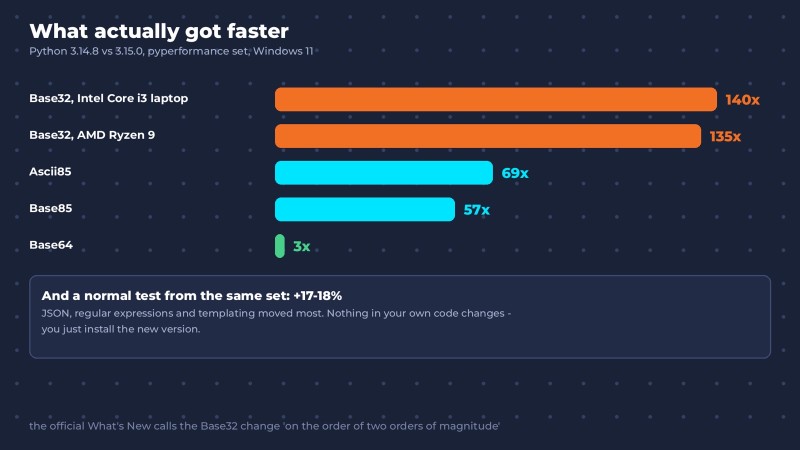
Now let's see where the 140x comes from. An independent pyperformance run — the standard benchmark suite for CPython — compared Python 3.14.8 and 3.15.0 on two Windows 11 machines. The record went to the Base32 encoding test: roughly 140x faster on an Intel Core i3 laptop and 135x on an AMD Ryzen 9.
In a nutshell: Base32 is a way to write any bytes using only the letters A–Z and the digits 2–7, so they can travel as plain text. You run into it more often than you think: the secret key you scan as a QR code into Google Authenticator is stored in Base32.
The trick is simple. In 3.15, Base32 was rewritten in C: it used to spin in a pure-Python loop, now it runs compiled code. The official What's New in Python 3.15 modestly calls it a speedup of "two orders of magnitude." Ascii85 and Base85, which live inside PDFs among other places, got 57–69x faster. Base64 got 2–3x faster.
Your script, of course, won't run 140x faster. But a typical test from the same suite got 17–18% faster, with JSON, regular expressions and templating improving the most. For free. You don't change a single line — you just install the new version. People spend weeks optimizing code for gains like that.
And the big one: the JIT finally kicked in.
In a nutshell: a JIT (Just-In-Time) compiler is the part of the interpreter that, while your program is running, finds the code that runs most often and turns it into machine instructions. A regular interpreter works through the bytecode again every single time. The JIT does that work once and then just runs the result.
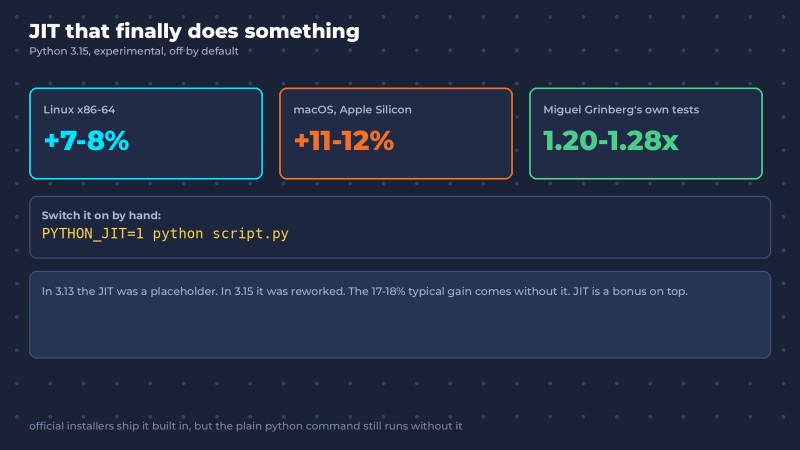
In Python 3.13 the JIT was more of a down payment on the future. In 3.15 it got a serious overhaul, and according to the official numbers it gives +7–8% on Linux and +11–12% on Macs with Apple Silicon. Miguel Grinberg, author of the well-known Flask Mega-Tutorial, runs the same pure-Python tests on every version — in his numbers the JIT sped code up 1.20–1.28x. The JIT is still experimental and you switch it on by hand with the PYTHON_JIT=1 variable, but the direction is clear.
Has Python caught up with C? No, and it isn't trying to. But the "slow" joke is starting to cough.

Joke #2. "Python threads are just for decoration" → Python without the GIL
You have eight cores. You start eight threads. Python runs on one core and acts like that was the plan all along.
Blame the GIL. In a nutshell: the GIL (Global Interpreter Lock) is a lock that makes regular Python execute code in only one thread at any given moment, no matter how many cores your CPU has. For twenty years it was the go-to argument in every "Python vs. everyone" debate.

Here's how it played out. Python 3.13 shipped an experimental build where the GIL can be turned off. Free-threaded Python, or Python without the GIL, is a separate build of the interpreter where threads truly run in parallel on different cores. In 3.14 it became officially supported, and its cost in single-threaded code dropped to 5–10%. And here's the payoff: in Grinberg's tests on 3.15, the free-threaded build computed Fibonacci numbers on four threads more than four times faster than the regular one.
More than four times faster. Simply because the threads finally run in parallel.
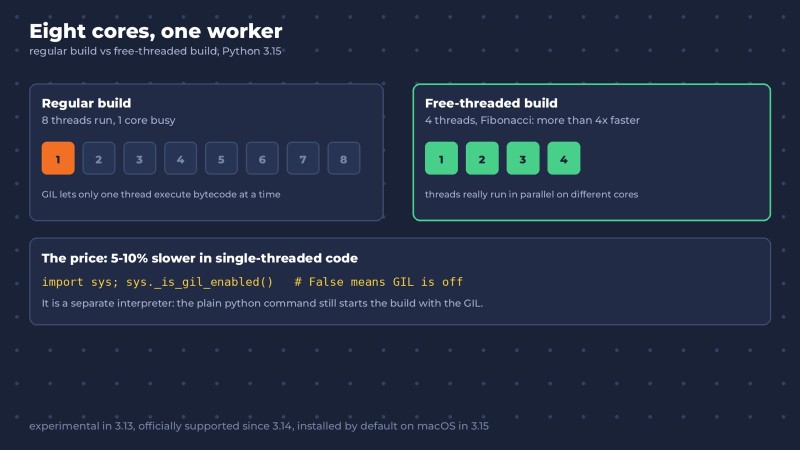
One catch: it's a separate interpreter. The official python.org installers for Windows and macOS can install it next to the regular one (on macOS in 3.15 it's installed by default), but the plain python command still launches the build with the GIL. You can check what you're running in one line:
import sys
print(sys._is_gil_enabled())   # False means the GIL is off
The twenty-year-old joke is living out its last releases.
Joke #3. "You can brew coffee while a script starts" → lazy imports
A command-line tool that only needs to show --help thinks for a couple of seconds. Because on startup it dutifully loads pandas, requests and twenty more modules that --help doesn't need at all.
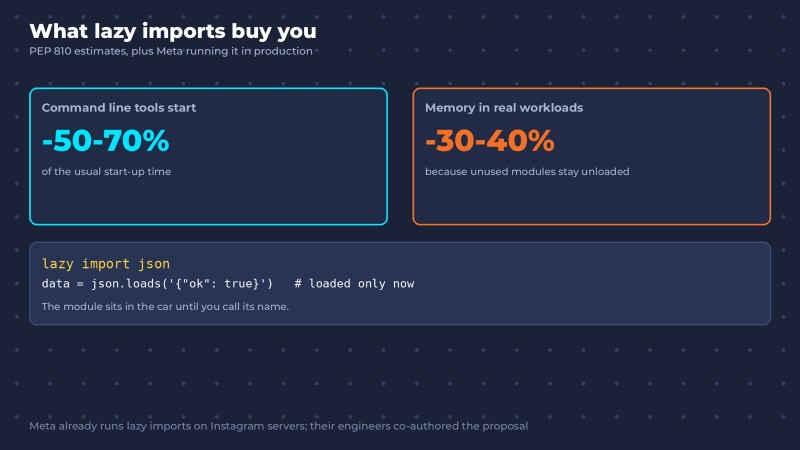
Python 3.15 adds lazy imports. In a nutshell: a lazy import is an import where the module is loaded not on the import line, but the first time you actually use it. You turn it on with the lazy keyword:
lazy import json
lazy from pathlib import Path

print("Starting...")                 # json and pathlib aren't loaded yet

data = json.loads('{"ok": true}')    # json loads only now
A lazy import is like a guest who waits in the car outside and only comes up when you call their name. Nobody calls — nobody has to set a place at the table.

According to the authors of PEP 810, command-line tools can start 50–70% faster, and memory use in real workloads drops by 30–40%. This isn't a lab toy: Meta has been running lazy imports on Instagram's servers for a long time, and engineers from there are among the proposal's authors.
Your coffee breaks are about to get a lot shorter.
Joke #4. "Python error messages are riddles" → smarter error messages
For twenty years the routine was the same: you get an error, paste it into a search engine, read three answers on Stack Overflow and try the fourth. The last three Python releases decided nobody should live like that.

Your file is called random.py and it contains import random? This used to end with a mysterious "module has no attribute randint" and half an hour of suffering. Since 3.13, Python tells you straight: your file has the same name as a standard library module, rename it.
A typo in whille True:? Since 3.14, Python asks: "Did you mean 'while'?"
And 3.15 got downright perceptive:
AttributeError: 'list' object has no attribute 'push'. Did you mean '.append'?
AttributeError: 'dict' object has no attribute 'put'. Use d[k] = v.
The first line is a personal hello to everyone coming from JavaScript. The second is for everyone coming from Java. The interpreter recognizes you by your accent.
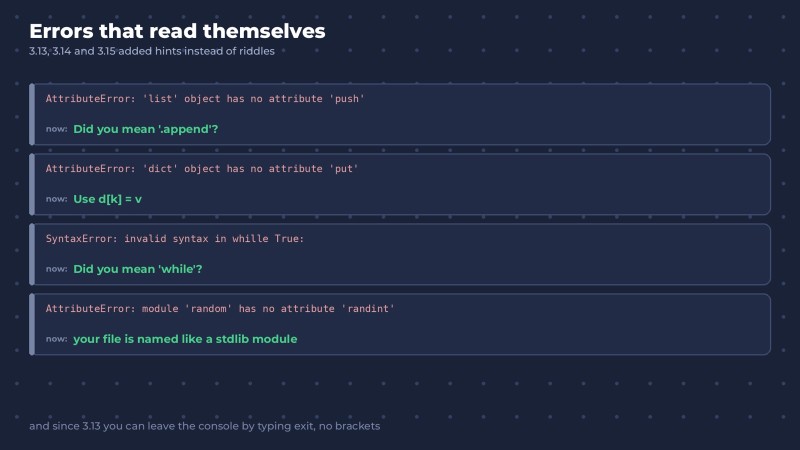
And a special thank-you to 3.13 for the new REPL: colored errors, multiline editing, and to quit you can now just type exit. No parentheses. A whole generation of people who googled "how to exit Python" right after "how to exit Vim" can finally breathe out.
Joke #5. "Non-ASCII text on Windows? Good luck" → UTF-8 by default
If you've ever written Python on Windows, you know this line all too well:
UnicodeDecodeError: 'charmap' codec can't decode byte 0x9d in position 12Before 3.15, open("file.txt") without an explicit encoding used the system encoding, and on Windows that usually isn't UTF-8. One curly quote pasted from Google Docs was enough to crash the script, and a name like José quietly turned into José. In 3.15, UTF-8 is the default everywhere. One of the most common beginner questions simply disappears.

If your code also has to run on older versions, it's still better to write encoding="utf-8" explicitly. "Explicit is better than implicit" comes from the Zen of Python, and nobody argues with the Zen.
Bonus: frozendict, t-strings and other small wins
These were never jokes, but they're too good to skip.
frozendict (3.15, PEP 814). frozendict is an immutable dictionary: you create it once and can't change it afterwards. The list has an immutable sibling — the tuple; the set has frozenset. The dictionary waited more than thirty years for its own:
config = frozendict(host="localhost", port=8000)
config["port"] = 9000   # TypeError: can't change it
Immutability used to be enforced by a # DO NOT TOUCH!!! comment. Now the interpreter itself protects your settings — including from you at 3 a.m.
Unpacking in list comprehensions (3.15). A list of lists flattens without the double loop that half of all people have to read twice:
flat = [*L for L in [[1, 2], [3, 4], [5]]] # [1, 2, 3, 4, 5]except without parentheses (3.14). except TimeoutError, ConnectionRefusedError: — a small thing, but a nice one.
t-strings (3.14, PEP 750). t-strings are relatives of f-strings that return a template instead of a finished string. Libraries can safely process the substituted values before they turn into SQL injection.
The Tachyon profiler (3.15). It attaches to a program that's already running and shows where it's slow, barely slowing it down. Unlike the old cProfile, which worked like a thermometer that raises your temperature. Running it with a ready-made flame graph:
python -m profiling.sampling run --flamegraph -o profile.html script.pyAnd for a process that's already running — python -m profiling.sampling attach plus the process ID (you'll need admin rights).
Why this matters more than 140x
Add up the three releases and you get a picture that's easy to miss behind the benchmark headlines.
Python is already the main language of AI and data work. People loved it because it's fast to write and put up with it because it's slow to run. Now it's methodically deleting the second half of that sentence: the JIT, threads without the GIL, fast startup, clear error messages.
If you're learning Python, this is the best news you could get. You're investing in a language that gets stronger every year. The code you write in practice exercises today could be running in a multithreaded service with a JIT tomorrow — and you won't have to switch languages to get the speed.
Just learn it the way it is now. AI assistants grew up on mountains of code written before 3.15: no lazy import, no frozendict, and plenty of open() calls without an encoding. The model will write code "the way it used to be done." Knowing how it's done now is your edge.
And yes, the new features take an evening to learn. To understand why Base32 rewritten in C got 140x faster while your script didn't, you need the fundamentals: how the interpreter works, what bytecode is and why a pure-Python loop is slower than a loop in C. We've laid out the order to learn them in our Python developer roadmap for 2026. Versions change. Fundamentals compound.

Cheat sheet: what's new in Python 3.13, 3.14 and 3.15
| Version | Released | Highlights |
| 3.13 | October 7, 2024 | new REPL: colors, multiline editing, exit without parentheses; a hint when your file is named like a standard library module; experimental free-threaded build; experimental JIT |
| 3.14 | October 7, 2025 | free-threaded Python officially supported; t-strings; except without parentheses; attaching the debugger to a live process with python -m pdb -p PID; syntax highlighting in the REPL; built-in zstd compression; deferred annotations; "Did you mean 'while'?" |
| 3.15 | October 9, 2026 | Base32 rewritten in C (up to 140x faster); upgraded JIT (+7–12%); lazy imports with lazy import; frozendict; UTF-8 by default; * unpacking in list comprehensions; the Tachyon profiler; even smarter error messages |
Python 3.15 FAQ
Is Python 3.15 really 140x faster?
Only in one test — Base32 encoding, which was rewritten from pure Python in C. A typical test from the pyperformance suite got 17–18% faster, and if you leave out the encoding tests, the average gain is about 1.2x. Your unchanged code will most likely get faster by percentages, not multiples.
When was Python 3.15 released?
October 9, 2026. New Python versions come out once a year, every October.
How do I enable the JIT in Python 3.15?
With an environment variable before launch: PYTHON_JIT=1 python script.py. The official Windows and macOS builds already include the JIT, but it's switched off. It's still experimental and gives +7–8% on Linux x86-64 and +11–12% on Macs with Apple Silicon.
How do I install Python without the GIL?
The official python.org installers for Windows and macOS can install it next to the regular version, and on macOS in 3.15 it's installed by default. For Linux and building from source, there's a guide in the documentation. To check, run sys._is_gil_enabled(): if it returns False, your threads run in parallel.
Should I upgrade to Python 3.15?
- Learning Python — yes, install 3.15. The new error hints will save you more than one evening.
- Working on a side project — go ahead too, just check that the libraries you need already support 3.15.
- Running production — wait for builds of your key dependencies and the first bugfix releases. Don't turn the JIT on in production yet.
The last joke
Only one joke from the list is still standing: "Python is the second-best language for everything."
But with every release, the word "second" gets a little quieter.
Jokes about Python go out of date faster than Python itself. Good time to learn it.
GO TO FULL VERSION