There's a bug almost everyone learning Python hits at least once. You write numbers = numbers.sort(), run it — and numbers is None. The list seemed to sort itself and then vanished.

Python did nothing wrong; it did exactly what you told it to. sort and sorted just look like twins and behave differently. Let's sort this out once and for all — and cover everything you'll run into in practice: keys, dictionaries, objects, multiple fields, accented letters, and speed.
What's the difference between sort() and sorted()?
The short version: sorted() is a function that returns a new sorted list and leaves the original data untouched. list.sort() is a list method that sorts the list in place and returns None.

scores = [42, 7, 19]

fresh = sorted(scores)
print(scores)  # [42, 7, 19] — the original list is untouched
print(fresh)   # [7, 19, 42] — this is a new list

fresh = scores.sort()
print(scores)  # [7, 19, 42] — now the list itself has changed
print(fresh)   # None
That's the bug from the intro solved: .sort() ran, sorted the list, returned None — and that None overwrote your variable. Returning None is a deliberate design choice in Python: a method that changes an object returns nothing, so nobody confuses it with a function that makes a copy.
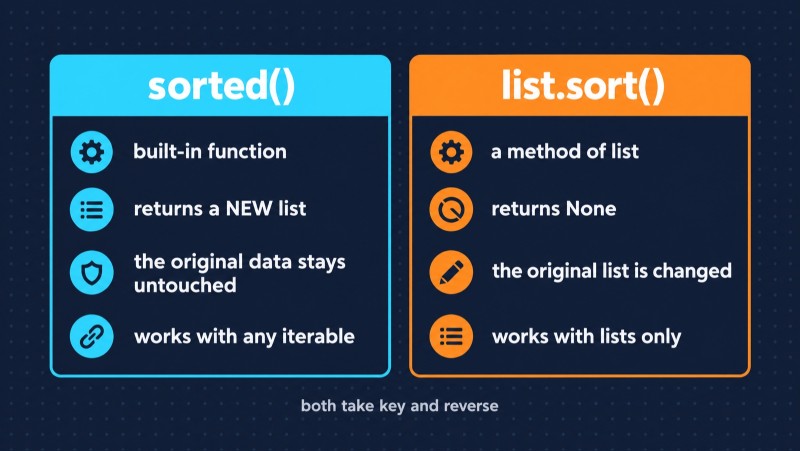
sorted() | list.sort() | |
| What it is | built-in function | list method |
| Returns | a new list | None |
| Original data | unchanged | changed |
| Works with | any iterable: list, tuple, string, dict, set | lists only |
| When to use | you need the original, or it's not a list | the list is large and you don't need the original |
One important detail: sorted() always returns a list, whatever you give it.
sorted((3, 1, 2))       # [1, 2, 3] — a tuple in, a list out
sorted("python")        # ['h', 'n', 'o', 'p', 't', 'y']
"".join(sorted("python"))  # 'hnopty'
Sorting in descending order: reverse
Both tools take the same parameters: key and reverse. They're keyword-only — numbers.sort(True) raises a TypeError.
cities = ["Seattle", "Austin", "Denver"]

sorted(cities)                # ['Austin', 'Denver', 'Seattle']
sorted(cities, reverse=True)  # ['Seattle', 'Denver', 'Austin']
Sorting with a key: the key parameter
key is the most important sorting parameter. You pass a function, Python calls it on every element and sorts by whatever it returns. The elements themselves don't change.
Let's take a list of employees — we'll use it from here on:
employees = [
    {"name": "Martha", "dept": "Dev", "salary": 4200},
    {"name": "Dennis", "dept": "QA", "salary": 2600},
    {"name": "Lisa", "dept": "Dev", "salary": 3100},
    {"name": "Karen", "dept": "Design", "salary": 2900},
]
lambda — for quick keys
by_salary = sorted(employees, key=lambda e: e["salary"])itemgetter and attrgetter — the same thing, only faster
The operator module has ready-made functions for getting a dictionary field or an object attribute. They're written in C, so they run faster than a lambda.
from operator import itemgetter

by_salary = sorted(employees, key=itemgetter("salary"))
How much faster? We measured on the latest Python 3.15 with a hundred thousand dictionaries: itemgetter beat the lambda by about 10%. Nice, but not a revolution — on short lists you won't notice. Use itemgetter when you sort a lot and often, and a lambda when it reads more clearly.

Built-in functions and methods
You can pass any one-argument function to key, including built-ins. The key is to pass the function itself, without parentheses.
words = ["banana", "kiwi", "Cherry"]

sorted(words)                 # ['Cherry', 'banana', 'kiwi'] — uppercase comes first
sorted(words, key=str.lower)  # ['banana', 'Cherry', 'kiwi'] — case-insensitive
sorted(words, key=len)        # ['kiwi', 'banana', 'Cherry'] — by length
Sorting by multiple keys
A tuple key
If key returns a tuple, Python compares it element by element: first value first, and if those are equal, the second, and so on. To make a numeric field sort in descending order, put a minus in front of it.
# by department, then by salary from highest to lowest within each department
result = sorted(employees, key=lambda e: (e["dept"], -e["salary"]))
Two passes — when you can't use a minus
A minus only works with numbers. If you need a string in descending order, stability saves the day: Python's sort never changes the order of elements with equal keys. So you can sort in two passes — first by the secondary field, then by the primary one.

from operator import itemgetter

# 1. secondary field: salary, descending
step1 = sorted(employees, key=itemgetter("salary"), reverse=True)
# 2. primary field: department, alphabetical — salary order within each department is kept
result = sorted(step1, key=itemgetter("dept"))
Conventional wisdom says the tuple is faster since it's a single pass. We checked on the same hundred thousand dictionaries — and two passes with itemgetter came out about one and a half times faster than a tuple with a lambda: 16 milliseconds versus 27. Building a hundred thousand tuples and comparing them element by element isn't free either. The moral is simple: pick whatever reads more clearly, and think about speed once a measurement shows a problem.
How to sort a dictionary by value
You can't sort a dictionary itself, but you can get sorted keys or pairs and build a new dictionary from them — since Python 3.7, dictionaries preserve insertion order.
grades = {"Tyler": 72, "Grace": 95, "Owen": 88}

sorted(grades)  # ['Grace', 'Owen', 'Tyler'] — keys only

# by value, highest to lowest
top = dict(sorted(grades.items(), key=lambda kv: kv[1], reverse=True))
print(top)  # {'Grace': 95, 'Owen': 88, 'Tyler': 72}
Only need the top N? Don't sort everything
A common task is finding the 10 largest values. The first idea: sort and take a slice. But sorting a million elements to get ten is wasteful. That's what the heapq module is for:
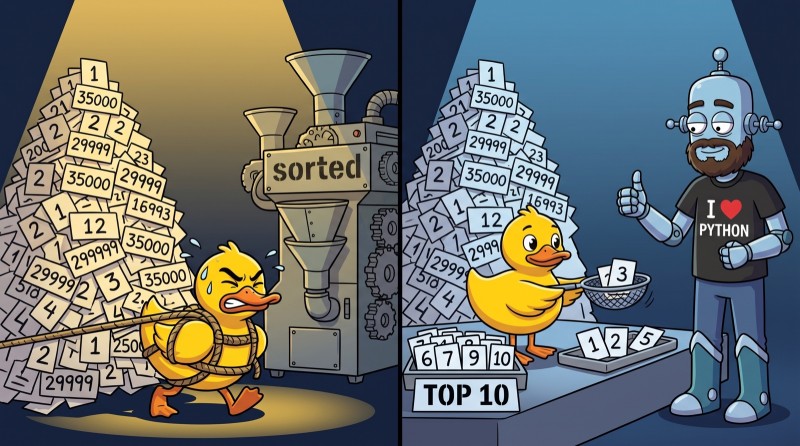
import heapq

top10 = heapq.nlargest(10, numbers)
cheapest = heapq.nsmallest(3, products, key=lambda p: p["price"])
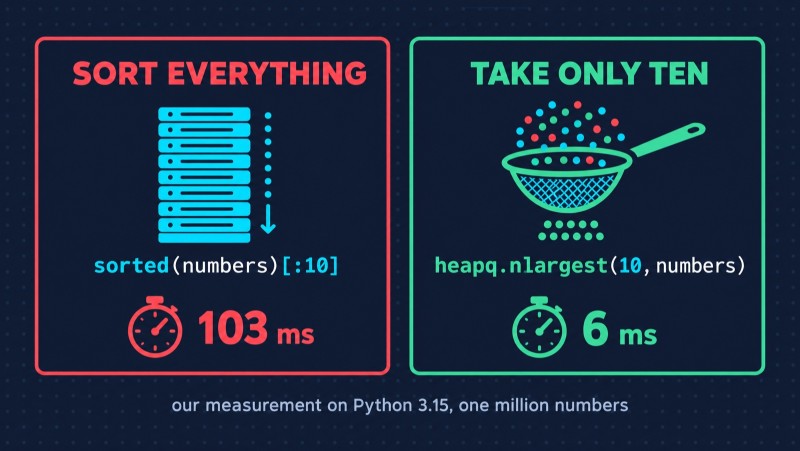
In our measurement on a list of a million numbers, heapq.nlargest(10, ...) was almost 18 times faster than sorted(...)[:10]: 6 milliseconds versus 103.
Sorting objects
If your data lives in objects, the key works the same way, just with attrgetter:
from dataclasses import dataclass
from operator import attrgetter

@dataclass
class Employee:
    name: str
    salary: int

staff = [Employee("Martha", 4200), Employee("Dennis", 2600)]
sorted(staff, key=attrgetter("salary"))
And if objects should always sort the same way, teach them to compare themselves: for a dataclass, @dataclass(order=True) is enough — comparison follows the fields in declaration order.
Five traps that break sorting
1. None in the list
sorted([3, None, 1])
# TypeError: '<' not supported between instances of 'NoneType' and 'int'
Python 3 can't compare None with numbers. The fix is a key that sends None to the end:
sorted([3, None, 1], key=lambda x: (x is None, x)) # [1, 3, None]2. Mixed types
sorted([3, "2", 1]) fails with the same error: you can't compare a string with a number. It usually means the data came in "dirty," say from a CSV. Convert to a single type before sorting, not inside it.
3. Numbers inside strings
files = ["file10.txt", "file2.txt", "file1.txt"]
sorted(files)  # ['file1.txt', 'file10.txt', 'file2.txt']
Strings are compared character by character, and the "1" in "10" is less than "2". To get the order a human expects — so-called natural sorting — split the string into text and numbers:
import re

def natural_key(s):
    return [int(part) if part.isdigit() else part.lower()
            for part in re.split(r"(\d+)", s)]

sorted(files, key=natural_key)  # ['file1.txt', 'file2.txt', 'file10.txt']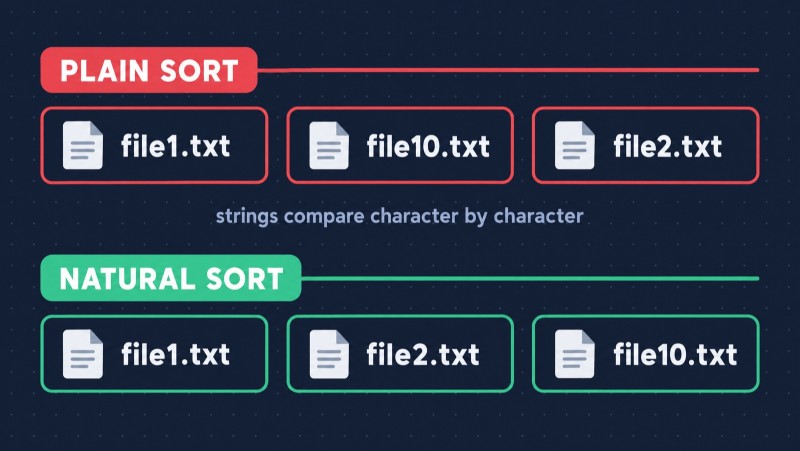
4. Accented letters
Here's a trap most tutorials skip — and it bites the moment your data contains real names:
sorted(["Zoe", "Émile", "adam"]) # ['Zoe', 'adam', 'Émile']Two problems at once. Zoe comes before adam because every uppercase letter comes before every lowercase one. And Émile lands dead last, after Z. Python compares strings by Unicode code points, and accented letters like "É" sit far beyond the plain A–Z range. key=str.casefold fixes the case problem — but Émile still ends up last.

To sort by the rules of a language, there's the locale module:
import locale

locale.setlocale(locale.LC_COLLATE, "en_US.UTF-8")
sorted(["Zoe", "Émile", "adam"], key=locale.strxfrm)  # ['adam', 'Émile', 'Zoe']
The catch: the result depends on which locales are installed on the system, and on Windows they're named differently. If you need human-friendly sorting in production, the PyICU library is more reliable — it behaves the same everywhere.
5. Assigning the result of sort
The bug from the very beginning. x = x.sort() is always None. Either call x.sort() on its own line or write x = sorted(x).
What's under the hood
Python's sort isn't a textbook bubble sort — it's a hybrid algorithm tuned for real-world data. From version 2.3 it was Timsort, and in Python 3.11 its merge policy was replaced with Powersort — more robust, with proven guarantees.

What matters in practice:
- Complexity is O(n log n) in the worst case.
- The sort is stable, and the documentation guarantees it. That's what the two-pass trick relies on.
- Nearly sorted data sorts very fast. The algorithm finds runs that are already in order and simply merges them. In our measurement, an already sorted list of a million numbers sorted about 9 times faster than a shuffled one.
We ran all measurements on Python 3.15.1 on an Apple Silicon laptop. Absolute numbers will differ on other hardware, but the ratios usually hold. Want to check on your machine? The timeit module and five lines of code are all you need.

Why bother, if AI writes the code?
Fair question. Ask any AI to sort a list of dictionaries by salary and you'll get working code in a second. But AI will just as confidently write data = data.sort(), ignore None values coming from the database, and put names with accents in the wrong place. The code will look right and pass a quick glance.
Only someone who understands how sorting works will catch that kind of bug. That's the difference between someone who uses AI and someone AI makes many times stronger: the tool accelerates whoever has the fundamentals.
Python fundamentals are built through practice, not reading. Our Python course on CodeGym has 52+ levels of tasks with instant checks plus dedicated levels on algorithms and data structures — where sorting is taken apart from the inside, not just "call sorted." If you're not sure where to start with Python as a whole, check out our Python Developer Roadmap 2026.
FAQ
What is the difference between sort() and sorted() in Python? sorted() is a built-in function: it takes any iterable and returns a new sorted list without changing the original data. list.sort() is a list method: it sorts the list in place and returns None.
Why does list.sort() return None? It's a deliberate design choice in Python: methods that modify an object in place return None so they aren't confused with functions that create a new object. That's why x = x.sort() stores None in the variable.
How do I sort a list in descending order in Python? Pass reverse=True: sorted(data, reverse=True) or data.sort(reverse=True).
How do I sort a dictionary by value in Python? Sort the pairs by their second element and build a new dictionary: dict(sorted(d.items(), key=lambda kv: kv[1])). Add reverse=True for descending order.
How do I sort a list of dictionaries by multiple keys? Pass key a function that returns a tuple: key=lambda e: (e["dept"], -e["salary"]). If a field can't be flipped with a minus, like a string, sort in two passes: first by the secondary field, then by the primary one — the sort's stability keeps the order.
What sorting algorithm does Python use? Up to and including version 3.10 — Timsort; since Python 3.11 — its improved variant, Powersort. Both are hybrid, stable, run in O(n log n), and are especially fast on partially ordered data.
GO TO FULL VERSION