1. Why arrays are needed
When you are just starting to program, it seems like you can create an infinite number of variables: score1, score2, score3… and everything will be fine. But reality quickly reminds you: a programmer is not an accountant with a calculator, and storing “a list of similar things” in dozens of separate variables is a path to chaos, mistakes, and sadness.
Imagine a task: store steps for a week, or grades for 10 quizzes, or temperature by day. If you do this with separate variables, you immediately run into three problems: it is inconvenient to iterate values with a loop, inconvenient to pass a “set” into functions, and inconvenient to extend the logic. We need a structure that keeps “many pieces of data with the same meaning” under one name. That structure is an array.
In programming it is very useful to look at things from different angles. When you see 7 values (for example, by day of week), you can think: “these are seven separate numbers”. Or you can think: “this is one dataset that has a size and elements”. An array is exactly what trains your brain to see collections of similar things everywhere.
Let’s imagine what a workout tracker would look like without arrays. It would be something like:
fun main() {
    val mon = 0
    val tue = 30
    val wed = 0
    val thu = 45
    val fri = 0
    val sat = 60
    val sun = 15

    println("Monday minutes = $mon") // Monday minutes = 0
}
Does it work? Yes. Is it convenient? Not really. And what if later you need to “loop over the days” and print all values? What if you need to find the maximum? What if you need to replace “7 days” with “30 days” (roughly)? This is where arrays start winning by a landslide.
What an array is
An array is a data structure that stores a fixed number of values of one type (or its subtypes). In Kotlin, arrays are the official tool for storing many values of the same kind and working with them as a single object. The most important word here is fixed: however many elements you set initially is how many you will have.

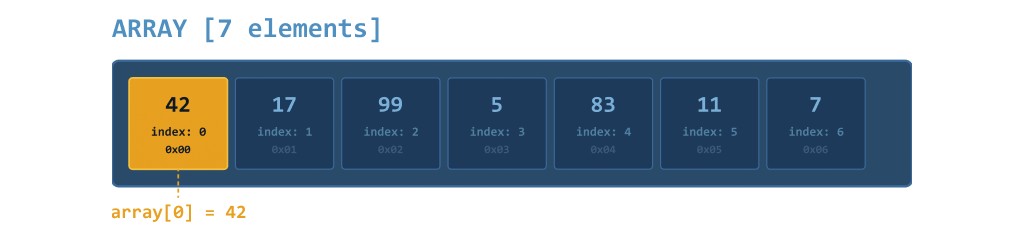
A handy real-life analogy: an array is a box with numbered cells. The box is manufactured in advance, and the number of cells does not change. You can rearrange the contents of cells, you can see what is inside a specific cell, you can go through all cells in order — but you cannot “insert another cell between 3 and 4”. The “box” does not support expansion.
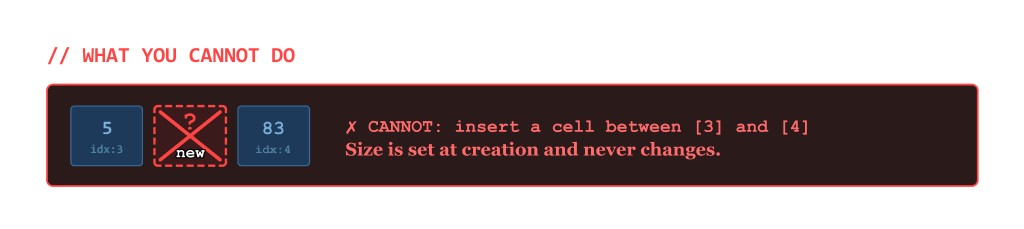
The word “fixed” is worth emphasizing again, because it is one of the most common sources of surprise. You cannot “extend” an array the way you extend a to-do list on paper: you add an item and that’s it. If an array has 7 elements, an “eighth” will not fit there. This is a fundamental property of arrays: the size is set at creation and does not change.
In practice, that means: if you suddenly need more space, you create a new array and copy the data. That may sound a bit scary, but later we will learn more convenient ways to do this. For today, it is enough to remember the rule: an array is a “fixed box”, not a “rubber bag”.
2. Types of arrays in Kotlin: Array and IntArray
In Kotlin there are two families of arrays that you should know right from the start:
- Array<T> — a generic array for objects (for example, String and any classes).
- primitive arrays (IntArray, DoubleArray, CharArray, etc.) — optimized for numbers/characters without extra overhead.
Array<T>: a generic array
The main “generic” array in Kotlin is Array<T>. It is suitable for storing objects: strings, any classes (and later, when you have your own types, those too). The element type is written in angle brackets: Array<String>, Array<Int>, Array<Char>.
The simplest way to create such an array is arrayOf(...): you list the elements, and Kotlin builds an array from them.
Example: an array of strings via arrayOf(...)
fun main() {
    val names: Array<String> = arrayOf("Ann", "Bob", "Cindy")
    println("names size = ${names.size}") // names size = 3
}
Here a new important property appears right away: size. This is the number of elements in the array. You will need it immediately, because all array bounds depend on its size.
Example: Kotlin often infers the type automatically
fun main() {
    val colors = arrayOf("red", "green", "blue")
    println("colors size = ${colors.size}") // colors size = 3
}
We did not write Array<String> — and it still worked correctly, because Kotlin inferred the type from the values. This is convenient, but at the beginning it is sometimes useful to write the type explicitly so your brain gets used to reading code “from left to right”.
Primitive arrays: IntArray, DoubleArray, CharArray
At this point, almost all beginners ask a reasonable question: “Why can’t we always use Array<T>? Why do we need additional things like IntArray, DoubleArray?”
The answer is: you can use Array<T>, but Kotlin specifically provides separate arrays for primitive types: IntArray, DoubleArray, CharArray, etc. The Java language, on which Kotlin was created, allows primitive types to be packed very compactly into arrays.
Elements in primitive arrays are packed more tightly than in Array<T>. Thanks to this optimization they take less memory and run faster. Just remember the rule: for integers in basic tasks, use IntArray, for Double — DoubleArray, for characters — CharArray. It makes code easier to read and reduces surprises. Kotlin explicitly highlights such “primitive arrays” as separate types.
Let’s compare “head-on”:
| What we store | Generic array | Primitive array |
|---|---|---|
| Strings | |
(no separate one) |
| Integers | |
|
| Floating-point | |
|
| Characters | |
|
Important: IntArray is not Array<Int>. They look similar in usage (there is size, you can iterate with a loop), but they are different types.
Example: an integer array via intArrayOf(...)
fun main() {
    val scores: IntArray = intArrayOf(10, 20, 30)
    println("scores size = ${scores.size}") // scores size = 3
}
4. Creating an array of the required size and default values
So far, we created arrays when we already knew the concrete elements. But in real tasks it is often the opposite: we know how many elements we need, and the values will appear later (for example, a user will enter 7 numbers, one per day of the week). For this, primitive arrays have a constructor of the form IntArray(size).
And here is an important point: the array will be filled with default values. For Int that is 0.
Example: create an array with 5 elements filled with zeros
fun main() {
    val zeros = IntArray(5)
    println("zeros size = ${zeros.size}") // zeros size = 5

    for (x in zeros) {
        print("$x ")
    }
    // 0 0 0 0 0
}
Pay attention to for (x in zeros): we iterate over the elements of the array “by values”. We are not working with indices yet (that will be the next lecture), but we can already see the contents.
5. Mini app: a weekly workout tracker
So that arrays are not “in a vacuum”, we will start assembling a small console application that we will develop further in the course. The idea is simple: we want to store workout data for a week. For now, without input, without editing, without statistics — just a structural draft. Yes, this is very similar to real development: first build a skeleton, then fill it with logic.
In the first version we will have:
- an array of day names (strings),
- an array of workout minutes for each day (integers),
- print how many days we have in the data to make sure the structure is assembled.
Example: data skeleton (days + minutes)
fun main() {
    val days: Array<String> = arrayOf("Mon", "Tue", "Wed", "Thu", "Fri", "Sat", "Sun")
    val minutes: IntArray = intArrayOf(0, 30, 0, 45, 0, 60, 15)

    println("Days count = ${days.size}")       // Days count = 7
    println("Minutes count = ${minutes.size}") // Minutes count = 7
}
For now it looks like “just two arrays”, but an important idea is already visible: data of the same nature should be stored together. We do not do monMinutes, tueMinutes, wedMinutes — we make one array minutes, where each position corresponds to a day of the week.
And one more important point: if you have two arrays that “run in parallel” (day and minutes), their sizes must match. Otherwise the logic will start breaking, and debugging will turn into an archaeological expedition through your code.
6. Common mistakes when working with arrays
Mistake 1: expecting the array to “expand by itself”.
Beginners sometimes think: “well, I can assign a[10] = 5, so the array will become larger”. No: the size is fixed, and trying to access out of bounds will cause a runtime error. Remember the mantra of the day: an array is a fixed-size box.
Mistake 2: mixing up Array<Int> and IntArray and being surprised that Kotlin does not accept one in place of the other.
These are different types. In basic tasks involving integers, choose IntArray: it is easier to read and there is less chance of getting confused. Kotlin describes primitive arrays separately as standalone classes.
Mistake 3: creating IntArray(n) and expecting “random values” or “emptiness”.
IntArray(n) is filled with zeros, because Kotlin guarantees a predictable initial state. This is convenient, but if you expected something else — be sure to do an explicit fill step (we will cover this in the next lectures).
Mistake 4: making an array out of “everything at once”, mixing types.
Arrays like order: one array — one type. If you feel like you “really want to mix”, most often that is a signal that the data should be stored differently (but that is not today’s topic). For now, stick to the simple rule: Array<String> for strings, IntArray for integers.
Mistake 5: forgetting to sanity-check the sizes of parallel arrays.
If you have two arrays that must be kept in sync (for example, days and minutes), they must have the same size. Otherwise later you will get “there is a day, but there are no minutes” — almost like a gym membership, but without the gym.

GO TO FULL VERSION