1. Introducao
Quando voce escreve seus primeiros programas, eles frequentemente lembram uma caixinha de musica: voce gira a manivela — e a mesma melodia toca. Isso e normal no inicio, mas logo voce vai querer que o programa reaja ao usuario ou aos dados de entrada da tarefa: “digite dois numeros — obtenha a soma”, “digite um nome — obtenha uma saudacao”.
Em Go (e na maioria das tarefas de estudo), o caminho principal e ler valores da entrada padrao (stdin) e escrever o resultado na saida padrao (stdout).
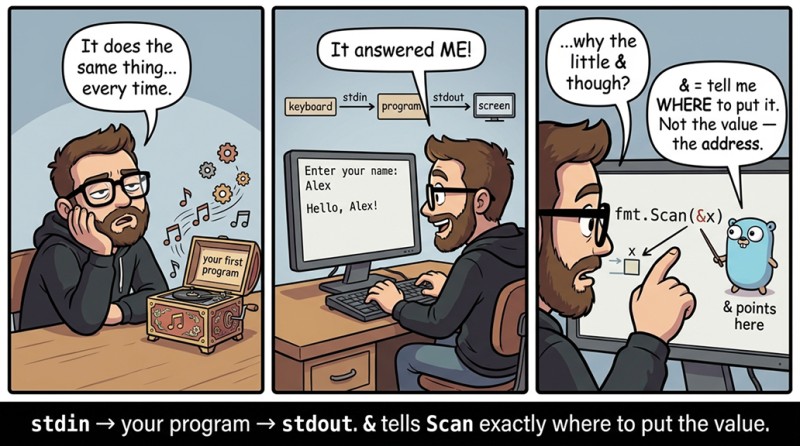
O objetivo principal desta lecture e tornar a entrada previsivel. Para que voce entenda exatamente quantos valores esta lendo, por que e colocado & antes da variavel e o que significam os dois resultados retornados por Scan/Fscan.
Como Scan ve a entrada: espacos e quebras de linha sao separadores
Quando voce olha para os dados de entrada com olhos humanos, voce ve “linha”, “paragrafo”, “quebra de linha”. Quando fmt.Scan olha para eles, nao ve “linhas”, mas uma sequencia de valores separados por espacos e quebras de linha.
Ou seja, para Scan normalmente nao faz muita diferenca se 10 20 estavam na mesma linha ou se 10 estava em uma linha e 20 na seguinte — continua sendo apenas dois valores.
flowchart LR
    A[stdin: '10  20 Bob'] --> B[fmt.Scan / fmt.Fscan]
    B --> C[token 1: 10]
    B --> D[token 2: 20]
    B --> E[token 3: Bob]
Para um iniciante, este e um modelo muito conveniente: voce sabe de antemao “preciso de 3 valores” — entao chama Scan de modo que ele tente ler exatamente 3 valores (ou faz varias chamadas).
fmt.Scan: lendo um valor
Vamos comecar com a versao mais tranquila: inserir um numero inteiro e imprimir o mesmo valor de volta. Este exercicio e util nao porque alguem precise de um “echo bot”, mas porque fixa a mecanica: a variavel precisa existir antes, e Scan precisa receber “onde escrever”.
package main

import "fmt"

func main() {
	var n int
	fmt.Scan(&n)
	fmt.Println(n) // if you entered 7, it will print: 7
}
Here two things are important.
First: we declared n in advance using var n int. Input does not create variables; it fills ones that already exist.
Second: we wrote fmt.Scan(&n), not fmt.Scan(n). And that & is the most common question at the very beginning of Go.
Important nuances about &x
If we explain it completely without pointer theory (and that is exactly what we will do), then &n can be read like this: “I am giving the function a place where it should write the answer”.
Imagine that a variable is a box with a label n. If you call fmt.Scan(n), it is as if you were saying: “Here is what is in the box right now.” But Scan does not need the current item from the box; it needs the ability to put a new item inside. So you pass not the contents of the box, but its “address”, that is, the box itself: &n.

A little more technically (but still in everyday terms): &n is the address of variable n in memory. Go does not let Scan return a value directly through parameters, so it writes into the variable via its address.
If you make a mistake and forget the &, the compiler will usually say something like: “cannot use n (variable of type int) as argument... expected pointer.” This is one of those cases where the compiler complains for a good reason: it is literally saying, “you did not give me the box; you gave me the number.”
Reading several values at once
A very typical task format: “given two integers a and b”. Then the input looks like a b (or on different lines), and it is convenient to read both at once:
package main

import "fmt"

func main() {
	var a, b int
	fmt.Scan(&a, &b)

	sum := a + b
	fmt.Println(sum) // if you entered 10 3, it will print: 13
}
Here Scan will try to read exactly two values: first into a, then into b. So the order of the variables must match the order of the values in the input.
If the input is 3 10, and you wrote fmt.Scan(&b, &a), the program will not “break” — it will honestly read 3 into b and 10 into a. Only your expectation of the result will break (and that can be even worse).
2. What does Scan return: (count, err)
Two results: how many were read and whether there was an error
Many Go functions return not one value, but two (or more). With fmt.Scan, it is exactly that case: it returns the number of successfully read values and an error if something went wrong.
Why was it designed this way in Go? Because in Go, errors are values that are handled explicitly: they can be returned, stored, printed, compared with nil. This approach is known as “errors are values”.
Let’s look at it directly, without clever handling: just read a number and print what Scan returned.
package main

import "fmt"

func main() {
	var x int
	count, err := fmt.Scan(&x)

	fmt.Println("count:", count) // e.g.: count: 1
	fmt.Println("err:", err)     // on success: err: <nil>
	fmt.Println("x:", x)         // if you entered 42, then: x: 42
}
How to read this.
count is how many values were actually recognized and written into variables. If you asked for one value, then with normal input count will be 1.
err is the error. If there is no error, err equals nil. This is an important detail: nil means “nothing there”, and in this case — “no error”.
Here we are not building a complex “what to do on error” flow yet (that will come later, when you get to conditionals), but even now it is useful to learn how to understand diagnostics and not be afraid of <nil>: <nil> is good news.
Why count is sometimes smaller than you expected
Sometimes you write fmt.Scan(&a, &b, &c), expecting three values, but the input only provides two. Or a word appears instead of a number. Then Scan cannot correctly fill all variables.
At that moment (usually) the following happens: count shows how many values were read successfully, and err becomes something other than nil (that is, some error appears).
Let’s simulate reading two numbers, but imagine that the input suddenly contained “10 kitten”.
package main

import "fmt"

func main() {
	var a, b int
	count, err := fmt.Scan(&a, &b)

	fmt.Println("count:", count) // probably: count: 1
	fmt.Println("err:", err)     // will not be <nil>, there will be an error description
	fmt.Println("a:", a)         // a: 10
	fmt.Println("b:", b)         // b: 0 (will remain the zero value)
}
Why did b become 0? Because b was declared (var b int), and int is zero by default, so if input could not write a new value — it stays “as it was”.
And once again, let me emphasize: you are not required to build “correct” error handling right now. But you can already understand the behavior: “part of the input was read, then an error occurred.”
Blank identifier _: when you do not want to store one of the results
Sometimes you do not need count. In most tasks of the form “input is guaranteed to be correct”, you really do not use count, because you expect everything to be read successfully.
In Go, it is customary to show explicitly: “I am consciously ignoring this result.” For that, there is a special name _ (underscore), called the blank identifier.
package main

import "fmt"

func main() {
	var n int
	_, err := fmt.Scan(&n)

	fmt.Println("err:", err) // on success: err: <nil>
	fmt.Println(n)           // e.g.: 5
}
Why is this useful even if you are not handling errors yet? Because the code becomes more honest: you do not pretend that count matters, and you do not create extra variables “just in case”.
3. Panic in Go
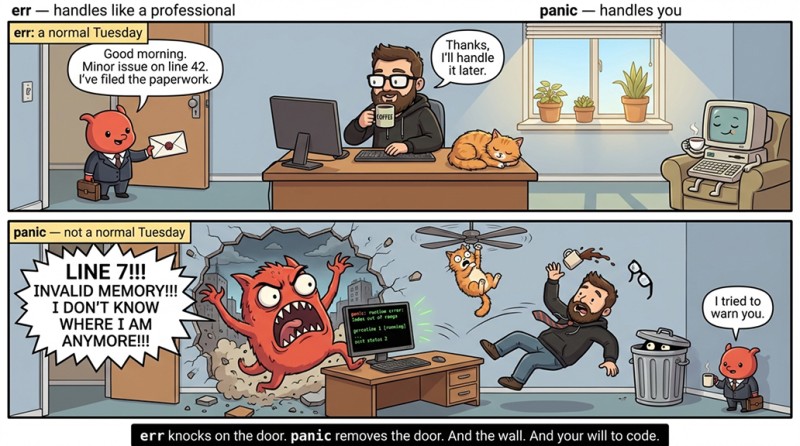
Sometimes a Go program does not “return an error” — it abruptly stops running. This is called panic.
Panic is a signal that says: “something went so wrong that continuing execution is dangerous or pointless.” Most often, panic happens because of bugs in the code or serious problems in the data.
Important not to confuse:
- err is an ordinary error; you can work with it: check it, print a message, return it upward.
- panic is a program crash: Go prints an error message, the place where it happened, and execution stops.
An example of a typical panic that beginners encounter fairly early:
package main
import "fmt"

func main() {
	x := 10
	y := 0
	fmt.Println(x / y) // panic: runtime error: integer divide by zero
}
If you are familiar with the concept of exceptions, then panic is similar to an exception, only used for severe failures.
So if the program suddenly crashed and you see the word panic, it almost always means a logic error (or incorrect assumptions about the data). But fmt.Scan usually does not panic — it returns err, so that you can handle the situation calmly.
4. fmt.Fscan: input with an explicit source os.Stdin
fmt.Scan is convenient because it reads from standard input “by itself”. But sometimes you need a bit more control: for example, you want to read not from stdin, but from another source (a file, a string, the network). Then fmt.Fscan is used, where the first thing is where to read from.
At our current level, it is enough to get acquainted with the simplest option: os.Stdin is the same standard input, just passed explicitly.
package main

import (
	"fmt"
	"os"
)

func main() {
	var a, b int
	fmt.Fscan(os.Stdin, &a, &b)

	fmt.Println(a * b) // if you entered 4 5, it will print: 20
}
From a practical point of view, in educational tasks Scan and Fscan(os.Stdin, ...) are often interchangeable. But the “idea” behind Fscan matters: an input function can read not only “from the console”, and in Go this is done by explicitly passing the source.
If you see fmt.Fscan(...) in someone else’s solution, do not be alarmed: it is the same Scan, just with the clarification “read from here”.
5. Mini-application: “Bill Calculator”
To reinforce input in the context of a normal program, let us continue our small educational project (let us call it calcbox). Before, it could only print and compute with pre-set values. Now it will read numbers from input and perform a calculation.
The scenario is simple: we enter a price and a quantity, and print the total cost. No percentages and no number strings — everything is integer-based, so we do not mix topics.
package main

import "fmt"

func main() {
	// read
	var price int
	var qty int
	fmt.Scan(&price, &qty)

	// compute
	total := price * qty

	// print
	fmt.Println(total) // if you entered 120 3, it will print: 360
}
Notice how naturally the rules from previous lectures fit here. Variables are declared in advance, input goes through &, computation is on a separate line, output is at the end. Even if the program is small, this order saves your brain from overheating.
If you want to add a debugging mode “see what was read”, you already know how to temporarily add printing of count and err, and then remove it.
6. Typical mistakes when reading input with fmt.Scan and fmt.Fscan
Mistake #1: forgot & before the variable.
This is the most common story. You write fmt.Scan(n) and expect n to be filled, but the compiler complains. The reason is simple: Scan needs somewhere to write the value, and without & you passed not a “place”, but the current contents. Think: “I am passing the box, not the item inside the box.”
Mistake #2: the variable was not declared before input.
Sometimes you want to write something like fmt.Scan(&x) without first having var x int. But a function cannot write into a “variable that does not exist.” First declare it, then scan. At the beginning, it is better to write a bit more verbosely, but without magic.
Mistake #3: the reading order is mixed up.
fmt.Scan(&a, &b) reads a first, then b. If the input order is different, the result will be “not the one you expected”, even though the program technically works. This is an unpleasant class of errors: the code compiles, runs, but the answer is wrong. It is fixed by paying attention to the input format and by using meaningful variable names.
Mistake #4: expected Scan to read the whole line together with spaces.
Scan reads tokens separated by spaces. If you enter "John Smith", then only "John" goes into the string through Scan. This is not a bug, it is a rule. Right now we are working with “words” and “numbers”, not with “full text lines”.
Mistake #5: ignore (count, err) and then spend a long time not understanding why the variable stayed zero.
Yes, for many tasks the input is guaranteed to be correct. But when you debug your code or accidentally enter the wrong thing, err is the only clue about what happened. The “errors are values” approach exists precisely so they can be seen and understood.

GO TO FULL VERSION