1. Operator if else
Programs would be of little use if they did the same thing regardless of how external circumstances change. A program needs to be able to adapt to different situations: do one set of actions in one case, and different actions in another.
In Kotlin this is implemented using a conditional operator — a special keyword that allows executing different blocks of commands depending on whether the condition is true.
A conditional operator consists of three parts: a condition, command 1, and command 2. If the condition is true, command 1 is executed; otherwise command 2 is executed. The commands are never executed at the same time. The general form of this operator is:
if (condition)
    command 1
else
command 2if-else
if means “if”, and else means “otherwise”. In plain language, it can be written like this:
If condition is true, then
   execute command1
otherwise
execute command2if-else in plain language
Examples:
// The following text will be printed: You are still a child

val age = 17
if (age < 18)
   println("你還是小孩")
else
   println("你已經是大人了")
// The following text will be printed: Warm

val temperature = 5
if (temperature < 0)
   println("外面很冷")
else
   println("很暖和")

// The following text will be printed: You can take the driving test

val age = 18
if (age == 18)
   println("可以去考駕照")
else
   println("可以開始存錢買車")
2. Command block
If, when a condition is met (or not met), you want your program to execute several commands, you can combine them into a command block.
To combine commands into a block, you “wrap” them in curly braces. Here is what it looks like in the general case:
{
   command1
   command2
   command3
}
There can be any number of commands in a block. Even zero.
Examples of combining the if-else operator with a command block:
// The following text will be printed: You are still a child. Don’t argue with adults

val age = 17
if (age < 18)
{
   println("你還是小孩")
   println("不要和大人頂嘴")
}
else
{
   println("你已經是大人了")
   println("年輕人真是的")
}
// The following text will be printed: Warm

val temperature = 5
if (temperature < 0)
{
   println("外面很冷")
   println("把帽子戴上")
}
else
   println("很暖和")
// An empty command block will be executed. Nothing will be printed.

val age = 21
if (age == 18)
   println("可以拿駕照")
else
{
}
3. Shortened syntax of the if operator
If there is no code in the else block, you can omit it. Then the if operator takes the form:
if (condition)
{
    command1
}if
Example:
val age = 19
if (age >= 18)
{
    println("你已成年!")
}
How does it work?
- If the condition is true, the code block is executed. If it is false, nothing happens — the program continues.
- The else block exists in the program, but it is empty (there are no commands between the curly braces). You can simply remove it: nothing changes in the program.
4. Combining conditions: else if
Sometimes you need to check not just “yes/no”, but choose from multiple options.
This is where the else if chain helps:
if (condition1)
{
    // Executed if condition1 is true
}
else if (condition2)
{
    // Executed if condition2 is true and condition1 is false
}
else
{
    // Executed if none of the above conditions matched
}
Example:
val hour = 13
if (hour < 12)
{
    println("早安!")
}
else if (hour < 18)
{
    println("午安!")
}
else
{
    println("晚安!")
}
What’s happening here?
- If the time is before 12 — it’s morning.
- If it’s from 12 to 18 — it’s daytime/afternoon.
- If it’s greater — it’s evening.
- The program chooses only ONE option! As soon as a condition matches, the rest are not even checked.
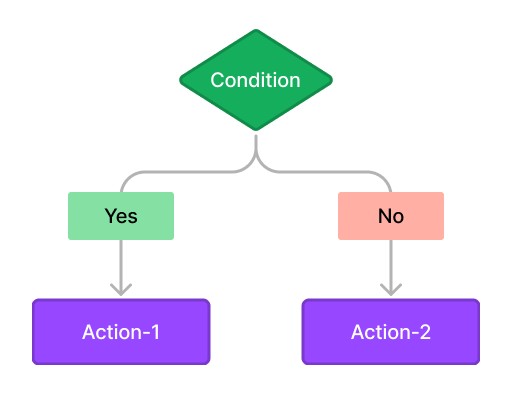
5. Schematic illustration: branching flowchart
Here is what it looks like as a flowchart:
And if there are multiple conditions:
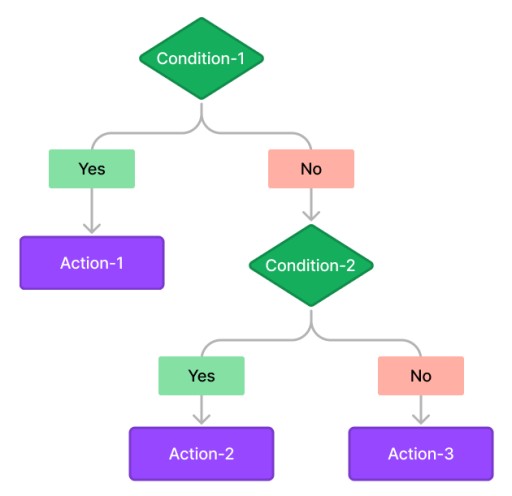
This strongly resembles crossroads in tabletop role-playing games: go left — one outcome, go right — another, go straight — yet something else!
6. What conditions can be checked?
Inside the parentheses after if there must be a BOOLEAN expression — the result is either “true” true or “false” false.
Main comparison operators:
| Operator | Meaning | Example |
|---|---|---|
|
Equal | |
|
Not equal | |
|
Greater than | |
|
Less than | |
|
Greater than or equal | |
|
Less than or equal | |
Examples of conditions:
if (number == 10)
if (age != 18)
if (temperature > 36)
if (balance <= 0)
Note: = (one sign) is assignment. == (two signs) is comparison. This is one of the most common mistakes among beginners! If you accidentally write:
if (x = 5) // ERROR!
— the compiler will complain, and it will be absolutely right.
7. Working with strings in conditions
Comparison using == in Kotlin compares values (content). Therefore, strings can be compared using == (unlike Java). At the same time, you need to be more careful with floating-point numbers (Double/Float): due to calculation inaccuracies, comparison via == can produce unexpected results.
We’ll talk more about the subtleties of string comparison later. And you can learn how to compare strings correctly from the example below:
val password = readln()
if (password == "qwerty")
{
    println("登入成功!")
}
8. Features and nuances:
Curly braces: needed or not?
If after if or else there is only one command, curly braces can be omitted:
if (age > 18)
    println("你超過 18 歲!")

// But it’s safer to ALWAYS write them:
if (age > 18)
{
    println("你超過 18 歲!")
}
Tip: always write braces. This protects you from a bunch of errors, especially when expanding code.
Logical errors: be careful with conditions!
If you write this:
if (age > 18)
    println("你超過 18 歲!")
    println("歡迎!")
Then the compiler will read this code as:
if (age > 18)
{
    println("你超過 18 歲!")
}

println("歡迎!")
The second line will always execute — braces are needed so that both lines are inside the “branch”.

GO TO FULL VERSION