1. What is Scrum?
You already understand that everything related to development is standardized. But what if I tell you that everything is actually standardized? And I’m not just talking about variable and function names, although those are also standardized 🤦♂️.
There’s a development methodology called Agile, and its popular implementation is Scrum. Scrum is also called a framework — it defines all the processes within a team. When meetings should happen, who needs to attend, what should be discussed, what results should be recorded, and in what format 📋.
"But why so much standardization," — you might ask. Well, first, you work in a high-tech sector — high-tech, all that. Second, it makes collaboration easier. And third, if you pay attention to the last word in your profession title — .NET Software Engineer — you’ll see it says engineer. And you’ll understand where the roots come from.

2. What does working with Scrum look like?
Scrum is an agile project management methodology, often used in software development. It’s based on iterative and incremental processes 🔁
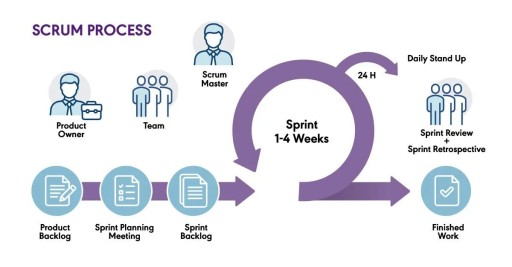
Scrum divides projects into cycles/stages called sprints, which usually last from two to four weeks. Each sprint begins with planning the tasks to be completed and ends with a presentation where the team demonstrates the achieved results 🎯.
Key elements of Scrum include roles, events, and artifacts.
- Main roles — are Product Owner, who defines the product requirements, Scrum Master, who supports the process according to Scrum rules, and development team, who does the work.
- Main events — are daily meetings (daily meetings or daily stand-ups), sprint planning, retrospectives, and demo sessions.
- Artifacts include the product backlog (list of tasks), sprint backlog, and product increment 📋.
Don’t be scared! Although regulating everything might seem a bit intimidating, working "by Scrum" is easy and enjoyable. Scrum has resolved the main conflict between developers and clients/product owners 🤗
Developers always wanted to be left alone to work peacefully. And product owners needed to urgently add new features, make changes, or run some experiments 🧪.
Scrum broke down development into stable periods — sprints (usually 2 weeks). During one period, developers only work on tasks planned for the current sprint. If the client needs something urgently, they add those features to the next sprint 🗓️.
3. Sprint & Scrum Board
Sprint — is the main development cycle in Scrum, lasting from one to four weeks. As mentioned earlier, during this period, the team works on completing a specific set of tasks from the product backlog.
At the start of each sprint, there is planning ⏳, where the team selects tasks from the product backlog and commits to completing them. The sprint ends with a demo of the completed work and a retrospective, where the team analyzes the sprint process and looks for ways to improve the next one. This approach allows for regular product updates and quick responses to changing requirements and priorities.
Throughout the current sprint, developers and the product owner should gather for a meeting to discuss tasks for the next sprint.
The Backlog 📚, or backlog, is a list of all tasks that need to be completed. In Scrum, there’s a product backlog, which includes all the requirements (features), and a sprint backlog, which consists of tasks selected for implementation in the current sprint. The backlog is a living document that is regularly updated and reviewed to ensure it aligns with current business goals and market conditions.
The backlog for the current sprint is often visualized on a Scrum Board ✅ — a task board with statuses. The board is divided into columns, usually representing stages like "To Do," "In Progress," "In Review," and "Done." This helps the entire team see progress and easily identify any bottlenecks in the workflow.
GO TO FULL VERSION