1. Variables and boxes
Variables are special things used for storing data. Any data. All data in Kotlin is stored using variables. In terms of meaning, a variable most of all resembles a box: the most ordinary box.
Suppose you wrote the number 13 on a piece of paper and put that sheet into a box. Now we can say that “the box stores the value 13”.

Each variable in Kotlin has three important properties: type, name, and value.
- Name is used to distinguish one variable from another. It’s like a label on the box.
- Type of a variable defines the type of values/data that can be stored in it. You store a cake in a cake box, shoes in a shoe box, etc.
- Value is some object, data, or information that is stored in a variable.
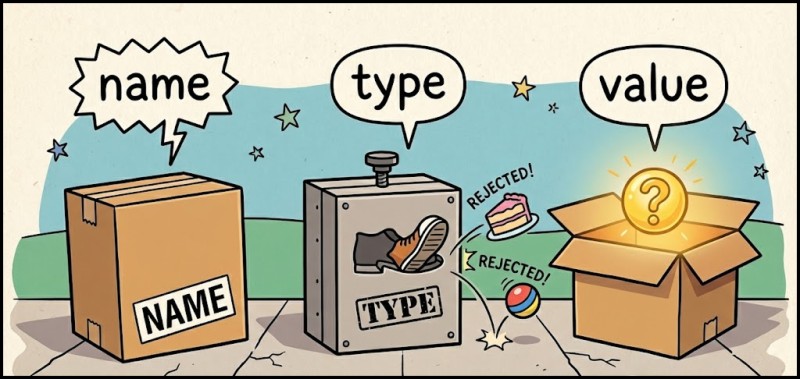
Every object in the Kotlin language has its own type. For example, there can be data types such as: integer, fractional number, text, Cat type, House type, etc.
Each variable (box) also has its own type. A variable can store only values of the same type as the variable itself. Different boxes are used to store different things: a candy box, a carton for a dozen eggs, and so on. Just like in real life.

2. Creating a variable
In Kotlin, to create a variable, you use a construct of the form:
var name: TypeWhere Type is the type of the variable (it matches the type of values the variable can store). And name is the variable name.
In Kotlin, there are two variants of variables:
- var — the variable can change
- val — the variable cannot change (a value can be assigned only once)
Examples:
| Creating a variable: first var/val, then name and type. | Description |
|---|---|
|
Create a variable named a of type Int. |
|
Create a variable named s of type String. |
|
Create a variable named c of type Double. |
The two most frequently used types are integers (denoted by the word Int) and text (denoted by the word String). The type Double is also popular — it is fractional (floating-point) numbers.
In Kotlin, you can often omit the type — it will be determined automatically from the initial value (we’ll cover this again later). But if a variable is created without a value, the type is usually specified explicitly.
3. Assignment
As mentioned above, a variable has a name, a type, and a value. We’ve already covered the name and type, but what about the value? How do you put a value into a variable?
To put a value into a variable, there is a special operation — the assignment operation. It copies the value from one variable to another. It doesn’t move it; it copies it. Like a file on disk. The assignment looks like this:
name = valueWhere name is the name of the variable, and value is the value that will be written into the variable. The value can be a literal value, the name of another variable, or even some expression using variables.
Examples:
var i: Int        // Variable i is created
var a: Int        // Variable a is created
var b: Int        // Variable b is created
var x: Int        // Variable x is created

i = 3             // The value 3 is written into variable i.

a = 1             // The value 1 is written into variable a.
b = a + 1         // The value 2 is written into variable b.

x = 3             // The value 3 is written into variable x.
x = x + 1         // On this line, the value of x is increased by 1; x is now equal to 4.
Equals sign
The assignment operation uses the equals sign =. This is not a comparison, not equality. It is a command to copy the value on the right side of the equals sign into the variable on the left.
For comparison in Kotlin, the double equals == is used (and there is also === — reference comparison).
4. Variable name: what’s allowed and what’s not
Here are some facts that will be useful to know when creating variables:
- A variable name can be anything (for example, temperature, score, userAge).
- But there are restrictions: it cannot start with a digit and cannot match reserved words in Kotlin (for example, you can’t name a variable if or class).
- It cannot contain special characters (for example #, +, quotation marks, etc.). Typically, names use letters, digits, and _.
- The difference between lowercase and uppercase letters matters in a name (Age and age are different variables).
- Typically, the camelCase style is used: the first letter is lowercase, then each word starts with an uppercase letter (userAge, maxScore).
Examples of allowed names:
val x123 = 1
var kitty: String
val PI = 3.14
val MAIN_PATH = "c:/"
Examples of forbidden names:
val 1first = 1          // the name cannot start with a digit
val number# = 25        // the # character cannot be used in a name
val name" = "John"      // quotation marks are not allowed in a name
val pi+e = 5.123        // the name cannot contain +
You’ll learn everything else in future lectures. And now a logic question: how many steps does it take to catch a cat in a box?
5. Cats and boxes

How to catch a cat:
- Take an empty box.
- Wait.
Just kidding 🙂
Well, maybe you can cram as many cats as you want into a box, but you can put only one value into a variable. And that’s what the next task will be about.

GO TO FULL VERSION