1. Memory organization
Every computer has RAM. What is it, what properties does it have, and—most importantly—what benefit do we get from it?
Every program (including programs written in Kotlin) is loaded into RAM before it runs. RAM contains the program code (executed by the processor) and the program data (placed into memory by the program itself).
So what is RAM, and what is it similar to?
Imagine Excel 😎 An Excel sheet consists of cells, and each cell has its unique number (A1, A2, ... B1, B2). Knowing the cell number, you can always write some value into it or read the value stored there. A computer’s memory is arranged in a similar way.
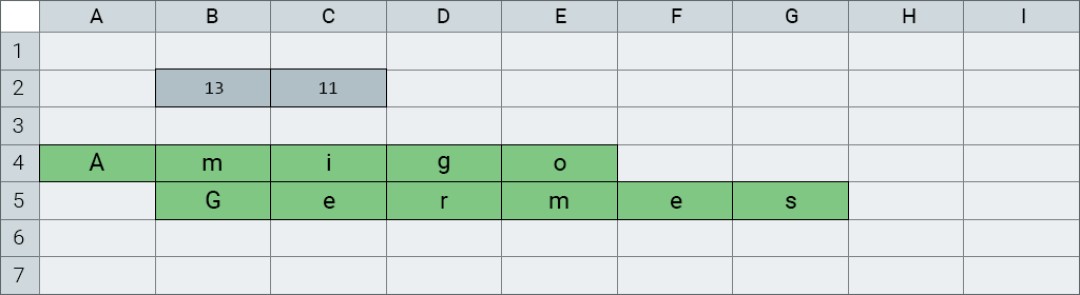
A program and its data are stored in memory while it runs. All computer memory is represented as small cells—bytes. Each cell has its unique number—0, 1, 2, 3, ... (numbering starts at zero). Knowing the cell number, we can store some data in that cell. Or retrieve it from there. Some cells store the program code—a set of commands for the processor; others store the program’s data. A cell number is also called a cell address.
The processor can execute commands from a program loaded into memory. Almost all CPU instructions are something like: take data from some cells → do something with it → put the result into other cells.

By combining hundreds of simple instructions, we get complex and useful behavior.
When a variable is declared in program code, it is allocated a chunk of still-unused memory. Usually this is several bytes. When declaring a variable, you must specify the type of information the program will store in it: numbers, text, or other data. Without knowing the type, it’s unclear what size block of memory needs to be allocated for the variable.
In the early days of the computer industry, programs worked directly with memory cell numbers, but later, for programmers’ convenience, cells started to be given names. A unique variable name is primarily for programmers’ convenience: at runtime, a program would handle numeric addresses just fine.
2. Variables in memory
In Kotlin, there are 4 main data types for storing integers. These are Byte, Short, Int, and Long.
| Type | Size, bytes | Name origin |
|---|---|---|
|
|
Byte, because it takes one byte of memory |
|
|
Short for Short Integer |
|
|
Short for Integer |
|
|
Short for Long Integer |
Also in Kotlin, there are 2 floating-point types—Float and Double:
| Type | Size, bytes | Name origin |
|---|---|---|
|
|
Short for Floating Point Number |
|
|
Short for Double Float |
Each time program execution reaches the instruction that creates a variable, it is allocated a small memory area (the size depends on the variable type).
The address of a variable is considered to be the address of the first cell of the memory block allocated for it.
Kotlin programs are not allowed to access memory directly. All work with memory happens only through the virtual machine (JVM).
3. The String type in memory
The String type can store large amounts of data, so it’s not just a data type but a full-fledged object.
The actual String data (text) is placed into a special object for which memory is allocated, and then the address of that object is stored in a variable, for which memory is also allocated.
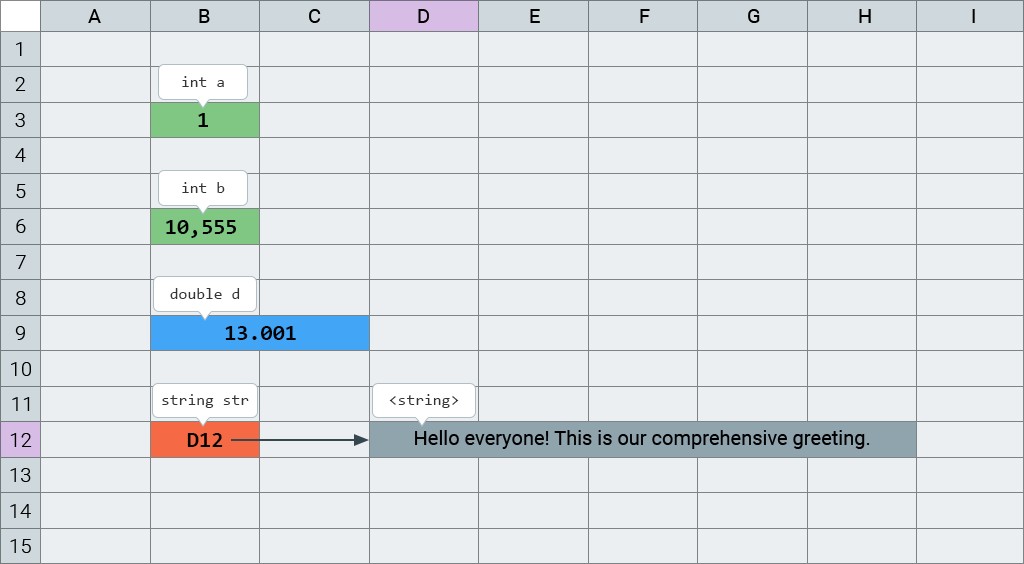
- The variable a of type Int takes 4 bytes and stores the value 1.
- The variable b of type Int takes 4 bytes and stores the value 10_555. In texts, numbers are sometimes written as 10,555, where the comma is not the fractional part but a thousands separator. In Kotlin code, you can use the _ character to separate digit groups. The fractional part is separated by a dot.
- The variable d of type Double takes 8 bytes and stores the value 13.001.
- The variable str of type String stores the value D12—the address of the first cell of the object that contains the text.
A String object (containing text) is stored as a separate memory block. The address of its first cell is stored in the variable str.
4. What happens when we assign
Another important thing is how assignment works. For example:
fun main() {
    val a = 10
    var b = a
    b = 20
    println(a) // 10
}
In this example, two cells are created in memory: one for a, one for b. When we write b = a, the value is copied (10), not the “box” itself. Changes in b do not affect a in any way.
Now similarly, but with strings:
fun main() {
    val s1 = "Hello"
    var s2 = s1
    s2 = s2 + " World"
    println(s1) // "Hello"
    println(s2) // "Hello World"
}
Here, both variables s1 and s2 refer to the same string "Hello" until the moment of change. But when we execute s2 = s2 + " World", a new string "Hello World" is created for s2, while s1 still points to the old string "Hello".
5. Why programming numbers everything from zero
People are very often surprised that in programming, almost everywhere it’s customary to count from zero. The reason is that there are many situations where counting from zero is more convenient (although there are also situations where it’s more convenient to count from 1).
I’ll try to come up with an analogy. Imagine you are standing in a long line at a store. Then the cashier says that all customers starting from the 20th should go to the second register. What numbers will they have? 20, 21, 22, 23, ... Makes sense. And relative to the 20th? 0, 1, 2, 3, ...
When we define a group as “the number of the first element” + “count”, then within the group the relative numbers are +0, +1, +2, ...
In programming it’s the same. If your variable was allocated 100 bytes of memory and you have X—the address of the first byte—then what will the addresses of all bytes be? X+0, X+1, X+2, ..., X+99. So we have a group of bytes with indices 0, 1, 2, 99.
When we think about a relative address within some data block, we always get numbering from zero. This is the first and most common reason for counting from zero.

GO TO FULL VERSION