1. Basic syntax of a nested if
In real life, you rarely encounter a situation where a decision is made based on only one criterion. Usually you have to check several conditions at once, and they often depend on each other. For example, to get into a concert, it’s not enough to simply be an adult — sometimes you also need to be on the guest list. That’s where so-called multi-level logic comes in, and nested if operators help us with that.
Nested conditions are when one if lives inside another. Imagine a box inside a box: if the first box opens (the condition is met), then we look at what’s inside and, possibly, open the second one. From the point of view of code and logic, this is a very powerful tool.
Let’s start simple:
if (conditionA)
{
    // actions if conditionA is true
    if (conditionB)
    {
        // actions if both conditions are true
    }
}if inside another
if
If this reminds you of a nesting doll, you’ve got it exactly right! The nested if inside the outer one will run only if the outer one has triggered.
Example: getting into a club

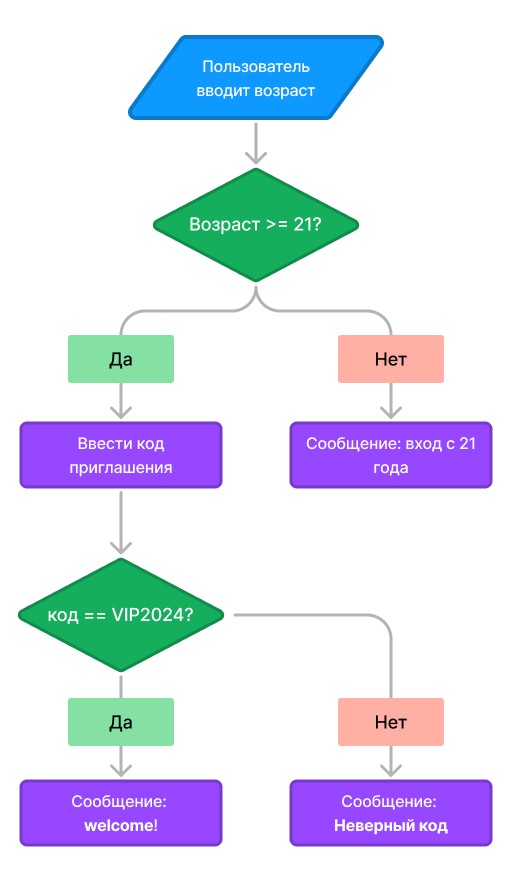
Let’s expand our learning app where the user previously entered their name and age. Now we’ll add a second level of checks: suppose that to get into a private club, you need to be older than 21 and have an invitation code.
fun main() {
    print("Enter your name: ")
    val name = readln()

    print("Enter your age: ")
    val age = readln().toInt()

    if (age >= 21) {
        print("Enter the invitation code: ")
        val code = readln()

        if (code == "VIP2026") {
            println("Welcome, $name, to the VIP club!")
        } else {
            println("Sorry, incorrect code. Access denied.")
        }
    } else {
        println("Sorry, entry is only allowed from age 21!")
    }
}
Note: the inner if checks the code only if the age has already passed validation. This saves resources (and doesn’t annoy the bouncer).
2. How many nesting levels are acceptable?
Technically — as many as you want. But in practice, the more nesting levels there are, the harder it is to read and maintain such code. In real projects, nesting deeper than 2–3 levels is rarely used. If you end up with “staircases” of 4 or more nested ifs, it’s worth thinking: maybe there’s a way to simplify the logic or move part of the validation into separate functions (and that’s a topic for another lecture!).
3. Nested if and else: pitfalls and nuances
Beginner mistake: sloppy formatting of curly braces.
When you write nested conditions, especially when using else, Kotlin strictly follows the syntax rules. If you don’t add curly braces {}, then only the first line after if or else belongs to it. This is a common source of annoying bugs.
Example with a potential mistake:
if (age >= 21)
    if (code == "VIP2026")
        println("Welcome!");
else
    println("Incorrect code.");
Many people expect else to relate to the age check, but in fact it relates to the nearest preceding if (the invitation code check). Because of this, messages may be shown differently than expected. It’s better to always use braces — even if there’s only one line inside!
To avoid confusion, I’ll show it again. The compiler interprets the code above like this:
if (age >= 21)
{
    if (code == "VIP2026")
       println("Welcome!");
else
    println("Incorrect code.");
}
Important! Again: If curly braces are not placed in an if-else construct, the else belongs to the previous (closest) if.
4. Alternatives: else if in nested conditions
Sometimes inside an outer if you want not only to check one additional condition, but also to provide an alternative. For example, if the invitation code doesn’t work, you can offer to buy a ticket. This is done with a nested else if/else construct:
fun main() {
    print("Enter your age: ")
    val age = readln().toInt()

    if (age >= 21) {
        print("Enter the invitation code: ")
        val code = readln()

        if (code == "VIP2026") {
            println("Welcome to the club!")
        } else if (code == "GUEST") {
            println("Guest mode: access only until 23:00.")
        } else {
            println("Unfortunately, access is not possible.")
        }
    } else {
        println("Entry is only allowed from age 21.")
    }
}
In this example, we made a nested choice among three scenarios: a VIP code, a guest code, and a rejection.
5. Practice: a discount calculator with multi-level logic
Let’s write an app like this: the user gets a store discount based on their age and whether they have a club card.
- If the user’s age is greater than or equal to 60 — the discount is 15%.
- If the age is lower, but the user has a club card — the discount is 7%.
- In all other cases, there is no discount.
How do we structure this?
fun main() {
    print("Enter your age: ")
    val age = readln().toInt()

    var discount = 0.0

    if (age >= 60) {
        discount = 0.15
    } else {
        print("Do you have a club card (yes/no)? ")
        val hasCard = readln()

        if (hasCard == "yes") {
            discount = 0.07
        }
    }

    println("Your discount: ${discount * 100}%")
}
Here we used a nested if inside the else branch. If the age didn’t qualify, only then do we ask about the card.

GO TO FULL VERSION