1. Logical data type: Boolean
As we have already seen, Kotlin has a very useful operator — if-else. It executes one block of commands if the condition in parentheses is true, and a second block of commands if the condition is false.
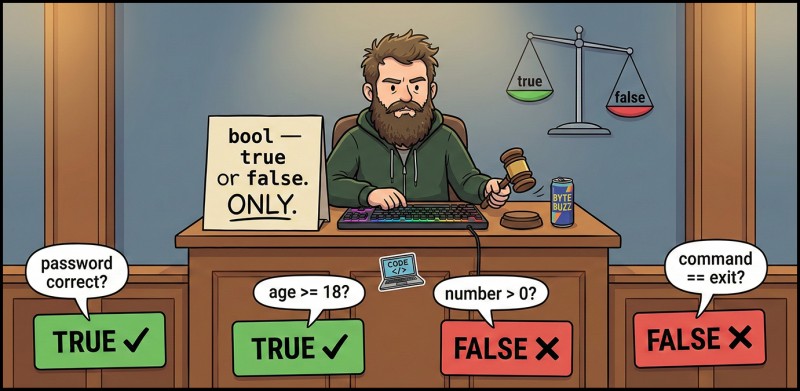
To make it convenient to work with expressions that can be true or false, Kotlin introduced a special type — Boolean. Its main feature is that variables of this type can take only two values: true (true) and false (false).
No other values can be assigned to variables of type Boolean. The compiler will not allow it.
Examples of Boolean variables:
val isAdult: Boolean = true
val hasMoney: Boolean = false
A Boolean variable has only two values — true (true) and false (false). That’s it! Almost like a successful test — either “passed” or “failed” (oops).
2. Comparison operations
So why do we need such a primitive type? The real power of Boolean shows up when we build logical expressions. Usually, they are created using comparison operators.
| Operator | Meaning | Example | Value |
|---|---|---|---|
|
Equal | |
true or false |
|
Not equal | |
true or false |
|
Greater than | |
true or false |
|
Less than | |
true or false |
|
Greater than or equal | |
true or false |
|
Less than or equal | |
true or false |
Example:
val age = 20
val isAdult = age >= 18               	// true (20 is greater than or equal to 18)
val isTeenager = age >= 13 && age < 18 	// false (20 is not less than 18)
val isEven = age % 2 == 0             	// true (20 is divisible by 2 with no remainder)
isAdult here will become true, because 20 really is an “adult” age.
Important point 1:
Operators that consist of two characters must not be split. That is, this code will not compile:

|
|---|
|
|
|
Important point 2:
Note that there are no => and =< operators: there are only <= and >=. If you write a =< 3, your code simply won’t compile.
Important point 3:
In Kotlin, you cannot write an expression like 18 < age < 65. Because the expression 18 < age will have the value true or false. And you can’t compare true < 65 (different types). At least, not in the Kotlin language.
3. Logical operations
In Kotlin, you cannot write the expression 18 < age < 65 — it will be syntactically incorrect and the program won’t compile.
But you can write it like this:
(18 < age) AND (age < 65)
Of course, instead of the word AND there will be a different logical operator, and now we’ll talk about them in more detail.
Kotlin has three logical operators: AND (and), OR (or), and NOT (not).
Good news: using parentheses, you can build logical expressions of any complexity.
Bad news: Kotlin developers decided to use C++-style symbols instead of the words and, or, and not.
Eyes on the screen:
| Logical operator | Expectation | Reality |
|---|---|---|
|
|
|
|
|
|
|
|
|
Here are a few examples of using logical operators in Kotlin:
| Expression | Spelled out | Explanation |
|---|---|---|
|
(0 < a) and (a < 100) | (0 < a) AND (a < 100) |
|
(not a) and (not b) | (NOT a) AND (NOT b) |
|
not((not a) or (not b)) | NOT((NOT a) OR (NOT b)) |
4. Truth tables
Let’s briefly go over logical operations.
AND operator
The AND operator, also known as AND, also known as &&, also known as conjunction, also known as logical multiplication.
| Expression | Result |
|---|---|
|
|
|
|
|
|
|
|
In other words, the result of the expression is true (true) only if both values participating in the expression are true (true). In all other cases it is always false (false).
OR operator
The OR operator, also known as OR, also known as ||, also known as disjunction, also known as logical addition.
| Expression | Result |
|---|---|
|
|
|
|
|
|
|
|
In other words, the result of the expression is true (true) whenever at least one value participating in the expression is true (true). If both are false, then the result is false.
NOT operator
The NOT operator, also known as NOT, also known as !, also known as inversion.
| Expression | Result |
|---|---|
|
|
|
|
Changes true to false and vice versa.
Useful expressions:
| Expression | Result |
|---|---|
|
|
|
|
|
|
|
|
5. Examples of logical operations: and, or, not
The “AND” operation, AND, is denoted by &&
The result is true only when both variables are true.
val age = 16
val hasTicket = true
val canAttend = age >= 14 && hasTicket // true (16 is greater than 14 AND there is a ticket)
If you are 14 AND you have a ticket — come on in!
The “OR” operation, OR, is denoted by (||)
The result is true if at least one condition is true.
val isAdmin = false
val isModerator = true
val canEdit = isAdmin || isModerator // true (you can edit if at least one of these is true)
If you’re an admin OR a moderator — please, press the buttons!
The “NOT” operation, NOT, is denoted by (!)
The inverter turns true into false and vice versa.
val isWeekend = false
val shouldGoToWork = !isWeekend // true (if it’s not the weekend, we work)
If it’s NOT the weekend — time to get up!
Combining: build conditions of any complexity
You can combine as many logical operations as you want (preferably without overdoing it, so you don’t end up with something like “if he is not NOT not NOT not an admin...” ). Parentheses can (and should!) be used for clarity.
Example:
val age = 17
val hasTicket = false
val isVip = true

val canGo = (age >= 18 && hasTicket) || isVip // true, because isVip = true
In this example, the logic is: if the person is an adult and has a ticket, or if they are VIP — let them in. If they are not VIP — only if they are an adult and have a ticket.
6. Short-circuiting
Now for one of the most practical ideas in this level. The logical operators && and || in Kotlin work in such a way that sometimes the second part of the condition is not evaluated at all. This is called short-circuiting (short-circuit).
It sounds like “an electrician’s problem”, but in practice it’s a super useful mechanism. It helps you write conditions safely: first we check “is it even possible to do the next check”, and only then do we perform potentially dangerous computations (for example, division). As a result, we avoid errors like “division by zero” — not because we catch the error (exceptions will come later), but because we prevent it.
How it works
For A && B:
- if A is already false, the overall result is definitely false;
- so B does not need to be evaluated at all.
For A || B:
- if A is already true, the overall result is definitely true;
- so B also does not need to be evaluated.
Mini diagram of evaluating && and ||
flowchart TD
    A[Evaluate the left side A] --> B{Which operator?}

    B -->|"&&"| C{"A == true?"}
    C -->|"no"| D[Result is false, do not evaluate B]
    C -->|"yes"| E[Evaluate the right side B, result = B]

    B -->|"||" | F{"A == true?"}
    F -->|"yes"| G[Result is true, do not evaluate B]
    F -->|"no"| H[Evaluate the right side B, result = B]
Short-circuiting in practice: protecting against division by zero
The most classic example that really saves beginners’ nerves: first check that the divisor is not zero, and only then divide.
Correct order: safety first, then math
fun main() {
    val x = 0

    if (x != 0 && (10 / x) > 1) {
        println("The quotient is greater than 1")
    } else {
        println("Either x = 0, or the quotient is not greater than 1") // Either x = 0, or the quotient is not greater than 1
    }
}
Here an important bit of “magic without magic” happens: when x == 0, the expression x != 0 evaluates to false, and Kotlin does not evaluate (10 / x) > 1. That means the division by zero does not happen at all.
Incorrect order: the dangerous part comes first
If you write it the other way around — division first, then checking x != 0 — short-circuiting won’t help anymore, because you have to “survive” long enough to reach it. The right side won’t save you if you broke on the left.

GO TO FULL VERSION