1. Introduction
Imagine you are writing a program that asks the user to enter their age. The user enters "abc". You say "invalid". And... what next? If you only have if, the program just reaches the end and terminates, leaving the user with a “fine then” feeling. Loops are needed for exactly this: to teach a program to repeat an action until the desired result is achieved—or while the condition is true.
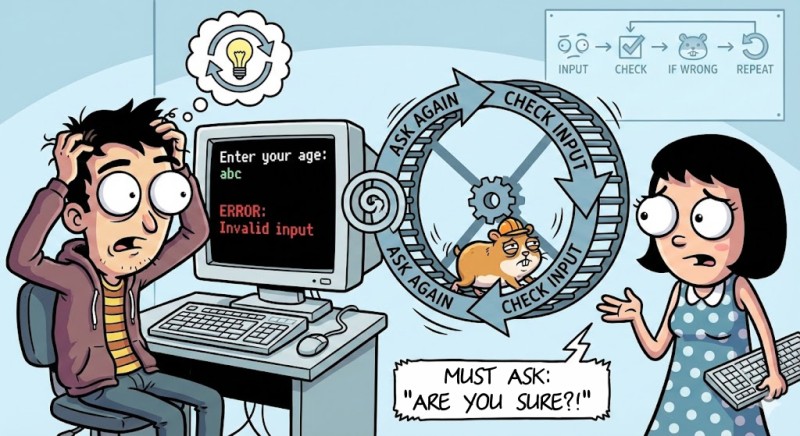
In real life, loops show up everywhere: repeated input, counting “from 1 to N,” accumulating a sum, gradually moving toward a goal. And yes, loops are the main tool with which you can accidentally create infinity (programmers sometimes like eternity too, but the compiler—not always).
2. while: syntax and mental model
The while loop reads very humanly: “while the condition is true—do it”. In Kotlin it looks like this:
while (condition) {
    // loop body
}The key feature: the condition is checked before entering the body. This means that if the condition is false right away, the body won’t execute even once—and that’s not a “bug,” it’s useful behavior. That’s exactly why while is ideal for “execute while it makes sense” situations.
while is like a bouncer at the entrance to a club: “Do you have a ticket?” (the condition). If you don’t, you won’t get in at all—not even for a single iteration.
A small flowchart to see the program’s movement with your own eyes:
flowchart TD
    A[Start] --> B{condition?}
    B -- no --> E[Exit the loop]
    B -- yes --> C[Loop body]
    C --> D[End of iteration]
    D --> B
And yes: Kotlin is Kotlin, but while here is absolutely classic, “like everywhere,” with no surprises. Even in the official imperative-style examples (where var and a loop are used) while looks exactly like this.
3. while patterns
Counter: three required parts
When beginners see a loop, the first thought is often: “Oh, repetition! Now I’ll repeat something... and it’ll stop by itself.” It won’t. The loop needs help.
A classic counter loop has three parts, and they are almost always visible right in the code:
- an initial value (before the loop),
- a continuation condition (in while (...)),
- changing a variable so the condition eventually becomes false (inside the body).

The simplest example—print numbers from 1 to 5:
fun main() {
    var i = 1

    while (i <= 5) {
        println("i = $i") // i = 1, then 2, 3, 4, 5
        i = i + 1
    }
}
Note: the variable i is declared as var because we change it. If it were val, the compiler would fairly say: “you promised not to change it.”
Now an example with a boundary where the body might not run even once. This is a very important “honesty check” for your understanding:
fun main() {
    var i = 10

    while (i <= 5) {
        println("This will not be printed")
        i = i + 1
    }

    println("The loop did not run even once") // The loop did not run even once
}
The condition i <= 5 is immediately false, so we never entered the loop. Sometimes that’s exactly what you need: for example, “repeat while there are errors,” and there may be no errors from the start.
Accumulation: sum and maximum
The while loop is useful not only for printing “steps,” but also for accumulating a result. A typical scenario: “there are several numbers, we need to calculate the sum.” While we don’t yet have arrays and lists, we practice on a fixed number of values or on “enter N times.”
Let’s start very small: the sum from 1 to 3.
fun main() {
    var sum = 0
    var i = 1

    while (i <= 3) {
        sum = sum + i
        i = i + 1
    }

    println("sum = $sum") // sum = 6
}
Here the roles of the variables are very clear: i is the “step,” sum is the “accumulator.” When you mix roles (for example, use one variable as both counter and sum), the code starts to look like a joke that’s only funny to the author.
Another useful pattern is finding the maximum among several entered values. Yes, later we’ll do this much more conveniently, but right now we care about the “compare and update” logic.
Suppose we want to process 3 numbers (we assume the input is valid so it doesn’t distract from the topic):
fun main() {
    var max: Int? = null
    var count = 0

    while (count < 3) {
        print("Enter a number: ")
        val n = readln().trim().toInt()

        if (max == null || n > max) max = n
        count = count + 1
    }

    println("max = $max") // for example: max = 42
}
Here max is nullable (Int?) because there is no “maximum” before the first input. This is a good example that nullable types are not only for “scary null topics,” but sometimes just an honest way to say: “the value will appear later.”
Infinite loop: why it happens and how to spot it

Time to talk about the main pastime of a beginner programmer: “I ran the program and it froze.” In reality it often didn’t freeze—it just found the meaning of life and now repeats the same thing forever.
The reason for an infinite loop is almost always the same: the condition does not become false. Either you forgot to change a variable, or you change the wrong one, or you change it “in the wrong direction.”
The most classic mistake:
fun main() {
    var i = 1
    while (i <= 5) {
        println("i = $i")
        // forgot i = i + 1
    }
}
Here i is always 1, the condition is always true, and the program will print "i = 1" until you (or your operating system) say, “enough.”
An even more devious version—you update the variable, but in a way that the condition will never become false:
fun main() {
    var i = 1
    while (i <= 5) {
        println("i = $i")
        i = i - 1
    }
}
i goes to 0, -1, -2... and the condition i <= 5 remains true forever.
The practical “anti-infinity” rule sounds boring, but it works reliably: after writing while, visually find in the body the line that affects the condition. If you don’t find one, you almost certainly have a perpetual motion machine.
4. Repeated input and validation
Counters are great, but one of the most practical reasons to love while is robust input. The user can enter spaces, an empty string, “forty-two” in letters, and even "42.0" (while you wanted an Int). And if you use toInt(), the program may crash. That’s why for the “repeat input until a valid value” scenario we use the combo trim() + toIntOrNull().
readln() reads the entire line, and toIntOrNull() returns either a number or null if the string is not a number. This fits perfectly with while.
Example: ask for an age (an integer from 0 to 130) and repeat until we get a normal result.
fun main() {
    var age: Int? = null

    while (age == null) {
        print("Enter age (0..130): ")
        val raw = readln().trim()
        val parsed = raw.toIntOrNull()

        if (parsed != null && parsed in 0..130) {
            age = parsed
        } else {
            println("Invalid input. Please try again.")
        }
    }

    println("Age accepted: $age") // for example: Age accepted: 25
}
Why this is convenient:
- We don’t “crash” on bad input—because we don’t use toInt() directly.
- The loop condition is very readable: “while the age has not been obtained.”
- Inside the loop it’s clearly visible what makes the input valid: the number must parse and fall within the range.
Notice an important detail: checking parsed in 0..130 is only possible if parsed != null. That’s why we write parsed != null && ... This is a continuation of the same logic you already used in conditions with && and ||.
5. Mini app: BudgetBuddy v0
Now let’s assemble a small, cohesive scenario that will look like a “real program,” not a set of scattered examples. Let it be BudgetBuddy v0: a mini helper that asks you to enter three expenses and calculates the total. The main focus is the while loop and resilience to invalid input without break/continue (we haven’t covered them yet).
The idea is: we need exactly 3 valid numbers. If the user enters nonsense, we don’t advance the counter and we ask again. This is a very important technique: the counter increments only on success.
fun main() {
    var sum = 0
    var entered = 0

    while (entered < 3) {
        print("Enter expense #${entered + 1} (integer >= 0): ")
        val raw = readln().trim()
        val value = raw.toIntOrNull()

        if (value != null && value >= 0) {
            sum = sum + value
            entered = entered + 1
        } else {
            println("Invalid. Must be an integer >= 0.")
        }
    }

    println("Sum of 3 expenses = $sum") // for example: Sum of 3 expenses = 1200
}
Notice how neatly the roles are distributed:
entered is responsible only for how many valid expenses we have accepted. If the input is bad, entered does not change, and we stay at the same “expense number.” This is “repeated input” in real life, without duplicating code.
And one more readability detail: "№${entered + 1}" is a string template you already know. It makes the prompt friendly: the user understands they are entering “expense #2,” not just some abstract numbers into the void.
6. Common mistakes when working with while
Mistake #1: you forgot to change the variable the condition depends on.
The most common cause of an infinite loop is that the variable in the condition (i, entered, age) remains unchanged. A useful habit: right after writing while (...), visually find in the body the line that will eventually make the condition false. If there is no such line, the loop is most likely infinite.
Mistake #2: you update “in the wrong direction,” and the condition will never become false.
Sometimes there is an update, but the logic is wrong: for example, in a loop while (i <= 5) you do i = i - 1. Formally the program “changes something,” but semantically it moves toward a region where the condition stays true forever. When you notice the value “running away” from the boundary, stop and check the sign of the change.
Mistake #3: you mixed the roles of variables, and the loop became unclear.
If with one variable you count steps, store the sum, and also try to keep the “last input,” the code becomes hard to read and easy to break. A good beginner style is “one variable = one role”: separate counter, separate accumulator, separate parsed value.
Mistake #4: you use toInt() in an input loop and get program crashes.
toInt() is good when you are confident in the input format. But in “user input” tasks, you usually aren’t. So for repeated input it’s better to use toIntOrNull() and a null check, as we did above: that way the program does not crash and can politely ask to repeat the input.
Mistake #5: you compare or check a range for a value that can be null.
A typical situation: val x = raw.toIntOrNull() and then an attempt to do if (x >= 0). The Kotlin compiler won’t allow this (and it will be right), because x can be null. The correct order of thinking is: first “not null?”, then “does it fit the range?”. This is especially important in loops, because an error in validation often turns into endless repetition or an inability to accept correct input.

GO TO FULL VERSION