1. Introduction
Sometimes it seems that while is a “universal loop”, and you can stop there. But in real programs (even the simplest console ones) you often encounter a scenario where an action must happen at least once. For example, we have to ask the user for a command or a number at least once—otherwise we simply have no data to check anything against.
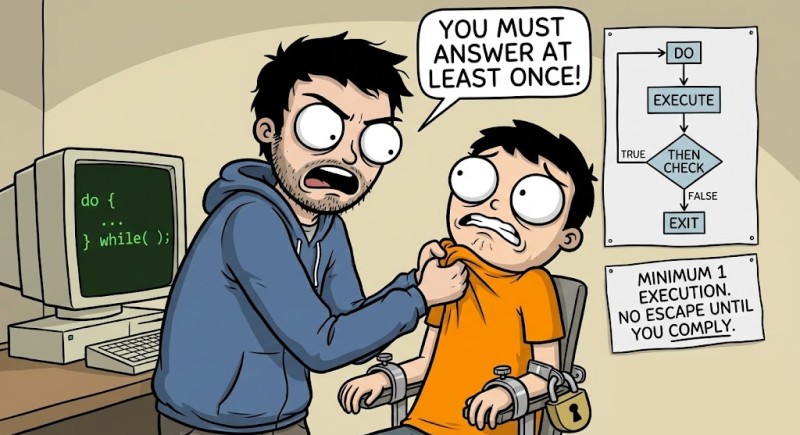
And this is where while starts forcing you into an “awkward ritual”: first perform the action once before the loop, and then repeat the same action inside the loop. It’s not fatal, but it’s annoying—like when you check twice whether you locked the door, and still doubt it both times.
do-while exists precisely for these cases: “execute the body at least once, and only then check the condition”.
From Kotlin’s point of view: in while the condition is checked before the body, while in do-while it is checked after the body, so the do-while body runs at least once.
do-while syntax and a “human” mental model
When you first see do-while, it looks a bit unusual: the condition is not on top but at the bottom. But the logic is very simple: first we take a step, then we ask ourselves, “again?”
Syntax:
do {
    // loop body
} while (condition)
This literally reads like a sentence: “Do { … } and repeat while condition is true.”
It’s important to remember one rule that later saves you from confusion: in do-while, the condition controls repeating the next iteration, not allowing the first one. The first iteration always happens—because “do it first” has already occurred.
2. while and do-while on the same task
It’s very useful to see the difference not “in theory”, but on the same exact scenario. Let’s take this task: the user must enter the word "exit" to finish. We must ask at least once.
while version with duplication
fun main() {
    print("Enter a command (exit to quit): ")
    var cmd = readln().trim().lowercase()

    while (cmd != "exit") {
        print("Enter a command (exit to quit): ")
        cmd = readln().trim().lowercase()
    }

    println("Exiting.") // Exiting.
}
This code works, but notice: the line with print(...) and the line that reads readln() appear twice. Beginners sometimes say, “So what.” And then the day comes when you change the prompt text and forget to change it in one place. And the program starts behaving as if it has a split personality.

do-while version without duplicates
fun main() {
    var cmd: String
    do {
        print("Enter a command (exit to quit): ")
        cmd = readln().trim().lowercase()
    } while (cmd != "exit")

    println("Exiting.") // Exiting.
}
Same meaning, but the “duplication ritual” is gone. That’s the main practical benefit of do-while.
3. Re-entering a number without duplication
Now we’ll do exactly what do-while is especially loved for in console programs: resilient input “until the user enters it correctly”.
Suppose we need a number from 1 to 5. The user can type anything: 3, " 3 ", "three", an empty string, 999. Our program should stay calm and simply repeat the prompt.
Here we use a familiar pattern: toIntOrNull() gives an Int?, meaning either a number or null.
Input a number in the 1..5 range via do-while
fun main() {
    var number: Int? = null

    do {
        print("Enter an integer from 1 to 5: ")
        val raw = readln().trim()
        val parsed = raw.toIntOrNull()

        number = if (parsed != null && parsed in 1..5) parsed else null
        if (number == null) println("Invalid input.") // Invalid input.
    } while (number == null)

    println("Accepted: $number") // Accepted: 4
}
There’s an important idea here that makes the code readable: the variable number stores the “accepted” value. Until it’s accepted, it’s null. The loop repeats while number == null.
4. Scope in do-while
When you write do-while, a perfectly normal question comes up: “Where do I declare the variable that I check in the condition?” Answer: so that it’s visible both in the body and in the while (...) condition.
That’s why this pattern is extremely common:
fun main() {
    var cmd: String
    do {
        cmd = readln().trim()
    } while (cmd != "exit")
}
If you declare val cmd inside the do { ... } block, then outside (in while (cmd != ...)) it won’t be visible anymore—and the compiler will say “I don’t know that name”. This isn’t Kotlin being picky; it’s a basic scope rule: a name lives inside the block where it’s declared.
To reinforce it, here’s an example of “what not to do” (it won’t compile):
fun main() {
    do {
        val cmd = readln().trim()
    } while (cmd != "exit") // Error: cmd is not visible here
}
5. Useful nuances of do-while
Mini diagram: how do-while executes step by step
To get less confused, it helps to keep a small execution diagram in mind. Imagine we have a loop that re-asks for a number (while number == null).
        flowchart TD
        A["START"] --> B["do { ... } executes (at least once)"]
        B --> C{"while (...) condition?"}
        C -->|true| B
        C -->|false| D["loop finished"]
        D --> E["END"]
Compare this to while: there the check happens before the body, so a “0 iterations” scenario is possible. With do-while it’s not possible: the first iteration always happens.
How to write a readable condition
It’s easy to turn do-while into a monster if you write, in while (...), a condition made of five checks with parentheses, &&, ||, and attempts to “fit everything into one line”. At this point it’s useful to remember: readability is part of correctness.
If the condition becomes heavy, it’s simpler to do this: inside the loop body, compute “accepted / not accepted” into a separate variable, and then use that variable in while.
Here’s an example of the same “age” scenario, but a bit more “conversational”:
fun main() {
    var age: Int? = null

    do {
        print("Age (0..120): ")
        val parsed = readln().trim().toIntOrNull()

        val ok = parsed != null && parsed in 0..120
        age = if (ok) parsed else null

        if (!ok) println("Enter an integer from 0 to 120.")
    } while (age == null)

    println("Age accepted: $age") // Age accepted: 42
}
The code got one line longer, but it’s easier on the brain.
Micro walk-through by iterations: what happens to the variables
Sometimes it’s useful to “run” the loop in your head, as if you were debugging the program manually. Let’s take the age input and assume the user entered: "abc", then "-5", then "30".
Inside the body, on each iteration it looks roughly like this:
| Iteration | raw | parsed | age after assignment | Condition age == null |
|---|---|---|---|---|
| 1 | |
|
|
true (repeat) |
| 2 | |
|
|
true (repeat) |
| 3 | |
|
|
false (exit) |
So do-while is doing a very clear job here: “try to accept a value until it works.”
6. Questionnaire v0.4: name and age
So the examples don’t feel like a set of disconnected snippets, let’s evolve one mini-application. Let it be a “questionnaire”: the user enters a name and an age. We won’t make functions (except main) and we won’t use arrays—everything at the level of the current day.
The idea is: the name must not be empty (after trim()), and the age must be an integer from 0 to 120. We want to bother the user as little as possible, but still not accept junk.
Step 1: reliable name input
fun main() {
    var name: String

    do {
        print("Enter your name: ")
        name = readln().trim()
        if (name.isEmpty()) println("Name must not be empty.") // Name must not be empty.
    } while (name.isEmpty())

    println("Hello, $name!") // Hello, Anna!
}
Note: here we don’t have null, because readln() always returns a string. It’s enough to check isEmpty() after trim().
Step 2: reliable age input
Now let’s add age. Here we use Int?, because toIntOrNull() may return null.
fun main() {
    var name: String
    do {
        print("Enter your name: ")
        name = readln().trim()
        if (name.isEmpty()) println("Name must not be empty.")
    } while (name.isEmpty())

    var age: Int? = null
    do {
        print("Enter your age (0..120): ")
        val raw = readln().trim()
        val parsed = raw.toIntOrNull()

        age = if (parsed != null && parsed in 0..120) parsed else null
        if (age == null) println("Age was entered incorrectly.") // Age was entered incorrectly.
    } while (age == null)

    println("User: $name, age: $age") // User: Anna, age: 25
}
Technically, we could store age as an Int and keep a separate “valid/invalid” flag, but at this stage Int? often ends up simpler: null = “not accepted yet”.
7. Common mistakes when working with do-while
Mistake #1: expecting the loop to run zero times.
That’s a habit from while. In do-while, the body runs at least once always, even if the condition is initially “false”. So do-while is not suitable for situations where the action might not be needed at all. If “0 iterations is fine” matters, while is often a better fit.
Mistake #2: declaring a variable inside do {}, then using it in while (...).
This is a classic scope issue. If a variable is declared inside a block, it’s not visible outside, and the condition won’t compile. Almost always, you declare the variable used in the condition before the loop so it’s available in both places.
Mistake #3: using toInt() instead of toIntOrNull() in a re-entry scenario.
With input like "abc", toInt() will terminate the program with an exception, but in learning scenarios we want the opposite—politely say “invalid” and repeat. For resilient input, toIntOrNull() is better because it turns non-numeric input into null.
Mistake #4: forgetting to normalize a string (trim()) before checks.
A user can easily enter " exit " or " 25 ". Without trim(), such values often won’t match what you expect, and the program will stubbornly act as if the user is wrong, even though they just added spaces. This is especially noticeable with commands ("exit") and numbers.
Mistake #5: making the while (...) condition too complex and losing the meaning.
If you write a half-screen expression at the bottom of the loop, you’re almost guaranteed to mess up parentheses or logic at some point. At this level it’s better to compute “accepted / not accepted” inside the body into a separate val ok, and then control repetition with a clear check like while (!ok) or while (age == null).
Mistake #6: mixing different roles in one variable.
For example, trying to store the “raw input string”, the “number”, and “whether the value was accepted” all in one var x. That creates confusion, and then bugs that are hard to explain even to yourself. Better: raw for the string, parsed for the parse result, and a separate variable for the accepted value (age) or for a flag (ok).

GO TO FULL VERSION