1. Introduction
When you first learned while and for, you might get the feeling: “Well, that’s it—now I can repeat anything as many times as I want (and sometimes even accidentally forever).” But in real programs, there are almost always moments when repetition needs to be stopped earlier, or наоборот — skipped for a specific step, because it is “bad” or “doesn’t fit.” And that’s where break and continue appear: they help make code shorter and more honest in meaning, but if you’re careless, they turn a loop into a mini-labyrinth.
Kotlin supports the traditional break and continue operators for loops. That is, this is not a “hack,” not magic, but a normal part of the language that is important to understand just as confidently as if/else.
Imagine a loop as a line at a coffee shop: iterations are people. Sometimes someone says “I changed my mind”— and the line ends (that’s break). And sometimes a person just steps aside “to get their wallet” and skips being served on this step, but the line continues (that’s continue). The only important thing to remember: these commands act inside the nearest loop, and they don’t teleport execution “somewhere,” but to strictly defined places.
A small diagram of what happens in a loop if we have both continue and break:
flowchart TD
    A[Start of iteration] --> B{Is the loop condition true?}
    B -- no --> Z[Exit the loop]
    B -- yes --> C[Loop body]
    C --> D{Need to skip?}
    D -- yes --> E[continue]
    E --> A
    D -- no --> F{Need to exit?}
    F -- yes --> G[break]
    G --> Z
    F -- no --> A
2. break: how to end a loop early
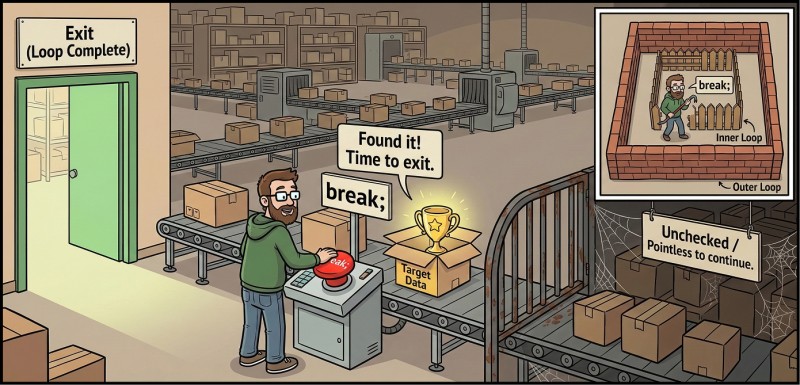
break is the command “exit the loop right now.” It is useful when further iterations don’t make sense: you have already found what you were looking for, received an “exit” command, encountered a “stop value,” or discovered a state in which you cannot continue. The key is understanding that break stops the current loop and passes control to the line after it. This is not “exit the program,” but specifically exiting one particular loop.
In Kotlin, break works in while, in do-while, and in for. It is always the same in effect: it instantly terminates the nearest loop. From a readability standpoint, break is most often good if the exit point is logically clear: “input finished,” “found,” “further is pointless.” If break is scattered through the code like confetti, the reader’s brain starts to get sad.
break in the “input until the end signal” scenario
In console programs, input is very often done “until a signal”: the user enters numbers, and the number 0 means “finish.” It’s like the “Stop” button on a microwave: it doesn’t matter how long you planned to heat, if you’ve already taken out the plate.

fun main() {
    var sum = 0

    while (true) {
        print("Enter a number (0 — end): ")
        val n = readln().trim().toIntOrNull()

        if (n == null) {
            println("That is not a number, try again.")
            continue
        }
        if (n == 0) break

        sum += n
    }

    println("Sum = $sum") // for example: Sum = 17
}
Here we use the while (true) + break style as a perfectly normal technique: the termination condition (entering 0) is more convenient to check inside, because it depends on what the user entered. This reads honestly: “we spin forever until someone tells us to stop.” But an infinite loop is acceptable only when the break point is obvious and not hidden behind five levels of conditions.
break in for: “found it—exit”
Sometimes for iterates over a range, and we need to stop at the first suitable value. For example: find the first number from 1 to 50 that is divisible by 7 and by 5 (that is, by 35). Sure, we could write a formula, but we’re practicing loops, not prophetic abilities.
fun main() {
    var found = -1

    for (x in 1..50) {
        if (x % 7 == 0 && x % 5 == 0) {
            found = x
            break
        }
    }

    println("Found: $found") // Found: 35
}
Notice the technique with found = -1. This is a “default value” that means “not found.” We don’t yet know null-safety as a separate topic (that will be later), so for beginners this approach is often simpler: choose a value that does not occur in a normal result.
Why break should not be hidden
A very common problem is to write break so that it’s hard to notice. Technically, the code will work, but it will be unpleasant to read—like a 40-page contract in tiny print.
The bad habit looks roughly like this: inside the loop there are many branches, and break sits somewhere deep. To avoid this, try to put exit checks “closer to the start of the iteration,” especially if they are related to input data. This makes it easier for your brain: first you check “are we continuing?”, then you do useful work.
3. continue: how to skip the current iteration
continue is the command “end the current iteration right now and move on to the next one.” That is, the loop does not end, but the remaining part of the body does not execute. If you imagine an iteration as a mini-script, then continue is “skip this episode, move to the next.”
Kotlin, like many languages, supports continue in loops. In practice, continue is especially useful when you want to make a “filter”: some values are processed, others are skipped. This often makes the code shorter because it removes unnecessary nested if.
continue as a filter in for

Suppose we want to print only odd numbers from 1 to 10. We can write the condition “if it’s odd—print,” or we can invert the logic: “if it’s even—skip.”
fun main() {
    for (i in 1..10) {
        if (i % 2 == 0) continue
        println(i) // 1 3 5 7 9 (each on a new line)
    }
}
Why is this form sometimes more convenient? Because after continue you can write the “main” logic without an extra else. It’s like a bouncer at the entrance: “you don’t fit—keep walking,” and inside the club there’s a normal party (that is, the main code).
continue in while: be careful, you can create an infinite loop
In for, the step happens automatically, but while relies on your discipline: you must change the state so that the loop ends at some point. And it is exactly here that continue can “shoot you in the foot,” because it easily jumps over important lines, including updating the counter.
Look at the example: we want to print numbers 1..5, but skip 3. If you write it naively, you can accidentally get an infinite loop that hangs on 3.
Incorrect version (shown as an anti-example—don’t do this):
fun main() {
    var i = 1
    while (i <= 5) {
        if (i == 3) continue
        println("i = $i")
        i = i + 1
    }
}
What happened here? When i == 3, continue triggers, and the line i = i + 1 is skipped. That means i stays 3 forever, and the loop never ends. This is that moment when the computer becomes an overly literal friend: you said “continue,” and it continues… forever.
The correct version is to update i before continue (or restructure the code so that the update always happens):
fun main() {
    var i = 1
    while (i <= 5) {
        if (i == 3) {
            i = i + 1
            continue
        }
        println("i = $i")
        i = i + 1
    }
}
Yes, it looks a bit longer, but the logic is correct: the state that the while condition depends on always changes.
4. break and continue: together, without hurting the reader
Mini-scenario “number piggy bank”
Now we’ll assemble a small coherent scenario that looks like a real console program rather than a set of separate fragments. We’ll make a “piggy bank”: the user enters numbers (for example, “how many coins were added”), and the program accumulates a sum. Input will end with the command number 0. We will ignore invalid lines and negative values, but we won’t terminate the program—we’ll just ask the user to enter again.
Here it is natural to have continue for “bad input” and break for “the end.”
fun main() {
    var total = 0

    while (true) {
        print("Enter an amount (integer >= 0, 0 — finish): ")
        val raw = readln().trim()
        val value = raw.toIntOrNull()

        if (value == null) {
            println("Doesn’t look like an integer.")
            continue
        }
        if (value < 0) {
            println("We don’t accept negative values. We’re saving up, not getting sad.")
            continue
        }
        if (value == 0) break

        total += value
        println("Current total in the piggy bank: $total") // for example: Current total in the piggy bank: 15
    }

    println("Done. Total: $total") // for example: Done. Total: 15
}
Note an important detail: the order of checks here is not accidental. First we figure out whether it’s a number at all (toIntOrNull()), then we check the range (is it non-negative), then we check the “stop value” (0), and only after that do we do useful work (add to total). This order makes the code more predictable and therefore easier to debug.
How to keep code readable with break and continue
At this stage of learning, there is one very typical temptation: “Oh, now I can jump around inside the loop! Let’s add a couple more continue, one more break, and one more if, and we’ll get… uhh… what will we get.” With break/continue, it’s important to remember a simple readability rule: if you can’t quickly explain out loud why the loop can end, and in which cases an iteration is skipped, then it’s time to simplify the code.
Since we are not using user-defined functions yet (that will be later), simplification is usually done in three ways. First, by moving intermediate values into clear variables (raw, value, isValid). Second, by placing “guard checks” at the beginning of the iteration: everything that leads to continue or break, try to put higher up. Third, by being careful with while (true): it is good when the meaning “loop until the exit command” is clearly readable, but bad when break is hidden far away and is not obvious.
There’s one more nuance that will be useful in the next lecture about nested loops: break and continue without additional means apply to the nearest loop. We won’t go deep into this today, but it’s important to at least remember that “exiting two loops with one break” does not happen by default— and that’s normal.
5. Common mistakes when working with break and continue
Mistake No. 1: mixing up the roles of break and continue.
Beginners sometimes expect continue to “exit the loop,” but it only skips the current iteration and moves to the next one. As a result, the program “keeps spinning,” even though the person wanted to stop. If you need to end the loop entirely, use break. If you only need to not execute the remaining code in the iteration, use continue.
Mistake No. 2: continue in while jumps over the state update.
This is the classic infinite-loop issue: the counter or other state is updated at the end of the body, but on some branches there is continue, which skips the update. The loop “hangs” on the same value and cannot reach the termination condition. The cure is discipline: the variable that participates in the while condition must be guaranteed to change so that at some point the condition becomes false—even on branches with continue.
Mistake No. 3: while (true) without a clearly readable break.
An infinite loop is not evil by itself, but it must be honest: the exit point should be quickly visible, usually in the upper part of the body. If break is hidden deep in branching, a person (and you two days later) stops understanding how the loop ends at all. In such situations, it is better either to rewrite the condition in the while (...) header, or to restructure the checks so that break is obvious.
Mistake No. 4: too many “jumps” in one loop.
When a loop has three continue and two break, the code starts to resemble the game “guess where you’ll end up in a second.” Formally it can be correct, but it’s hard to read and maintain. Usually, reordering checks to the start of the iteration and simplifying conditions helps: less nesting, more direct meaning.
Mistake No. 5: using toInt() instead of toIntOrNull() in an input loop.
If you do input in a loop, the user is almost guaranteed to enter something wrong at some point: a space, an empty string, “five,” “12.3,” “-”. toInt() in such a place leads to a crash, meaning your loop won’t even have time to “politely ask again.” For robust input, use toIntOrNull(), and handle invalid input via continue so the loop simply asks the user to enter again.

GO TO FULL VERSION