1. How Double is represented and the precision problem
When you first see that 0.1 + 0.2 suddenly is not equal to 0.3, it is tempting to suspect a conspiracy: the compiler, the CPU, a cat walking across the keyboard. In reality, everything is simpler (and more boring): the computer stores Double in a format where many “nice” decimal fractions are represented not perfectly, but by the closest available value.
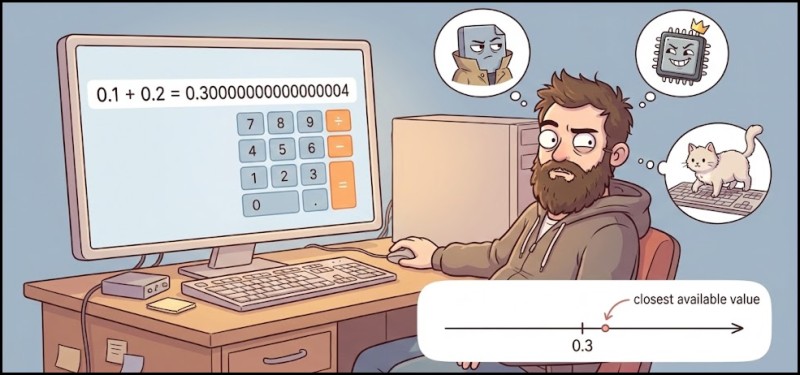
This is like a real-life situation: you measure a table with a tape measure, but the markings are only down to a millimeter. If the table length is actually 1000.0004 mm, you will still write down 1000 mm or 1001 mm. You are not lying—you are simply limited by the tool. With Double, it is the same: the tool works in binary, and some decimal fractions do not fit neatly into it.
Why == is a trap for Double
If numbers are approximate, then the result of computations can also be approximate. And here the main problem appears: the == operator checks strict equality, meaning “every digit matched,” not “close enough.” For integers (Int), that is usually what you want. For Double, it often is not.
For Float/Double comparisons, Kotlin follows the IEEE 754 standard rules rather than its own. This implies special behavior for NaN, zeros, infinities, and comparisons.
Let’s look at the classic example that has produced more memes than “the programmer forgot a semicolon again.”
fun main() {
    val x = 0.1 + 0.2
    println("x = $x")                  // x = 0.30000000000000004 (for example)
    println("x == 0.3 -> ${x == 0.3}")  // x == 0.3 -> false (for example)
}
The “(for example)” note matters here: the exact output may vary slightly, but the idea is the same—the number ends up very close to 0.3, but it is not required to become exactly 0.3.
2. Epsilon comparison: “almost equal”
The basic idea of epsilon comparison
When you compare floating-point results, most of the time you do not need a bit-for-bit match. You need “the difference is so small that we consider the numbers the same.” This “acceptable error” is called epsilon (often written as eps). The logic is: two numbers are almost equal if the absolute value of their difference is less than eps.
Technically, we use abs (absolute value) so the difference is positive (because we care about the distance between the numbers, not which one is larger).

fun main() {
    val x = 0.1 + 0.2
    val eps = 1e-9

    val almostEqual = kotlin.math.abs(x - 0.3) < eps
    println("almostEqual = $almostEqual") // almostEqual = true (usually)
}
This idea—“we compare not equality but closeness”—is your main lifeline throughout working with fractional numbers.
A small diagram (not because you cannot understand without it, but because diagrams sometimes save the brain from overheating):
flowchart TD
    A["There are two Doubles: a and b"] --> B["Compute the difference: d = abs(a - b)"]
    B --> C["Compare with tolerance eps"]
    C -->|d < eps| D["Consider: almost equal"]
    C -->|d >= eps| E["Consider: noticeably different"]
How to choose eps so it does not become magic
At this point, a beginner usually has a reasonable question: “Why 1e-9? Can I use 1e-3? Can I use 0.5 to make it definitely work?” You can do anything—but the correct eps depends on the meaning of the task and the scale of the numbers.
If you are comparing results like 0.3, 1e-9 is a decent starting point for Double in learning exercises. But if you are working with numbers on the order of a million, an absolute tolerance of 1e-9 becomes absurdly strict: you are demanding “nanometer-level” precision when measuring the length of a football field.
Sometimes a “combined rule” is used: the tolerance depends on the scale of the numbers. The idea is simple: compare abs(a - b) not just with eps, but with eps * max(abs(a), abs(b), 1.0). This is still not “higher math,” but it already looks like adult life.
fun main() {
    val a = 1_000_000.0 + 0.1
    val b = 1_000_000.0 + 0.10000000005

    val eps = 1e-9
    val scale = maxOf(kotlin.math.abs(a), kotlin.math.abs(b), 1.0)
    val almostEqual = kotlin.math.abs(a - b) < eps * scale

    println("almostEqual = $almostEqual") // almostEqual = true (usually)
}
In this lecture, the key thing to remember is not the formula “by heart,” but the idea: eps is an agreement about precision, not a magic number.
3. Special values: NaN and Infinity
NaN: “not a number” that breaks checks
Now for special effects. In the world of Double, there are values that look like numbers, live in a variable of type Double, but do not behave like “normal numbers.” The most famous is NaN (Not a Number, “not a number”).
It appears when the result of an arithmetic operation is mathematically “undefined.” The simplest example is 0.0 / 0.0.
fun main() {
    val nan = 0.0 / 0.0
    println("nan = $nan")                    // nan = NaN
    println("nan == nan -> ${nan == nan}")   // nan == nan -> false
    println("nan.isNaN() -> ${nan.isNaN()}") // nan.isNaN() -> true
}
Important point: NaN cannot be checked with ==, even against itself. The correct check is x.isNaN().
Kotlin nuance: comparison via Any
Kotlin has a subtlety: when the operands of a comparison are not statically typed as Double/Float (for example, hidden inside Any), the comparison may behave differently: in that mode, NaN may turn out to be equal to itself. Kotlin explicitly describes that for “non-floating-typed” operands, a structural semantics applies that differs from IEEE 754, and among the differences it mentions that NaN equals itself.
This does not mean Kotlin “broke”—it means that in practice it is better not to hide a Double inside Any if you want predictable arithmetic semantics.
Infinity: infinity as a value, not an error
In the integer world, division by zero is almost guaranteed to be an error and crash the program. In the world of Double, you often get not an error, but a special value: Infinity (infinity). For example, 1.0 / 0.0 produces positive infinity.
fun main() {
    val inf = 1.0 / 0.0
    val negInf = -1.0 / 0.0

    println("inf = $inf")                              // inf = Infinity
    println("negInf = $negInf")                        // negInf = -Infinity
    println("inf.isInfinite() -> ${inf.isInfinite()}") // true
}
This value can be compared with numbers, and it really does behave like “very large.” But infinity has its own “chemistry”: some expressions turn it into NaN.
fun main() {
    val inf = 1.0 / 0.0
    val nan = inf - inf

    println("inf - inf = $nan")              // inf - inf = NaN
    println("nan.isNaN() = ${nan.isNaN()}")  // true
}
4. Practice: a mini speedometer and protection from NaN/Infinity
So this does not remain abstract philosophy about fractions, let’s write a small console helper application. Let it be a “Mini speedometer”: the user enters distance (in meters) and time (in seconds), and the program computes the average speed in m/s.
We will intentionally keep the input as integers (Int), because parsing a Double from a string is a separate topic and we are not going into it now. But we will show how to neatly get a Double result and how to check it for NaN/Infinity.
Why “just divide” will not work
If you do distance / time as Int / Int, you will get an Int, and the fractional part will be lost. So we will force the expression to become floating-point by adding 1.0 * ... (this is a simple hack: once a Double participates in the expression, the result becomes a Double).
fun main() {
    print("Enter distance (meters): ")
    val distance = readln().toInt()

    print("Enter time (seconds): ")
    val time = readln().toInt()

    val speed = 1.0 * distance / time
    println("speed = $speed m/s") // example: speed = 2.5 m/s
}
Note: there is already a potential problem here—if time equals zero, we will get Infinity or NaN, not a “normal speed.” And this is not a compiler error: it is an honest result of floating-point arithmetic.
Checking the result for NaN and Infinity
Now let’s add a simple variation: if the speed is not a normal finite number, we output a message about it. We use the isNaN() and isInfinite() methods—these are basic tools that exist specifically for such cases.
fun main() {
    print("Distance (m): ")
    val distance = readln().toInt()

    print("Time (s): ")
    val time = readln().toInt()

    val speed = 1.0 * distance / time

    if (speed.isNaN() || speed.isInfinite()) {
        println("Cannot compute speed: check time (zero?)") // example
    } else {
        println("Average speed: $speed m/s")
    }
}
Comparing to a reference: “is the speed almost 10 m/s?”
Now let’s add a small element of “control logic”: suppose we want to check that the speed is approximately equal to 10.0 (for example, for a test or a demonstration). Writing speed == 10.0 is bad practice. Instead, we use epsilon comparison.
fun main() {
    val speed = 0.1 + 9.9
    val eps = 1e-9

    val ok = kotlin.math.abs(speed - 10.0) < eps
    println("speed = $speed")     // speed = 10.0 (or very close)
    println("ok = $ok")           // ok = true
}
The example is, of course, far from real life, but the point is different: in real formulas (especially with lots of divisions and multiplications), error pops up unexpectedly, and epsilon comparison makes checks stable.
5. Common mistakes
Mistake No. 1: comparing computation results of Double using ==, as if it were Int.
Such a comparison is easily broken by completely “ordinary” expressions where everything is perfect in math, but a micro-error appears in the computer. If you are comparing precisely the result of computations, use the “almost equal” approach: abs(a - b) < eps.
Mistake No. 2: choosing eps randomly and then believing it like absolute truth.
Too large an eps turns the comparison into a farce: almost everything is “equal.” Too small an eps brings you back to the strict == problem, only in a more disguised form. eps must match the meaning of the task and the scale of the numbers, not the programmer’s mood at 2 a.m.
Mistake No. 3: trying to check NaN using == or using “weird” comparisons (x > 0, x < 0).
NaN is a special value, and comparisons with it do not behave the way you would expect from normal numbers. In correct code, the check must be explicit: x.isNaN(). It is also useful to remember that the comparison rules for NaN depend on whether the operands are statically Double/Float or not—Kotlin describes this separately.
Mistake No. 4: assuming that division by zero in Double “must crash with an error.”
In floating-point arithmetic, division by zero often yields Infinity, and 0.0 / 0.0 yields NaN. If you write formulas where the denominator can become zero, you must either validate the inputs in advance, or at least check the result with isInfinite()/isNaN() and not continue calculations as if everything were fine.
Mistake No. 5: hiding Double inside Any (or mixing types so the compiler loses the “floating-point context”), and then being surprised by == behavior.
This is a rarer problem at the beginner level, but it happens even to experienced developers when data passes through “universal” containers. Kotlin separately emphasizes that comparisons involving NaN and some other cases can behave differently if the operands are not statically Double/Float.

GO TO FULL VERSION