1. The [] operator: reading and writing
Now let’s move on to the whole point of the exercise: how to get an element from an array and how to write one back. In Kotlin, the [] operator is the standard way to access array elements: a[i] reads a value, and a[i] = ... writes a new one.
Let’s start with the smallest possible example: read, change, read again.
fun main() {
    val steps = intArrayOf(3000, 5000, 4500)

    println(steps[0])      // 3000
    steps[0] = 7000
    println(steps[0])      // 7000
}
Two things are important to notice here.
First, arrays are mutable: their elements can be changed even if the array variable is declared as val. val forbids reassigning the array reference itself, but it does not forbid changing the contents of the “box.” This is normal behavior: “the box is the same, the items inside have changed.”
Second, the assignment steps[0] = 7000 works only if the index is valid. If the index is invalid, the program will crash at runtime.
2. Indexes and zero-based numbering
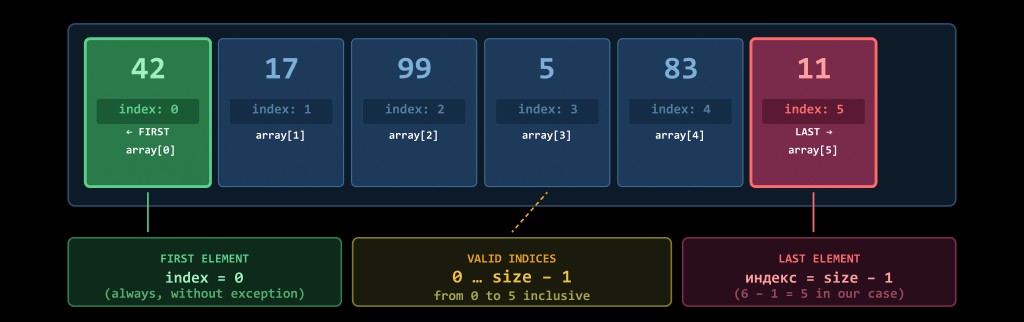
When you first see a[0], you want to ask: “Why not a[1]? I’m a human, not a robot.” The answer is simple: historically, that’s how it works in almost all languages, and Kotlin is no exception. An index is an offset from the start of the array: the first element is at offset 0. It’s awkward for the first two days, and then you start counting from zero even in a notebook.
The main rule for arrays sounds like this:
- the first element of an array has index 0
- the last element of an array has index size - 1
- valid indexes are from 0 to size - 1 inclusive
Kotlin strictly follows this model: array indexing starts at zero, and access/mutation is done via the [] operator.
Let’s look at a short illustration. Imagine an array of three numbers:
values:   [ 50,   10,   99 ]
indexes:    0     1     2
size = 3
last index = size - 1 = 2
That’s why the expression a[3] for an array of length 3 is an attempt to find the fourth element, which does not exist.
3. size: how many elements and where the boundary is
If an array has size elements, it’s tempting to think: “If the size is 3, then the indexes are 1..3.” And this is where Kotlin tells you “nope”: size is the number of elements, not the “maximum index.”
If size = 3, then the indexes are: 0, 1, 2. Let’s compare in a table:
|
Valid indexes | Last index |
|---|---|---|
|
none | — |
|
|
|
|
|
|
|
|
|
By the way, notice size = 0 (an empty array): it has no valid indexes at all. That’s why any attempt to do a[0] will result in an error. But such an array is perfectly valid.

Mini example:
fun main() {
    val a = intArrayOf(10, 20, 30)

    println("size = ${a.size}")           // size = 3
    println("last index = ${a.size - 1}") // last index = 2
}
a.size - 1 is an expression you will write very often. First in programs, and later in real life too.
4. indices: the correct index range
If you constantly write 0 and size - 1, it’s easy to make an off-by-one mistake. And “off by 1” errors are an ancient programming curse that feeds on your deadlines :)
That’s why Kotlin provides a convenient thing: a.indices.
indices is a ready-made set of all valid indexes of the array. If the array has length 3, then indices roughly corresponds to 0..2. If the array is empty, indices will be an “empty range,” which is also convenient: many loops will simply do nothing.
The best part: indices can be used both in loops and in checks.
Checking an index via in a.indices
Imagine the user enters a day-of-week number, and you want to write steps into an array. Users are creative creatures: today they enter 3, tomorrow 999, the day after tomorrow -5 (just to see “what happens”). So you need to validate the index.
fun main() {
    val steps = intArrayOf(3000, 5000, 4500) // 3 days for the example
    val i = 2

    if (i in steps.indices) {
        println("steps[$i] = ${steps[i]}")   // steps[2] = 4500
    } else {
        println("Invalid index: $i")
    }
}
This reads roughly like: “if i is within the valid indexes of the steps array.”
And yes: in here is specifically a membership check: “does the value fall within the range.” This combo (in + indices) is one of the most basic techniques for safe array work.
Iterating over an array via for (i in a.indices)
Today we’re not diving deep into “sum/max/search” algorithms, but iterating by index is already useful because sometimes you need the index itself, not just the value.
fun main() {
    val steps = intArrayOf(3000, 5000, 4500)

    for (i in steps.indices) {
        println("Day#$i: ${steps[i]}")
        // Day#0: 3000
        // Day#1: 5000
        // Day#2: 4500
    }
}
Why is this better than for (i in 0..steps.size - 1)? Because you don’t write the bounds by hand—fewer chances to make a mistake.
What happens when you go out of bounds
There are things Kotlin can check ahead of time (for example, “you can’t add a String and an Int”). And there are things that depend on runtime data. Array indexes are exactly the second case.
If you write:
val a = intArrayOf(1, 2, 3)
println(a[10])
The compiler may not detect your mistake. Maybe you’ll change the array later, maybe the index will come from input. So the code compiles, but the program crashes at runtime with an “array index out of bounds” exception.
5. A step tracker and safe updates
To make the examples more realistic, let’s come up with a small learning program that you can continue developing later within the arrays level. Let it be a console weekly step tracker again. For now, it’s as simple as possible: we have an array for 7 days, we ask the user for the day (index) and the new step count, and we update the array safely.
The key point: we’re not trying to build an “ideal UI,” we’re not using commands or complex parsing—only what you already know.
fun main() {
    val steps = IntArray(7) // by default all elements = 0

    println("Enter day index (0..6):")
    val day = readln().toIntOrNull()

    println("Enter step count:")
    val value = readln().toIntOrNull()

    if (day == null || value == null) {
        println("Error: you must enter integers.")
        return
    }

    if (day in steps.indices) {
        steps[day] = value
        println("OK: steps[$day] = ${steps[day]}")
    } else {
        println("Error: day must be from 0 to 6.")
    }
}
Notice the “double protection” style. First, we check that the input parsed (toIntOrNull() did not return null). Then we check that the index is within bounds. This is not paranoia; it’s real life: a user can enter anything, including “kittens” and -100, and the program should at least not crash.
6. Bulk operations: fill() and copyOf()
Sometimes you need to do a “batch” operation on an array: quickly reset values or, conversely, save a copy (snapshot) before changes. Kotlin has simple but very useful methods for this.
fill(value): quickly fill an array with one value
Sometimes you need to overwrite an array in bulk: reset values, set defaults, fill with “empty” data. You can do it manually with a loop, but it’s boring—programmers are supposed to be constructively lazy.
That’s what fill(value) is for: it iterates over the array and writes the same value into every element.
Imagine this scenario: we track steps for a week, but we want to “start over” (for example, a new challenge). The easiest way is to reset:
fun main() {
    val steps = intArrayOf(1200, 5000, 4300, 0, 8000, 6500, 2000)

    steps.fill(0)

    for (x in steps) {
        print("$x ")
    }
    // 0 0 0 0 0 0 0
}
It’s important not to confuse expectations: fill(0) does not change the array size; it only changes element values.
If you fill IntArray(7) with sevens, you will have seven elements, all equal to 7, with no magic involved:
fun main() {
    val steps = IntArray(7)
    steps.fill(7000)

    println(steps[0]) // 7000
    println(steps[6]) // 7000
}
This is one of those operations that makes code shorter and clearer: “fill the array with value X” reads better than a 7-line loop for the same idea.
copyOf(): array copy vs “second name”
Now for one of the most important topics of this level—and one of the most “sneaky” for beginners.
When you write:
val a = intArrayOf(1, 2, 3)
val b = a
you are not copying the array. You are creating a second variable that points to the exact same array. It’s like two desktop shortcuts that lead to the same folder. Delete a file via one shortcut, and it disappears via the other as well.
But copyOf() creates a new array that initially contains the same values, but exists independently.
Let’s see the difference in code. First, just a reference with no duplication of the array:
fun main() {
    val original = intArrayOf(10, 20, 30)
    val alias = original

    alias[0] = 999

    println("original[0] = ${original[0]}") // original[0] = 999
    println("alias[0] = ${alias[0]}")       // alias[0] = 999
}
Many people expect original to remain (10, 20, 30), but no: alias is not a copy; it’s the same array.
Now, the correct independent copy:
fun main() {
    val original = intArrayOf(10, 20, 30)
    val copy = original.copyOf()

    copy[0] = 999

    println("original[0] = ${original[0]}") // original[0] = 10
    println("copy[0] = ${copy[0]}")         // copy[0] = 999
}
In the step tracker, you can use this as a “weekly snapshot”: you save the old values and then start changing the current ones.
Practice: array snapshot and week reset
Let’s combine the two operations (copyOf() and fill()) into a small but practical scenario. Let the program do this: we have steps for a week, we create a copy as an “archive,” then we reset the current week to zeros. In real life, this can be “a new week starts with a clean slate.”
fun main() {
    val steps = intArrayOf(1200, 5000, 4300, 0, 8000, 6500, 2000)

    val archive = steps.copyOf()
    steps.fill(0)

    print("archive: ")
    for (x in archive) print("$x ")
    println()
    // archive: 1200 5000 4300 0 8000 6500 2000

    print("steps:   ")
    for (x in steps) print("$x ")
    println()
    // steps:   0 0 0 0 0 0 0
}
7. Common mistakes
Mistake #1: thinking the last index equals size.
This is a classic: an array of 3 elements, you write a[3] and wonder why the program crashes. The rule is simple: size is the number of elements, and the last index is size - 1. If you don’t want to keep this in your head all the time, use a.indices for loops and checks so you don’t compute bounds manually.
Mistake #2: not validating an index coming from input (or from a calculation).
As long as the index is “typed by hand” and you are sure it’s correct, everything is fine. But once the index comes from the user or is computed in a more complex way, it can become negative or too large. Then a[i] turns into a program crash. The habit if (i in a.indices) is not an “extra line,” it’s insurance against uncontrolled behavior.
Mistake #3: believing that val b = a creates a copy of the array.
No, it’s just another name for the same array. Change b[0] and a[0] changes too. If you need an independent copy, use copyOf(). This is especially important when you keep “snapshots” of state: without copyOf() you will accidentally corrupt the “archive” while changing the “current” one.
Mistake #4: trying to “print an array” via println(a) and expecting a list of elements.
To a beginner this seems logical: “I’m printing a variable.” But by default you will see not the contents, but a technical representation of the object. The clearest way at this level to see the elements is to iterate and print each one. Yes, it’s a bit longer, but you’ll understand exactly what is happening.
Mistake #5: expecting fill() to change the array size or add elements.
fill(value) adds and removes nothing; it only overwrites existing elements. The array remains fixed-size—exactly as you created it at the beginning. If you want a structure “that grows,” that will be a separate topic later. For today, keep this principle in mind: an array is a fixed box, and fill() just puts identical items into it.

GO TO FULL VERSION