1. Introduction
While we were working with one-dimensional arrays, everything was pretty simple: data went in a line, one value after another. This format is great for lists—grades for one student, daily temperatures, task numbers, or items in a shopping cart.
But in practice, very quickly a situation arises where one dimension is no longer enough. Data starts to look like a table: we have rows and columns, and each element has not one index but two at once. For example, in a gradebook, rows correspond to students and columns to subjects. On a game board, rows and columns form a grid of cells. In mathematics, these are matrices; in games, maps and levels; in everyday tasks, schedules and calendars.
In all these cases there is an important feature: each row of the table has the same length. If one student has grades in five subjects, then all other students also have those same five subjects. If a game board is ten cells wide, then each row consists of exactly ten elements. This property is exactly what lets us think of the data as a rectangular table, not just as a set of independent rows.
This structure is called a two-dimensional array.
2. The Array<IntArray> type and the meaning we put into it
From the Kotlin language point of view, a two-dimensional array is not a separate type. It uses the same familiar type Array<IntArray>. Formally, this means “an array whose elements are arrays of integers.” Kotlin does not know whether we want to use this structure as a rectangular table or as a set of rows of different lengths.
That is why it is important to distinguish the technical side from the logical one. Technically, Array<IntArray> is just nested arrays. Logically, within this lecture, we assume that each inner array has the same size. This is not a rule of the language, but our agreement as programmers.
In other words, the compiler will not prevent you from creating rows of different lengths. But if you do, you will break the “two-dimensional table” model, and code that relies on a rectangular shape will start to behave incorrectly. Therefore, it is important to agree in advance: in this lecture Array<IntArray> is a table specifically, not a jagged structure.
3. How to correctly picture a two-dimensional array
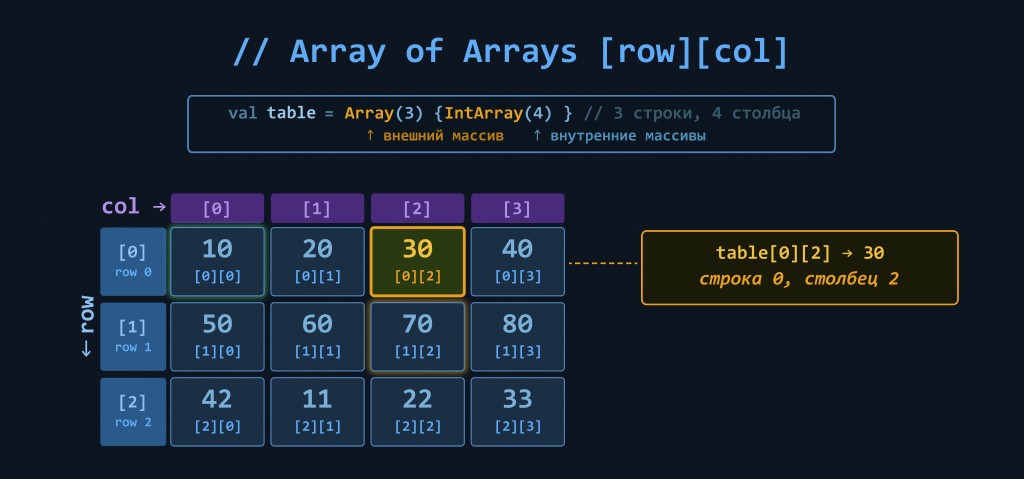
It helps a lot if you build the right mental model of a two-dimensional array from the start. This is not some magical matrix or a special data type. It is a regular array that contains other arrays. Each inner array is one row of the table.
When we write table[0], we do not get the “first column” or a “part of the table.” We get a full one-dimensional array—the first row. It has its own size, its own indices, and its own elements. And only after that, by accessing table[0][2], we take a specific element inside that row.

That is exactly why accessing elements looks like two consecutive steps. First, a row is selected; then, an element within that row. This order is natural and logical if you perceive a table as a set of rows.
This is also where the familiar coordinate notation comes from: [row][col], where row is the row number and col is the column number. Indexing, as in all Kotlin arrays, starts at zero. The first row is row = 0, the first column is col = 0. If a table has three rows and four columns, then the valid index values are from 0 to 2 for rows and from 0 to 3 for columns.
4. Creating a two-dimensional array
The most straightforward way to create a two-dimensional array is to define it explicitly by listing rows one after another. Such code is easy to read and immediately shows the shape of the table.
val table = arrayOf(
    intArrayOf(10, 20, 30),
    intArrayOf(40, 50, 60),
    intArrayOf(70, 80, 90)
)
From this snippet it is immediately clear that the table consists of three rows, and each row has three elements. This approach is especially convenient for examples, test data, and learning tasks.
However, in practice it often happens that the table dimensions are known in advance, while the values will be computed or filled in later. For example, you need to create a game board of a certain size or a table to store intermediate results. In this case, the Array constructor is used, which lets you specify the number of rows and then create an array of the desired length for each row.
val rows = 3
val cols = 4
val table = Array(rows) { IntArray(cols) }
Here it is important to understand that each row is created separately. As a result, we get a table where all rows have the same length, which means the structure remains rectangular. This behavior is critical: if the rows referenced the same array, any change would be reflected immediately in all rows. Kotlin does everything correctly, but it is useful to be aware of what is happening behind the scenes.
5. Accessing elements and table sizes
Accessing elements in a two-dimensional array is always done via double indexing. First you specify the row number, then the column number. For example, the expression table[1][2] means: take the second row of the table and inside it the element with index two.
Reading and writing elements look equally simple:
val value = table[0][1]
table[2][0] = 42
Since table[row] is a regular one-dimensional array, you can work with it exactly as before: find its size, iterate over elements, change values.
For a rectangular table, it is convenient to separate its dimensions in advance. The number of rows is defined as table.size, and the number of columns as table[0].size. This is safe precisely because we agreed on equal length for all rows. With jagged arrays, this approach no longer works, and that will become an important topic of the next lecture.
When working with indices, you should always keep array bounds in mind. For correct access, the row index must be within table.indices, and the column index must be within the valid indices of the row. In the case of a rectangular table, to validate a column it is enough to use the first row as a reference, because all the others have the same length.
A very common mistake is to confuse row and column sizes. table.size is the number of rows, not the “size of the whole table.” If you mix up these concepts, nested loops start to work incorrectly, and the program either crashes with an error or produces strange results. That is why it is important from the beginning to clearly separate these two dimensions in your head.
6. Iterating over a two-dimensional array: how to read a table sequentially
Working with a two-dimensional array almost always means using nested loops. But before writing code, it is useful to lock in the mental model. A two-dimensional array is read the same way as a table on paper: first we take a whole row, then we move through the elements inside that row. Therefore, the outer loop is responsible for rows, and the inner loop for columns.
When it is important for us to know an element's coordinates, we work with indices. The outer loop iterates over valid row indices, and the inner loop iterates over valid column indices. Since in this lecture we are considering a rectangular table, the number of columns is the same for all rows, and we can safely take the column range from the first row.
fun main() {
    val table = arrayOf(
        intArrayOf(1, 2, 3),
        intArrayOf(4, 5, 6)
    )

    for (r in table.indices) {
        for (c in table[0].indices) {
            print("[$r,$c]=${table[r][c]} ")
        }
        println()
    }
}
This iteration approach gives full control: we always know which row and which column we are working with. This is especially important when you need to change values, check conditions, or build output with coordinates.
However, far from always are coordinates actually needed. In many tasks we only care about the values themselves. In that case, the code becomes noticeably simpler if you drop indices and work directly with rows and the elements within them.
fun main() {
    val table = arrayOf(
        intArrayOf(1, 2, 3),
        intArrayOf(4, 5, 6)
    )

    for (row in table) {
        for (x in row) {
            print("$x ")
        }
        println()
    }
}
This variant is easier to read and practically eliminates out-of-bounds errors. A good rule: if you do not need an index to solve the task, it is better not to use it.
7. Basic operations with a two-dimensional array
Many operations familiar from one-dimensional arrays simply “expand” into two levels in the two-dimensional case. For example, to compute the sum of all elements in a table, we first take one row, then iterate over all values inside it and accumulate the sum. After that, we move on to the next row.
fun main() {
    val table = arrayOf(
        intArrayOf(1, 2, 3),
        intArrayOf(4, 5, 6)
    )

    var sum = 0
    for (row in table) {
        for (x in row) {
            sum += x
        }
    }

    println(sum)   // 21
}
If the task is formulated as “find the sum in each row,” it is important to remember that each row is a separate array. Therefore, the sum variable must be created anew for each row; otherwise, you will get one total sum for the entire table.
fun main() {
    val table = arrayOf(
        intArrayOf(1, 2, 3),
        intArrayOf(4, 5, 6)
    )

    for (r in table.indices) {
        var rowSum = 0
        for (x in table[r]) {
            rowSum += x
        }
        println("row $r sum = $rowSum")
    }
}
The sum by columns requires a slightly different view of the table. Columns are not represented as separate arrays, so for each column we fix its index and then go through all rows, extracting the element with that index.
fun main() {
    val table = arrayOf(
        intArrayOf(1, 2, 3),
        intArrayOf(4, 5, 6)
    )

    val cols = table[0].size

    for (c in 0 until cols) {
        var colSum = 0
        for (r in table.indices) {
            colSum += table[r][c]
        }
        println("col $c sum = $colSum")
    }
}
This code works correctly precisely because the table is rectangular. We are sure that every row has an element with index c.
8. Modifying elements by coordinates
Changing a value in a two-dimensional array happens through the same square brackets, only now there are two of them. First we specify the row number, then the column number. It is important to read such notation strictly left to right: row first, then column.
fun main() {
    val table = Array(3) { IntArray(3) }

    table[0][0] = 1
    table[1][1] = 5
    table[2][2] = 9

    for (row in table) {
        println(row.joinToString())
    }
}
Even if the table is rectangular, careful code assumes bounds checks, especially if indices are computed or come from outside. The check is performed at two levels: first the row, then the column.
if (row in table.indices && col in table[0].indices) {
    table[row][col] += 1
}
9. Common mistakes when working with two-dimensional arrays
Mistake #1: confusing rows and columns in indexing.
One of the most common problems when working with two-dimensional arrays is swapping the order of indices. In the notation table[row][col], the first index always refers to a row, and the second to a column. If you write table[col][row], the code may compile and even work for a while, but the program logic will be broken. What is especially dangerous is that such a mistake does not always cause the program to crash, which means it can remain unnoticed for a long time. A good habit is to use the names row and col (or r and c) and read the expression aloud: “row r, column c.”
Mistake #2: using table.indices to iterate over columns.
table.indices describes valid row indices, not column indices. Beginners often use this range in both the outer and inner loops, assuming that the table is “symmetric.” In a rectangular table, the number of rows and columns can differ, so for columns you need to use table[0].indices or table[0].size. This code works precisely because within this lecture we assume the same length for all rows.
Mistake #3: going out of bounds due to an incorrect range.
The classic “off by one” mistake looks like this: for (c in 0..table[0].size). Such a loop will inevitably try to access an element with index size, which does not exist. The last valid index is always size - 1. To avoid keeping this in mind all the time, it is better to use indices: this range is already correct and safe.
Mistake #4: forgetting that columns are not arrays.
Unlike rows, which actually exist as arrays (IntArray), columns are a logical representation. You cannot take a column directly; it has no own size and indices. To process a column, you need to fix its index and iterate over all rows. Attempts to “access a column as an array” almost always lead to confusion and logic errors.
Mistake #5: assuming that any Array<IntArray> is rectangular.
This is the most important mistake in the context of the entire block of lectures. In this lecture we intentionally work with Array<IntArray> as with a rectangular table and use this assumption in code. But the type itself does not guarantee it. In the next lecture we will see arrays where rows have different lengths, and code that looks natural here will stop being safe. That is why it is important to understand not only the syntax, but also the data model you are working with.

GO TO FULL VERSION