1. Rows of different lengths
When we get to tables, schedules, matrices, “data by days”, we usually want to think like this: there are rows and there are columns. But the real world is rarely perfect. One student has 5 grades, another has 3 (skipped class, was sick, the cat pulled out the Wi‑Fi), one week has 7 days, and the last week of the month has only 2–3 days. And that is where a “rectangular table” starts to suffer: you have to fill empty cells with zeros or some kind of placeholders.
A jagged array solves this problem: it is literally a “shelf with boxes”, where each box can have its own length. On the outside, we have one array (say, weeks), and inside we have a separate array for each week (for example, daily expenses). And each week can have its own number of days/entries.
To avoid confusion in terms, let’s agree on this: the outer array is a table, its elements are rows, and each inner array is a row (row). If you are used to the term “two-dimensional array”, think of it that way, but with an important caveat: the “2D-ness” here does not have to be rectangular.
Creating a jagged structure: rows of different lengths
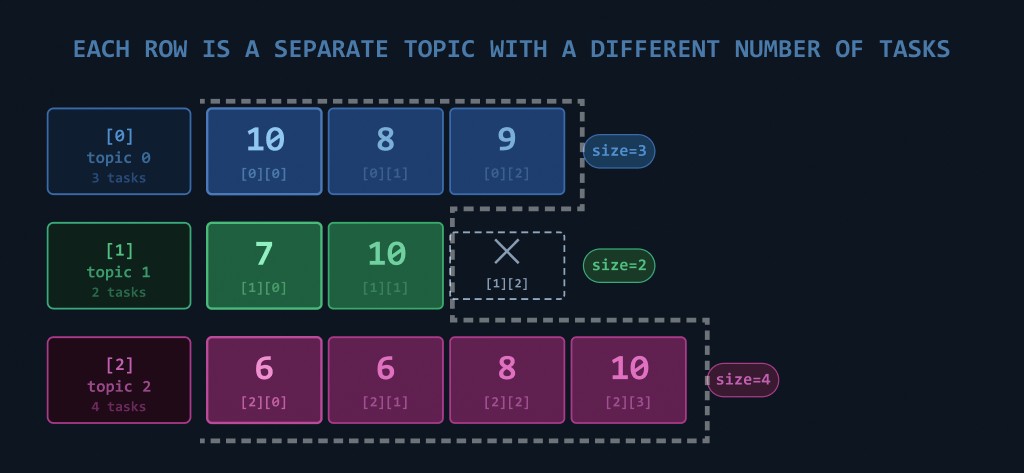
Most often, at the first steps it is more convenient to create a jagged array literally “by hand” using arrayOf(...) and intArrayOf(...). This is the most readable way, and it does not require any additional knowledge.
Imagine we are building a mini app called “Study Gradebook”, where each topic has a different number of exercises (sometimes 2, sometimes 5 — the teacher is a human too). Let each row be a topic, and the numbers in the row be points for the exercises.
fun main() {
    val scoresByTopic: Array<IntArray> = arrayOf(
        intArrayOf(10, 8, 9),        // topic 0: 3 exercises
        intArrayOf(7, 10),           // topic 1: 2 exercises
        intArrayOf(6, 6, 8, 10)      // topic 2: 4 exercises
    )

    println(scoresByTopic.size)      // 3
}
Here scoresByTopic.size is the number of topics (rows). But the number of exercises inside a topic is scoresByTopic[topicIndex].size. And this is where the first difficulty starts: each row has its own bounds.
Accessing table[row][col]: two bounds checks
When you work with a one-dimensional array, you have one check: the index must be in a.indices. In a jagged array, there are two checks: first make sure the row exists, then make sure the column exists inside that row.

The most common beginner mistake is “I checked col against the length of the first row, so everything is OK”. It is not OK: the second row might be shorter. In a jagged array, there is no “overall width”.
Here is a careful template for safe access:
fun main() {
    val table = arrayOf(
        intArrayOf(1, 2, 3),
        intArrayOf(10, 20)
    )

    val row = 1
    val col = 1

    if (row in table.indices && col in table[row].indices) {
        println(table[row][col])     // 20
    } else {
        println("out of bounds")     // (won't be printed)
    }
}
Pay attention to the order: first row in table.indices, and only then table[row]. This is not accidental — this way you do not risk accessing a non-existent row.
2. Working with rows of different lengths
Nested loops: how to iterate over a table when rows have different lengths
When we have an “array of rows”, the traversal logic is almost always: the outer loop goes over the rows, the inner loop goes over the elements of the row. But the key idea is slightly different: the inner loop must rely on the current row, not on some “imaginary common length”.
The simplest and safest way to iterate over the array is to get all values:
fun main() {
    val table = arrayOf(
        intArrayOf(1, 2, 3),
        intArrayOf(10, 20)
    )

    for (row in table) {
        for (x in row) {
            print("$x ")
        }
        println()
    }
    // 1 2 3
    // 10 20
}
This option is great because you do not think about indices at all, which means you almost eliminate going out of array bounds.
But sometimes indices are needed: for example, for pretty output with coordinates ([row][col]) or for updating the array. Then we use indices and remember that they can be different for each row:
fun main() {
    val table = arrayOf(
        intArrayOf(1, 2, 3),
        intArrayOf(10, 20)
    )

    for (r in table.indices) {
        for (c in table[r].indices) {
            print("[$r,$c]=${table[r][c]} ")
        }
        println()
    }
    // [0,0]=1 [0,1]=2 [0,2]=3
    // [1,0]=10 [1,1]=20
}
Why is this correct? Because table[r].indices describes valid column indices specifically for row r, not “for the whole table”. This approach directly follows the idea of indices as a safe range of indices.
Row bounds: why you cannot “measure everyone by the first row”
Now for an important point that saves hours of debugging.
Imagine a table:
- row 0: length 3
- row 1: length 2
- row 2: length 4
If you write the inner loop as for (c in 0..2) because the first row has 3 elements, then on the second row you will sooner or later try to access table[1][2], which does not exist.
That is why you must keep in mind that an array is not always a rectangle. It is more correct to think of it as a set of rows, where each row is an independent array with its own size.
Let’s keep a small table in mind:
| Model | How it looks in code | The idea of width |
|---|---|---|
| “Rectangular” table | roughly Array<Array<Int>>, where all rows are the same | width is shared |
| Jagged table | Array<IntArray> | each row has its own width |
3. Practice: “Exercise log by topics”
Let’s put together a small project that evolves step by step. The idea is: we have topics, and in each topic there is a list of points for exercises. We want to print the table, compute the sum for each topic, and find the “best exercise” (maximum) inside each topic.
Printing the table
First, let’s make a nice output: topic number and points.
fun main() {
    val scoresByTopic = arrayOf(
        intArrayOf(10, 8, 9),
        intArrayOf(7, 10),
        intArrayOf(6, 6, 8, 10)
    )

    for (t in scoresByTopic.indices) {
        print("Topic $t: ")
        for (score in scoresByTopic[t]) {
            print("$score ")
        }
        println()
    }
    // Topic 0: 10 8 9
    // Topic 1: 7 10
    // Topic 2: 6 6 8 10
}
Here the outer loop goes over topics (rows), and the inner loop goes over the values in the row. This is the safest form: you do not use indices where they are not needed.
Sum for each row: an old pattern in a new form
Now let’s apply the familiar “array sum” pattern, but separately for each row. Important: the sum variable must be created anew for each topic, otherwise you will accidentally get “the total sum of the whole array”.
fun main() {
    val scoresByTopic = arrayOf(
        intArrayOf(10, 8, 9),
        intArrayOf(7, 10),
        intArrayOf(6, 6, 8, 10)
    )

    for (row in scoresByTopic) {
        var sum = 0					// sum is inside the outer loop
        for (x in row) sum += x
        println("row sum = $sum")    // row sum = ...
    }
    // row sum = 27
    // row sum = 17
    // row sum = 30
}
Maximum in each row: carefully starting from the first element
Maximum is the classic case where you cannot write “let the maximum be 0” (otherwise negative values break the logic). We take the first element of the row as the starting value. But this approach requires a mandatory check: the row must be non-empty.
fun main() {
    val scoresByTopic = arrayOf(
        intArrayOf(10, 8, 9),
        intArrayOf(7, 10),
        intArrayOf(6, 6, 8, 10)
    )

    for (topic in scoresByTopic.indices) {
        val row = scoresByTopic[topic]
        var best = row[0]
        for (x in row)
        	if (x > best) best = x
        println("topic $topic best = $best")
    }
    // topic 0 best = 10
    // topic 1 best = 10
    // topic 2 best = 10
}
Updating an element by coordinates
Now imagine the teacher decided: “If an exercise is solved with a hint, minus 2 points.” Suppose this is topic 2, exercise 1. That is, coordinates (row=2, col=1).
Let’s change the value in the array (with bounds checks):
fun main() {
    val scoresByTopic = arrayOf(
        intArrayOf(10, 8, 9),
        intArrayOf(7, 10),
        intArrayOf(6, 6, 8, 10)
    )

    val row = 2
    val col = 1

    if (row in scoresByTopic.indices && col in scoresByTopic[row].indices) {
        scoresByTopic[row][col] -= 2
    }

    println(scoresByTopic[2][1])    // 4
}
The key point: the second check is specifically col in scoresByTopic[row].indices. Not “in 0..something”, not “like the first row”, but specifically for the row you are accessing.
4. How to think about a jagged table (in your head and in code)
Sometimes it is useful to reinforce what you learned not with code, but with a picture. Here is one way to visualize Array<IntArray>:
flowchart TD
    T["table: Array⟨IntArray⟩"] --> R0["table[0]: IntArray (size=3)"]
    T --> R1["table[1]: IntArray (size=2)"]
    T --> R2["table[2]: IntArray (size=4)"]

    R0 --> A00["[0][0]"]
    R0 --> A01["[0][1]"]
    R0 --> A02["[0][2]"]

    R1 --> A10["[1][0]"]
    R1 --> A11["[1][1]"]

    R2 --> A20["[2][0]"]
    R2 --> A21["[2][1]"]
    R2 --> A22["[2][2]"]
    R2 --> A23["[2][3]"]
Notice: table[1] does not have [1][2]. Rectangular tables are long gone. That is the reality of a programmer.
5. Common mistakes when working with jagged arrays
Error No. 1: assuming the table has an “overall width”.
This is the most popular trap: you take table[0].size and use it as the width for all rows. On short rows, this ends with out-of-bounds access. In a jagged structure, width is a property of each row, so in the inner loop the bounds must be table[r].indices, not “one size fits all”.
Error No. 2: mixing up index order and getting logical confusion.
When someone writes table[col][row] instead of table[row][col], the program might not even crash (if sizes allow it), but it will start doing the “wrong thing”. A good habit is to name indices clearly as r and c (row/col) and stick to one convention everywhere.
Error No. 3: checking only one level of bounds.
Beginners sometimes check row in table.indices, but forget about col in table[row].indices. This is especially tricky: it feels like “I checked it!”, but it still crashes. To access table[row][col], you need two checks, because it is two [] accesses in a row.
Error No. 4: making the inner loop use the range 0..row.size instead of correct indices.
This is the classic off-by-one: the range 0..row.size includes row.size, but the last valid index is row.size - 1. The result is out-of-bounds on the last iteration. If you want a loop over indices, use row.indices — it is already correct.
Error No. 5: forgetting that a “row” is also an array with its own life.
Sometimes people write code as if table[r] is just a “part of the table”, not a full-fledged array. But table[r] has its own size, you can iterate over it, find a maximum, compute a sum, and so on. As soon as you start seeing a row as a normal IntArray, nested loops become logical and predictable.

GO TO FULL VERSION