1. Introduction to the do-while loop
Sometimes a program needs to perform actions at least once, even if the “continuation condition” might initially be false. You encounter this in code when you must show a menu at least once, ask the user for input at least once, or execute the loop body at least once to obtain data for checking.
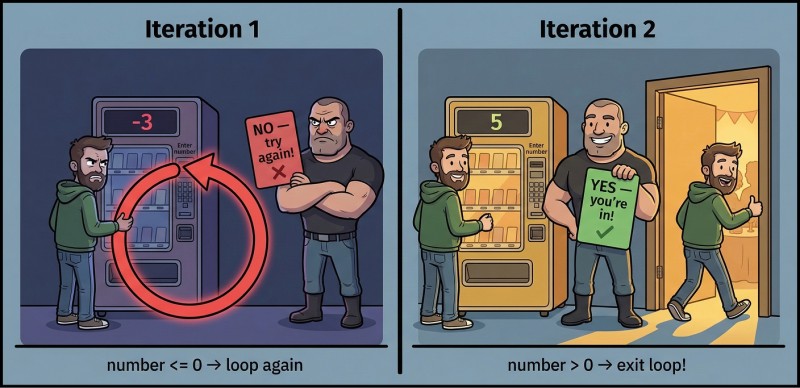
Imagine a typical task: “ask the user for a number and repeat the question until they enter a number greater than zero.” To check “greater than zero”, you first need to read that number. So one pass is absolutely necessary: without it we have no value to check, and the do-while makes this scenario straightforward.
Syntax of do-while and the mandatory ;
The do-while syntax is simple but particular: it requires a semicolon at the end. It's one of the rare cases in C++ where the compiler almost seems to say: “I know it looks odd, but this is how it must be.” It's important to memorize the whole template, not assemble it piecewise during compilation. The form is: first do, then the block, then while (condition) and the mandatory ;.
Here is a minimal example “run once and exit” because the condition is false:
#include <iostream>

int main() {
    int x = 0;

    do {
        std::cout << "Hello!\n"; // Hello!
    } while (x > 0);
}
Key idea: the condition is checked after the body. Therefore the body is guaranteed to run at least once. And yes, the semicolon after while (...) is mandatory — without it you'll get a compilation error.
while vs do-while: one syntactic difference, different consequences
The difference between while and do-while seems small, but the consequences can be significant. In while we check the condition before executing the body. In do-while we execute the body first and check the condition afterwards. This affects whether the body will run at least once, which is often exactly what we need.
Compare with the same value x = 0:
#include <iostream>

int main() {
    int x = 0;

    while (x > 0) {
        std::cout << "while\n";
    }

    do {
        std::cout << "do-while\n"; // do-while
    } while (x > 0);
}
If you read this as a story, while says: “do while true.” And do-while says: “do, then decide whether to repeat.” The second variant makes sense when the first action is required on its own: show a menu, request input, print a hint, perform a “first attempt”.

2. When do-while is useful in real code
Input and menus without extra boilerplate
In practice do-while is most often used in two scenarios. First — repeated input: ask the user for a value, check if it's acceptable, and if not — ask again. Second — a console menu: display a list of commands, let the user choose, execute the action, and show the menu again until they choose exit.
Notice: both situations share a common sense — nothing works without the first pass. Until the menu is shown there is nothing to choose. Until the value is read there is nothing to check. It's like trying to judge the taste of borscht without tasting it (though some do that, but that's another discipline).
Example: require a number > 0
Start simple: read n and don't let the user go until they enter n > 0. This is an ideal case for do-while, because we need to perform the read at least once.
#include <iostream>

int main() {
    int n = 0;

    do {
        std::cout << "Enter n (> 0): ";
        std::cin >> n;
    } while (n <= 0);

    std::cout << "n = " << n << '\n'; // for example: n = 5
}
Note: the final condition reads almost like natural language: “repeat while n <= 0”. This is a good style for do-while: formulate the condition as a continuation condition, not an exit condition. That reduces confusion with ! and intent.
3. Example: console piggy-bank menu
Let's start building a small console application that will evolve through the loop topics. Today we'll create the base: a “piggy-bank” (simple budget) where you can add money, view the balance, reset the balance and exit. No arrays, functions or complex structures — just int, if/else and loops.
Menu skeleton using do-while
First, make the menu skeleton with do-while. It's convenient: the menu must appear at least once.
#include <iostream>

int main() {
    int balance = 0;
    int cmd = -1;

    do {
        std::cout << "1 - Add\n2 - Show\n3 - Reset\n0 - Exit\n";
        std::cin >> cmd;

        if (cmd == 2) {
            std::cout << "Balance = " << balance << '\n'; // Balance = 0
        }
    } while (cmd != 0);
}
This is not yet a “dream app”, but you can see the important point: do-while makes the structure “show menu → read command → action → repeat” very direct. You can do it with while too, but often you end up duplicating the menu output or adding setup code before the loop.
Adding and resetting the balance
Now add handling for commands 1 and 3. We stay within what we've learned: only if/else and basic arithmetic. It's important not to turn the loop body into an unreadable mess. Keep the logic straightforward: read the command → choose the action → execute.
#include <iostream>

int main() {
    int balance = 0;
    int cmd = -1;

    do {
        std::cout << "1 - Add\n2 - Show\n3 - Reset\n0 - Exit\n";
        std::cin >> cmd;

        if (cmd == 1) {
            int add = 0;
            std::cout << "Add amount: ";
            std::cin >> add;
            balance = balance + add;
        } else if (cmd == 2) {
            std::cout << "Balance = " << balance << '\n';
        } else if (cmd == 3) {
            balance = 0;
            std::cout << "Balance reset.\n"; // Balance reset.
        }
    } while (cmd != 0);
}
Notice one important point: the variable add lives only inside the branch for cmd == 1. This is normal and even useful: fewer chances to accidentally use it later when it's no longer needed.
Handling unknown commands
If the user enters 42, the program currently silently “swallows” it and re-displays the menu. Formally that's not an error, but the UX feels like a vending machine that ignores you and pretends nothing happened (while still asking for money). Let's add gentle handling for unknown commands.
#include <iostream>

int main() {
    int balance = 0;
    int cmd = -1;

    do {
        std::cout << "1 - Add\n2 - Show\n3 - Reset\n0 - Exit\n";
        std::cin >> cmd;

        if (cmd == 1) {
            int add = 0;
            std::cout << "Add amount: ";
            std::cin >> add;
            balance = balance + add;
        } else if (cmd == 2) {
            std::cout << "Balance = " << balance << '\n';
        } else if (cmd == 3) {
            balance = 0;
            std::cout << "Balance reset.\n";
        } else if (cmd != 0) {
            std::cout << "Unknown command.\n"; // Unknown command.
        }
    } while (cmd != 0);
}
Note how neat the else if condition looks (cmd != 0): we don't complain about the exit command because that's the correct one. Small things like this build the sense that the program is “alive”.
4. Execution order and common pitfalls
Execution flow of do-while
When beginners get confused with loops, the problem is usually not syntax but execution order. It's useful to visualize a flowchart once. Read it as: first the body is executed, then the condition is checked, and you either repeat or exit.
flowchart TD
    A[Enter do-while] --> B[Execute loop body]
    B --> C{Condition true?}
    C -->|yes| B
    C -->|no| D[Exit loop]
If you keep this diagram in mind you'll avoid many errors like “why did it run once if the condition is false”. For do-while that's not a bug, that's the purpose.
The loop must move toward termination
do-while doesn't cancel the main rule of loops: there must be a reason the loop will eventually end. Sometimes the reason is a changing variable, sometimes user input, sometimes a decreasing number via division, as you've seen in other examples. But there must be a reason.
In our menu the termination reason is simple: the user enters 0, and the condition cmd != 0 becomes false. If we forgot to read cmd inside the body (or accidentally overwrite cmd with the wrong value), we could get an infinite loop. Infinite loops are not inherently “evil”, but today our focus is on correctly terminating loops, so treat this as a contract: “each iteration brings us closer to exit”.
Semicolon and empty body
There are two classic traps with do-while that occur so often they're folklore. First — forgetting the ; after while (...). Second — an accidental ; right after do { ... } while (...), which turns the loop into a strange construct where you think something runs inside, but actually it doesn't.
Memorize the correct template visually:
do {
    // body
} while (condition);
If you start thinking of } while (...) ; as a single “unit”, you'll reduce such mistakes.
5. Typical mistakes when working with do-while
Mistake #1: forgot the semicolon after while (the condition).
This error is annoying because your brain says “it's almost like while!”, while the compiler says “no”. Fix: learn the do-while as the complete template do { ... } while (...); and always use braces in learning projects, even for a single statement.
Mistake #2: confused continuation condition with exit condition.
People often write the condition as “how to exit” and then put it in while (...), producing a loop that works the opposite way. A good habit is to read the condition aloud as a continuation: “repeat while …”. If the phrase sounds unnatural, you probably wrote an exit condition instead of a continuation condition.
Mistake #3: loop body doesn't change the situation and the loop becomes infinite.
In the menu this happens if you forget std::cin >> cmd;, or accidentally read into the wrong variable, or constantly assign the same value to cmd. In input loops this happens when the variable in the condition is never changed at all. Before running the program ask yourself: “What changes in one iteration? Why does that bring us closer to completion?”.
Mistake #4: too much logic in one place, making the loop unreadable.
do-while is often used for menus, and menus can easily become a “combine-harvester”: ten commands, twenty ifs, and you dread opening the file. Even without functions you can keep discipline: let the body do things in the same order — show prompt → read command → handle a single branch → go back to start.
Mistake #5: accidentally created an empty loop due to an extra ; in the wrong place.
Sometimes people write do { ... }; while (cond); or other combinations after which the program compiles but behaves oddly. When behavior seems magical, punctuation is almost always to blame: ; and {}. In C++ these are not decorations but control elements of the language — treat them like wires in an electrical panel: an extra wire can not only interfere, it can short the logic.

GO TO FULL VERSION