1. Introduction
Sometimes a loop is written simply: “while i <= n — do it”. But in real life stopping conditions can be hidden inside the body: we are searching for something, validating input, waiting for a “stop word”, detected an error, or found the answer earlier. In such moments it's convenient to have explicit flow-control commands: break to exit and continue to skip the rest of an iteration. The main point is to use them consciously: they are like a sharp kitchen knife — useful, but you probably want to keep your fingers.
First, a small quick-reference table:
| Command | What it does | Where it acts |
|---|---|---|
|
instantly terminates the nearest loop | only one (the innermost) loop |
|
skips the remaining part of the body and goes to the next iteration | also only in the current (nearest) loop |
2. break: “found it — exit”
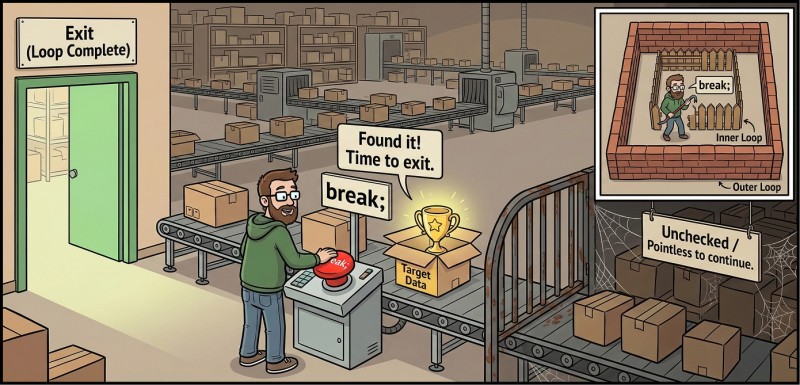 break is useful when we don't want to "spin" the loop to the end because the answer is already found or continuing is pointless. This is especially common in searches: the first divisor of a number, the first suitable value, the first input error, or an "exit" command in a menu. Remember a simple rule: break does not jump anywhere, it terminates only the nearest loop that contains it.
Mini example: finding the first divisor
Imagine we are looking for the smallest divisor of a number n (except 1). Once found — there is no point in checking further.
#include <iostream>

int main() {
    int n = 0;
    std::cin >> n;

    int firstDiv = 0;

    for (int d = 2; d <= n; d = d + 1) {
        if (n % d == 0) {
            firstDiv = d;
            break; // found it — exit
        }
    }

    std::cout << firstDiv << '\n'; // for example: 15 -> 3
}
Here break makes the code more honest: we really want the "first suitable" and we don't have to go all the way to n.
break in while: read until told to stop
Sometimes it's convenient to keep the condition “inside” rather than in the header. For example, read commands until you encounter 0.
#include <iostream>

int main() {
    while (true) {
        int x = 0;
        std::cin >> x;

        if (x == 0) {
            break; // 0 is the exit command
        }

        std::cout << "Read: " << x << '\n'; // Read: 5
    }
}
Yes, here while (true) looks like "infinity", but in fact the loop is finite because there is a clear exit inside via break. This is acceptable if the exit is indeed unique and the logic is transparent.
3. continue: “skip the extra, work with the needed”
continue is useful when a loop has "garbage" cases that we want to skip. A typical scenario: filtering — print only odd numbers, sum only positives, ignore numbers out of range. But continue has a character: everything written below continue; in the current iteration will not be executed. This is a common source of "why does the program do nothing?" for beginners.


Mini example: print only odd numbers
#include <iostream>

int main() {
    for (int i = 1; i <= 10; i = i + 1) {
        if (i % 2 == 0) {
            continue; // skip even numbers
        }
        std::cout << i << '\n'; // 1 3 5 7 9
    }
}
The meaning reads almost like plain language: "if even — skip; otherwise print".
continue as protection from unsuitable input
While we are not dealing with complex recovery of std::cin after errors, we will assume input is correct but may be "unsuitable" (for example, negative numbers).
#include <iostream>

int main() {
    int sum = 0;

    for (int k = 0; k < 5; k = k + 1) {
        int x = 0;
        std::cin >> x;

        if (x < 0) {
            continue; // ignore negatives
        }

        sum = sum + x;
    }

    std::cout << sum << '\n';
}
Here continue helps avoid bloating the code with a large if/else: we immediately "cut off" the unnecessary case.
Nuance: continue behaves differently in for and while
At first glance it seems: continue simply "goes to the next iteration". That's true, but there is a subtle difference in what happens between continue and the next condition check. In a for, after continue the step still happens (the i = i + 1), whereas in a while there is no separate step — you immediately go to check the condition. This nuance sometimes saves you from infinite loops... and sometimes creates them.
Let's look at the diagram (simplified, without details):
flowchart TD
    A["for: body"] --> B{"continue?"}
    B -- "yes" --> C["step (i = i + 1)"]
    B -- "no" --> D["end of body"]
    D --> C
    C --> E{"condition?"}
    E -- "yes" --> A
    E -- "no" --> F["exit"]

    W["while: body"] --> X{"continue?"}
    X -- "yes" --> Y{"condition?"}
    X -- "no" --> Z["end of body"]
    Z --> Y
    Y -- "yes" --> W
    Y -- "no" --> Q["exit"]
Now the practical takeaway: if your "step toward termination" is located below a continue, that step may not be executed, and the loop may start suspiciously resembling a perpetual motion machine.
4. Nested loops: “a loop inside a loop” and why it's useful
A nested loop is when another loop lives inside the body of a loop. It sounds like a matryoshka doll, and that's exactly what it is: the outer loop controls "big steps", the inner loop — "small repetitions" on each big step. This is useful for tables, grids, enumerating pairs of values, drawing rectangles with characters, working with coordinates (row/column). It's important to get used to the idea: the inner loop starts over on each pass of the outer, so the number of actions grows quickly — and that's fine as long as you understand why you need it.
Multiplication table 1..5
#include <iostream>

int main() {
    for (int a = 1; a <= 5; a = a + 1) {
        for (int b = 1; b <= 5; b = b + 1) {
            std::cout << (a * b) << ' ';
        }
        std::cout << '\n';
    }
}
The outer loop is rows (a), the inner loop is columns (b). This is a convenient model of "two-dimensionality", even if we haven't learned 2D arrays yet.
Draw a rectangle of #
Also nested loops: outer — rows, inner — how many characters in a row.
#include <iostream>

int main() {
    int h = 3;
    int w = 6;

    for (int row = 0; row < h; row = row + 1) {
        for (int col = 0; col < w; col = col + 1) {
            std::cout << '#';
        }
        std::cout << '\n';
    }
}
Such examples train understanding of bounds: row < h means exactly h rows, col < w — exactly w characters.
5. break in nested loops: why it doesn't exit “everything at once”
Here the most popular surprise begins: break exits only the nearest loop. If you are inside an inner loop — break will terminate the inner one, and the outer will continue as if nothing happened (it's not angry, it just doesn't know about your drama).
Finding a pair a * b == target
#include <iostream>

int main() {
    int target = 12;
    bool found = false;

    for (int a = 1; a <= 10; a = a + 1) {
        for (int b = 1; b <= 10; b = b + 1) {
            if (a * b == target) {
                std::cout << a << " * " << b << " = " << target << '\n'; // 2 * 6 = 12
                found = true;
                break; // exit only the inner loop
            }
        }

        if (found) {
            break; // now exit the outer one too
        }
    }
}
Here the flag found is a simple way to "signal outward" that the result is already found. We don't use any complex constructs: just bool, if and two breaks.
6. When break/continue help and when they hurt
It's very easy to start "escaping" complexity with break and continue everywhere, and end up with code that reads like a quest: "if here jump, then skip, then exit, but only if you didn't exit earlier". Good style is to use these operators like spices: a little makes the dish tastier, but if you dump the whole jar — it's no longer food, it's a survival experiment.
Let's talk about two typical cases.
continue as a neat filter — that's good
If you have a "guard" at the start of an iteration that cuts off unnecessary cases, continue makes the code shorter and cleaner. We already saw the odd-numbers example — it's easy to read.
Many continues and breaks mixed together — usually bad
Compare two styles. The first — "jumping around":
#include <iostream>

int main() {
    for (int i = 1; i <= 10; i = i + 1) {
        if (i == 7) break;
        if (i % 2 == 0) continue;
        if (i == 3) continue;
        std::cout << i << '\n';
    }
}
This is not yet terrible, but you already have to keep too many exceptions in your head.
The second style — "one condition for printing" (often easier to read):
#include <iostream>

int main() {
    for (int i = 1; i <= 10; i = i + 1) {
        bool shouldPrint = (i % 2 != 0) && (i != 3) && (i != 7);
        if (shouldPrint) {
            std::cout << i << '\n'; // 1 5 9
        }
        if (i == 7) {
            break; // if an early exit is exactly needed
        }
    }
}
The downside here is that the expression becomes longer. But the plus is that the logic "when to print" is gathered in one place and is not hidden behind jumps.
7. Console menu: break/continue and nested loops
Let's support the idea of a "small application" we started with do-while and a simple menu. We will not turn main into a huge monster (although it already tries), but will add features carefully: add a command to print the table and a command to find a divisor. These are exactly the places where nested loops and break look natural.
Menu skeleton and the "table 1..N" command
#include <iostream>

int main() {
    int cmd = -1;

    do {
        std::cout << "1 - Multiplication table\n";
        std::cout << "2 - First divisor\n";
        std::cout << "0 - Exit\n";
        std::cin >> cmd;

        if (cmd == 1) {
            int n = 0;
            std::cin >> n;

            for (int a = 1; a <= n; a = a + 1) {
                for (int b = 1; b <= n; b = b + 1) {
                    std::cout << (a * b) << ' ';
                }
                std::cout << '\n';
            }
        }

    } while (cmd != 0);
}
Note: we do not use switch (we haven't covered it yet), so we build the menu via if. Yes, it's a bit longer, but honest with current knowledge.
The "first divisor" command: break + check via continue
Now add the second command and show how continue can "cut off" an unsuitable scenario. For example, finding a divisor makes sense for n >= 2.
#include <iostream>

int main() {
    int cmd = -1;

    do {
        std::cout << "1 - Multiplication table\n";
        std::cout << "2 - First divisor\n";
        std::cout << "0 - Exit\n";
        std::cin >> cmd;

        if (cmd == 2) {
            int n = 0;
            std::cin >> n;

            if (n < 2) {
                std::cout << "Need n >= 2\n";
                continue; // return to the menu, don't do extra work
            }

            int firstDiv = 0;
            for (int d = 2; d <= n; d = d + 1) {
                if (n % d == 0) {
                    firstDiv = d;
                    break;
                }
            }

            std::cout << firstDiv << '\n';
        }

    } while (cmd != 0);
}
Note an important thing: continue here applies to the do-while loop, that is, "skip the rest of the menu body and show it again". This is logical: with a bad n we want to return to the menu.
8. Typical mistakes: break/continue and nested loops
Mistake #1: expecting break to “exit all loops at once”.
Beginners often think break is a red button that "stops everything". In reality it terminates only the nearest loop. If you are inside nesting, the outer loop will continue. This is fixed either with a flag (for example, bool found), or by restructuring the logic so the outer loop also sees the termination condition.
Mistake #2: continue is placed above the “step toward termination”, and the loop becomes infinite.
It's especially easy to do this in while, where the step is often written at the end of the body. If under some condition you do continue;, and the variable update is below — it won't be executed, the condition won't change, and the loop will repeat forever. Best prevention is to keep the "step" either before possible continues, or ensure that continue does not bypass important state changes.
Mistake #3: code after continue "suddenly doesn't run", although it seems it should.
This is not a compiler bug or "broken C++", it's the literal semantics of continue: skip the rest of the body. So it's dangerous to put important logic below continue and forget it won't execute. If an iteration needs both filtering and mandatory actions, separate them: mandatory — before continue, the rest — after.
Mistake #4: nested loops are written correctly, but bounds are swapped.
Classic: you wanted row < h and col < w, but accidentally wrote row < w and col < h. The code compiles, but the result is "crooked", and debugging is unpleasant because everything looks reasonable. A habit of naming variables by meaning (row, col) and running a small example (for example, h = 2, w = 3) and expecting a concrete shape helps.
Mistake #5: too many break/continue turn a loop into a "jumping" scenario.
break and continue are convenient, but each adds a point of non-linear transition. When there are many such transitions, the code becomes hard to read: you have to mentally simulate execution. If you feel there are already three "holes in reality" via continue in a single loop, it's often better to rewrite the condition more straightforwardly: make one clear if for the action, or move part of the check into a bool with a descriptive name.

GO TO FULL VERSION